On this page
OpenLiteSpeed is fast, efficient, and a natural fit for modern hosting—but many websites and applications still depend on Apache-style .htaccess behavior. That creates a practical question for server administrators: what happens when a site expects familiar directives for PHP settings, redirects, headers, access controls, and security?
CyberPanel’s custom OpenLiteSpeed module is designed to bridge that gap. We tested it on a fresh CyberPanel 3.0.7 installation and recorded the complete workflow in a real browser session.
The test system used OpenLiteSpeed 2.5.5, the cyberpanel_ols module version 2.7.7, and ModSecurity 3.0.17. Rather than showing isolated screenshots, the walkthrough starts in CyberPanel, edits the website’s Rewrite Rules, saves the configuration, activates the module, and verifies the results through actual web requests.
Why this module matters
Many applications ship with .htaccess files written for Apache. These files may contain much more than rewrite rules. They can define PHP values, response headers, environment variables, access restrictions, file matching rules, authentication requirements, cache lifetimes, and custom error handling.
OpenLiteSpeed already supports native rewrite behavior, but not every Apache directive has the same meaning or execution path. CyberPanel’s custom module expands that compatibility so administrators can manage more of these rules directly from the familiar CyberPanel interface.
That distinction is important: a rule appearing in the editor does not prove that the running web server applied it. Every test in this walkthrough follows the same pattern—edit, save, request, and verify.
Setting PHP values from CyberPanel
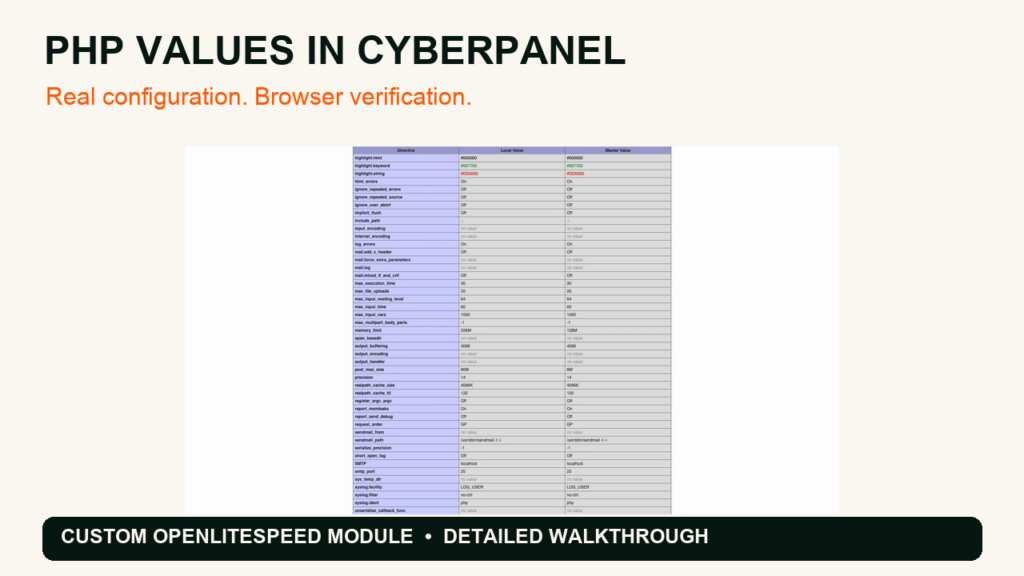
We first recorded the site’s original PHP values:
memory_limit: 128Mpost_max_size: 8Mupload_max_filesize: 2M
Inside CyberPanel, we opened Websites → List Websites → Manage → Site Settings → Config → Rewrite Rules and added PHP configuration directives for the demo site:
php_value memory_limit 256M
php_value post_max_size 80M
php_value upload_max_filesize 64M
Saving the directives alone did not change the live values while the custom module was disabled. After controlled module activation and an OpenLiteSpeed restart, the same PHP information page reported:
memory_limit: 256Mpost_max_size: 80Mupload_max_filesize: 64M
This before-and-after comparison is the clearest demonstration of the module’s role: CyberPanel saved the configuration, but the custom OpenLiteSpeed module made the PHP directives effective for the website.
Redirects: native rewrite and module compatibility
The walkthrough then tests both native rewrite behavior and Apache-style redirect directives. The browser follows each request to its real destination, making it easy to see that the redirect is not merely present in a configuration file—it is executed by the live server.
This is useful during migrations because application-generated .htaccess files often mix RewriteRule logic with simpler redirect directives. Testing the final browser destination helps catch loops, unexpected status codes, and differences in path handling before they affect production traffic.
Response headers and request headers
Headers are a common part of security and application configuration. We verify a custom response header generated from the website rules and also show a request header being recognized during the live request.
Typical uses include security headers, cache controls, migration markers, application routing, and integration-specific metadata. As always, inspect the actual response instead of assuming a saved directive is active.
Environment variables and conditional behavior
The module also processes environment-related directives such as SetEnv and SetEnvIf. In the demonstration, a controlled page exposes only the selected test values, allowing us to verify the behavior without displaying unrelated server variables or secrets.
Environment values can be useful for application flags, conditional routing, feature switches, and compatibility with software that already expects Apache-style variables.
File matching and browser caching
We tested file-specific rules using Files and FilesMatch, then inspected browser-cache behavior. The file matching and access behavior worked in the recorded requests.
One cache-duration result deserves attention: a rule requesting a one-hour lifetime produced a seven-day max-age in this environment. That means another active server or application configuration influenced the final header. The lesson is straightforward—verify the final response headers and account for every cache layer instead of reading one rule in isolation.
Access controls, authentication, and HTTPS enforcement
The live tests cover legacy access-denial syntax and modern Require rules; both returned the expected HTTP 403 response for the protected resource. Authentication directives produced a real credential challenge, although the video intentionally does not show a successful authenticated session or expose credentials.
The SSLRequireSSL check did not deny the HTTP request in this build: both HTTP and HTTPS returned 200. That limitation is preserved in the video because compatibility claims should come from observed behavior. Administrators who require HTTPS should continue using a verified redirect or server-level enforcement path and test it from an external client.
Brute-force protection
The custom protection path was exercised with repeated POST requests. The first two requests returned 200, while the third returned 403. This demonstrates the configured threshold taking effect on the real endpoint rather than relying on a status screen alone.
When testing rate or brute-force protections, use an isolated environment and a harmless endpoint. Production testing can block legitimate clients or create misleading security alerts.
ModSecurity: version verified, marker not blocked
The installation contained ModSecurity 3.0.17. During the browser test, however, the harmless marker request returned 200 because no active rule matched and blocked it. Installing or loading ModSecurity is not the same as proving that a particular ruleset will block a particular payload.
For production validation, confirm all three layers:
- the ModSecurity engine and expected version are installed;
- the intended ruleset is loaded for the virtual host;
- a safe test that matches a known rule produces the expected audit entry and response.
Compatibility findings from the walkthrough
The recorded session verifies successful PHP-value overrides after module activation, native and module-powered redirects, custom headers, selected environment variables, file matching, access denials, authentication challenges, and brute-force protection.
It also records four items that require environment-specific follow-up:
- the custom ErrorDocument body returned HTTP 200 instead of preserving a 404 status;
SSLRequireSSLdid not deny plain HTTP;- the requested one-hour cache lifetime appeared as a seven-day
max-age; - the ModSecurity marker request was not blocked because no matching active rule handled it.
These results are precisely why browser-level verification matters. Compatibility is not a single on/off label; it is the observed behavior of each directive in the complete server configuration.
A repeatable verification workflow
Use this workflow whenever you introduce or migrate .htaccess behavior:
- Record the current application response and PHP values.
- Make one small rule change through CyberPanel.
- Save and reload the relevant web-server configuration safely.
- Request the exact HTTP and HTTPS endpoints from a clean client.
- Inspect status codes, final URLs, headers, and application-visible values.
- Check server and security logs for the same request.
- Restore the original rules after a temporary test.
The core principle is simple: edit, save, request, verify.
Final thoughts
CyberPanel’s custom OpenLiteSpeed module can make migrations and day-to-day site management much easier when applications depend on Apache-style directives. The fresh-install test demonstrates meaningful compatibility—including live PHP overrides and access controls—while also showing where administrators should retain explicit server-level checks.
Watch the embedded walkthrough for the complete CyberPanel flow and every browser verification. If you are testing this on an existing server, take a configuration backup first and validate each directive on a staging domain before applying it to production.
Learn more about CyberPanel at cyberpanel.net.