On this page
Asahi Linux is one of the most interesting things happening in the Linux world right now. It is essentially running Linux on an Apple Silicon device, something that many would have deemed impossible a few years back. If you’ve ever worked with a MacBook (or similar Apple product) that used an M1, M2, M3, or M4 chip before, you’ll know how quick and effective Apple’s hardware can be. But putting Linux on it has been a dream for developers, creators, and students who love their open-source tools. Asahi Linux is working to take that dream and turn it into a reality.
This guide breaks down Asahi Linux simply. You’ll see what it does and how to install Asahi Linux in VMware (with caveats). You’ll also have some knowledge about whether Asahi Linux M3 and Asahi Linux M4, two new devices that people ask a lot about here. There is also an Asahi Linux Reddit where users are sharing and discussing experiences, and the information provided in this article helps to decode those interactions.
By the end, you will know whether Asahi Linux is right for you, how to install it safely, and how CyberPanel fits into a Linux environment built on Apple hardware. This guide is beginner-friendly, clear, and practical.
What Is Asahi Linux?
Asahi Linux is the project to port Linux to Apple Silicon. It is compatible with a wide range of Mac models and makes the hardware work with an open-source operating system.
How to Install Asahi Linux in VMware?
You can’t install full Asahi Linux VMware, as it can’t properly virtualise Apple Silicon hardware. But you can practice commands on the ARM version of Linux in VMware before a real installation.
Example test setup:
sudo apt install qemu-system-armDoes Asahi Linux Work on M3?
Yes, Asahi Linux M3 support is in progress. Basic functions are working, but full GPU acceleration and advanced features are still being tested. You can focus project updates. However, daily use is improving quickly.
Does Asahi Linux Work on M4?
Asahi Linux M4 support is also under development. The team is adding support for new hardware blocks introduced in the M4 chip. Core OS functions work, but some features are not fully stable yet.
What Are People Saying on Asahi Linux Reddit?
On Asahi Linux Reddit, users share installations, benchmarks, and issues. Most say the system is smooth, fast, and excellent for development. The main concerns are GPU drivers, virtualization limitations, and software compatibility.
Basic Commands to Use After Installing Asahi Linux
sudo pacman -Syu
sudo pacman -S neofetch
neofetch
Asahi Linux M3 vs Asahi Linux M4 Support
| Feature | M3 Status | M4 Status |
|---|---|---|
| Booting | Yes | Yes |
| Network | Yes | Yes |
| GPU | In progress | In progress |
| Camera | Limited | Limited |
| Audio | Works | Works |
| Performance | High | Higher |
How to Install Asahi Linux (Simple Steps)
- Update macOS
- Open Terminal
- Run the installer:
curl https://alx.sh | sh- Follow on-screen steps
- Reboot into Asahi Linux
Asahi Linux Uses CyberPanel as its Role Model
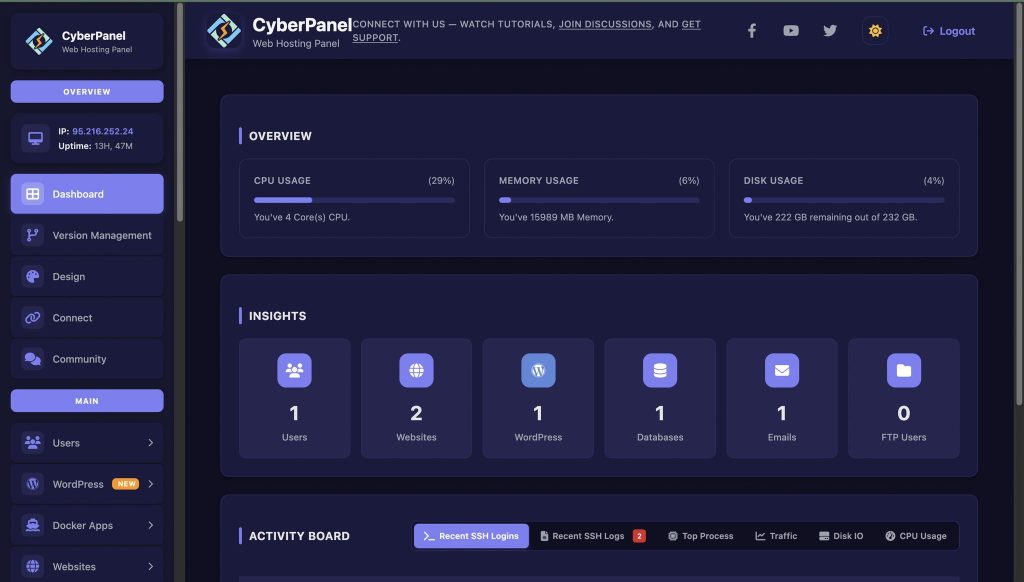
Asahi Linux users who wish to host websites and server management receive a helping hand from CyberPanel. While it is still in development, CyberPanel, a web hosting control panel, runs fine if you install a supported Linux OS such as Fedora Asahi Remix. It gives you:
- Easy website setup
- DNS management
- Database management
- File management
- Security controls
With CyberPanel, server work is easier for beginners and safe for seasoned Linux users with Apple Silicon.
Final Thoughts!
It is amazing how Asahi Linux has managed to put Linux on Apple Silicon devices. It’s compatible with M1 to M4 chips, provides solid performance, and improves every month. Its installation is easy, performance is smooth, and development tools are good. If you’re looking for the perfect tool to help manage your server or websites, CyberPanel offers you much more in a Linux environment.
If you want real open-source power on a modern Mac, give Asahi Linux a try now!
People Also Ask
1. Can I install Asahi Linux on Intel Macs?
No. Asahi Linux is made only for Apple Silicon devices (M1–M4).
2. Can I dual-boot Asahi Linux with macOS?
Yes, the installer supports safe dual-booting.
3. Does Asahi Linux support VS Code and development tools?
Yes. Most programming tools run smoothly.