
On this page
Making music on Linux is no longer a problem because of Linux Multimedia Studio, also known as LMMS.
If you are looking for LMMS Linux Multimedia Studio, you are in the right place to learn what this software is, how to install it, and whether it is worth your time.
The short answer is yes, LMMS is worth your time.
This open-source digital audio workstation lets you make melodies, beats, basslines, and entire arrangements using virtual instruments, effects, MIDI controllers, automation, samples, and more.
This software is great for making electronic music and is compatible with Linux, Windows, and macOS.
Besides being free and open source, LMMS is also interesting because you can start making music with minimal investment and invest more in the program as you go.
In this article, you will learn what Linux Multimedia Studio is, what you can do with LMMS, how to download and install it, what computer hardware you need to run it, what place it takes in the modern music production world, and what its limitations are.
What Is Linux Multimedia Studio?
Linux Multimedia Studio is the full name of LMMS, an open-source digital audio workstation used for computer music production.
With LMMS, you can make beats, melodies, patterns, play virtual instruments, connect MIDI controllers, work with samples, add effects, and automate your music production.
While Linux Multimedia Studio used to be focused on Linux, the software is now used on other platforms as well.
According to the LMMS website, LMMS is a free, open source, and community-developed digital audio workstation for Linux, Windows, and macOS.
This application is great for people who want to make electronic music and MIDI-based arrangements. It is also great for people who want to take advantage of the Linux-based production tools and gradually invest in other instruments and plugins.
LMMS is a digital music production platform that offers a variety of tools for making beats and melodies.
You can think of it as a music production suite that offers all the necessary tools for making music:
- Beat creation
- Melody writing
- Bass line creation
- MIDI sequencing
- Synthesizer programming
- Sample arrangement
- Effects processing
- Automation
- Song arrangement
- Audio export
What Does LMMS Stand For?
As mentioned above, LMMS used to be called Linux Multimedia Studio.
This is why you may find multiple variations of the same search query when you are looking for this application.
The variations of the search query are all related to the same music production software.
It may be confusing at first if you are looking for Linux Multimedia Studio, but there is no separate application for Linux called Linux Multimedia Studio.
What Can You Do With LMMS?
LMMS can do most of the things you would expect from a digital audio workstation.
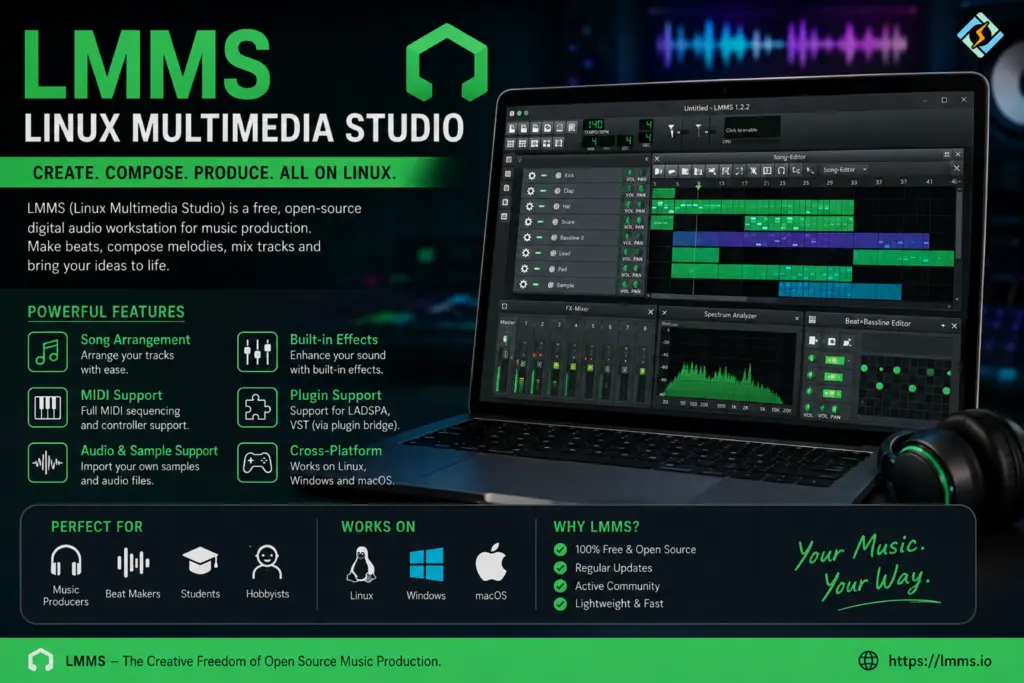
The official website lists beat creation, MIDI, composition, mixing, automation, sequencing, virtual instruments, effects, and sample-based production.
Create Beats
LMMS lets you create drum patterns and beats using the Beat and Bassline editor.
You can make kick patterns, snare rhythms, hi-hat patterns, percussion patterns, and electronic drum loops.
You can start with simple beats and gradually make them more complex as your song progresses.
Write Melodies
You can use the Piano Roll to write melodies and arrange your music.
This is a great tool for learning how to make music because you can see the musical notes and play them back to hear how they sound.
You can move the notes around and change their value to make different melodies and rhythms.
Build Bass Lines
Similarly to how you can build beats and melodies, you can use the same tools to build bass lines.
You can layer your bass lines with melodies and beats to make your song arrangement.
Use Virtual Instruments
LMMS comes with a variety of virtual synthesizers and instruments.
The official website lists 16 built-in synthesizers, SoundFont support, and plugin support. This means you have plenty of options to experiment with different sounds before investing in new virtual instruments.
Linux Multimedia Studio Features at a Glance
| Feature | What It Does |
|---|---|
| Piano Roll | Creates and edits notes |
| Beat and Bassline Editor | Builds drum and rhythm patterns |
| Song Editor | Arranges patterns into complete songs |
| Automation | Changes controls over time |
| MIDI | Works with MIDI files and compatible devices |
| Synthesizers | Creates electronic and musical sounds |
| SoundFont Support | Uses sampled instrument banks |
| Effects | Processes sounds with audio effects |
| VST Support | Allows supported plugin workflows |
| Sample Support | Uses external audio samples |
LMMS also supports MIDI import and Hydrogen project import, giving users more ways to bring existing musical material into their projects.
Is LMMS Good for Beginners?
Yes. If you aim to learn music production without wasting money on a DAW.
The interface might seem intimidating at first glance due to the variety of windows and tools. It is important to ignore the distractions at first and focus on a few particular tasks.
The best way to approach LMMS as a beginner is to start with making a drum pattern, then a bass line, and finally, a short melody.
After mastering these three elements, the user can proceed to the Song editor and start putting the sounds together into a song.
LMMS Linux Multimedia Studio Download
The best place to download Linux Multimedia Studio is the official website. The official LMMS download page offers the best options for installing the software on a Linux-based OS.
Moreover, the official LMMS download page states that LMMS is distributed under the GPL license and is available for Linux, Windows, and macOS.
The official page offers multiple Linux binaries. Moreover, it mentions that LMMS is available in the official repositories of major Linux distributions.
The official repositories offer stable versions of the software, whereas the development repositories will have unstable builds. The official LMMS download page explicitly warns that Alpha and nightly builds might have various issues.
How to Install LMMS on Linux?
The exact command to install LMMS depends on the Linux distribution.
The official LMMS download page offers the command to install LMMS on Debian-based distributions like Ubuntu:
sudo apt update
sudo apt install lmmsSimilarly, there is a command to install LMMS on Arch:
sudo pacman -S lmmsFedora and Red Hat-based distributions, and openSUSE might have their own ways of installing LMMS. The official LMMS download page lists all the options for Linux-based OS.
It is important to use the correct Linux command to install LMMS on your machine. It would be unwise to try to use the APT command on an Arch-based distribution.
What About the LMMS AppImage?
An AppImage is a good option to launch Linux applications without having to use package management software. The official LMMS download page lists AppImages. To launch the .AppImage file, the user might have to make the file executable.
The official LMMS download page offers the following command to make an AppImage file executable:
chmod +x ~/Downloads/lmms-*.AppImageOnce the file is made executable, the user can double-click it to launch LMMS.
AppImages are useful when the package management software in a Linux distribution has an outdated version of LMMS.
LMMS Hardware Requirements
Music production can use more system resources than ordinary desktop work.
LMMS itself may run comfortably on modest hardware, but large projects can become demanding when you add many instruments, samples, and effects.
A practical setup might look like this:
| Component | Practical Recommendation |
| CPU | Modern 64-bit processor |
| RAM | 8 GB or more |
| Storage | SSD recommended |
| Audio | Low latency compatible interface |
| MIDI | Optional MIDI keyboard |
| Graphics | Basic modern GPU is usually enough |
| OS | Supported 64 bit Linux distribution |
These are practical recommendations rather than a universal official minimum.
Your actual requirements depend on the size of your projects.
Does LMMS Support MIDI?
Yes. MIDI is one of the essential parts of the LMMS workflow.
By using MIDI, one can control virtual instruments and produce notes, tempo, velocity, or any other musical parameter.
By using a MIDI keyboard, you can play directly in LMMS instead of having to type in all the notes manually.
Besides, using a MIDI file as an input source is supported in LMMS. According to the official LMMS website, MIDI file import is supported.
Thus, LMMS is especially suitable for electronic producers since it allows one to make a complete track without having to record all the instruments live
LMMS Plugins and Sound Libraries
It is worth knowing that plugins can significantly extend LMMS’ capabilities.
While LMMS has quite a decent set of built-in synthesizers and effects, there are various third-party plugins and sound libraries that can be used in the program.
According to LMMS’ website, they officially support LADSPA and VST Effects as well as SoundFonts, GIG, and GUS format instruments.
Nevertheless, having access to a large library of plugins does not mean you should use them.
If you are a newbie, get comfortable with the basics of LMMS.
Explore how different synthesizers work and learn the fundamentals of sound design (what a filter is, how reverb and delay work, what equalization does, etc). Only then should you consider using various plugins to design amazing sounds.
Is LMMS Good For Electronic Music?
One of the best things about LMMS is its pattern-based interface that makes the production of electronic music tracks really fun.
By adding a pattern to a track in LMMS, you can design various musical parts such as drums, basslines, melody, and so on.
Thus, you can make EDM, house, techno, trap, hip-hop, synthwave, ambient, and many other genres of electronic music.
Moreover, LMMS’ native synthesizers allow one to get creative and design unique sounds without having to buy expensive third-party plugins.
Can LMMS Record Vocals and Live Instruments?
When it comes to recording live instruments or vocals, LMMS is not the best choice.
LMMS prioritizes sequencer-based composition and sound design and provides native support for MIDI instruments, samples, and synthesisers.
However, if your task is to record guitars, vocals, drums, and other instruments or you need a full-scale multitrack recorder, you may want to consider other Linux DAWs such as Ardour or Hydrogen.
So, LMMS lacks native support for standard audio recording and mixing tools.
This does not make LMMS any worse, though.
It only means that different DAWs prioritize different features and have different target audiences.
Thus, LMMS is great for those who want to produce MIDI-based music and electronic music tracks.
LMMS vs a Commercial DAW
| Category | LMMS | Commercial DAW |
| Cost | Free | Usually paid |
| Source Code | Open source | Usually closed source |
| Linux Support | Native | Varies |
| MIDI Production | Strong | Strong |
| Beat Making | Strong | Strong |
| Synthesizers | Built in | Usually available |
| External Plugins | Supported formats | Usually broad support |
| Audio Recording | Not its main strength | Often stronger |
| Subscription | None | Depends on product |
The right choice depends on what you actually need.
If your goal is beat making, MIDI sequencing, electronic music, and sound design, LMMS deserves serious consideration.
Common LMMS Issues on Linux
For all the excellence of this software, Linux Multimedia Studio LMMS has had some issues with the configuration.
No Sound
Verify that the selected audio device and Linux system’s audio configuration are set correctly.
Ensure that the system’s volume is not muted
MIDI Keyboard Not Working
Check whether Linux recognizes your device; if it does not, changing the settings in LMMS will not help.
High CPU Usage
If a person has a project with numerous instruments and effects, it can strain the processor.
Such an issue can be resolved by turning off all unneeded effects and limiting the number of audio plugins.
Plugin Not Showing Up
Verify that the plugin format is supported and that LMMS looks for plugins in the right directory.
Not all plugins that work on your system are automatically compatible with all digital audio programs.
Project Sounds Different on Another Computer
It is possible that external samples and plugins are absent on the computer they are being transferred to.
Therefore, it is essential to keep all the files, samples, and plugins necessary for the project in one place.
How CyberPanel Helps People with LMMS?

While being an incredible tool for creating music, LMMS does not cover all the aspects of a musician’s work. Nowadays, many producers and performers use the internet to promote and sell their content and services. A cyber panel can help such people by providing them with all the necessary web-based services.
CyberPanel is an advanced and free web hosting control panel. It offers a variety of hosting-related features. It helps create a portfolio, configure SSL certificates, databases, domains, and backups. In other words, CyberPanel takes care of all the technical details so that a creator can focus on their work. Thus, using CyberPanel is a good way to complement one’s work with LMMS.
CyberPanel allows you to avoid spending a lot of time on server management and instead concentrate on making awesome music and managing its distribution.
Who Should Use Linux Multimedia Studio?
Linux Multimedia Studio is suitable for:
- People who want to learn music production
- Producers of electronic music
- People who want to create beats and synth music and experiment with sound in general
- People who want to record on Linux OS or get away from the constant payments for DAWs
Linux Multimedia Studio may not be appropriate for someone who wants to set up a major recording studio. Understanding the limitations of the software beforehand can save frustration.
Final Thoughts!
Linux Multimedia Studio, or LMMS, remains a practical choice for Linux users who want to create music without paying for a commercial DAW.
Its strengths are clear. It is free, open source, cross-platform, and packed with tools for MIDI sequencing, beat creation, synthesizers, samples, effects, automation, and arrangement. The official project continues to develop, with recent progress including Linux ARM64 support, Wayland support in Linux AppImages, Qt6 work, performance improvements, and other changes.
At the same time, LMMS is not the perfect tool for every producer.
If you mainly create electronic music, beats, melodies, and MIDI arrangements, it can give you a strong starting point without a large software bill. If your work depends heavily on recording live vocals or instruments, you should also consider a DAW designed around that workflow.
The best way to judge LMMS is not by the number of features on its interface. Install it, create a simple project, build a beat, add a melody, and see whether its workflow feels natural to you.
That is ultimately what matters.
Download LMMS from the official project, create your first track, and use CyberPanel to put your music portfolio online.
FAQs
Does LMMS require an internet connection?
No. Once the application, instruments, samples, and plugins you need are installed, you can work offline. Internet access is mainly needed for downloading software, updates, plugins, samples, and other resources.
Can I export music created in LMMS?
Yes. LMMS supports exporting completed projects into usable audio formats. The exact export options depend on the version and configuration you are using.
Is LMMS useful for learning music theory?
LMMS is a music creation tool rather than a dedicated music theory course. However, its Piano Roll makes it easy to experiment with notes, chords, scales, rhythms, and melodies while learning.
Can LMMS run on a low-end laptop?
It can work on modest hardware, especially with small projects. Large arrangements with many instruments and effects are more demanding, so reducing the project size can improve performance.
Can I collaborate on an LMMS project with another producer?
Yes, but both users need access to the project’s required samples, plugins, and other resources. Sharing only the project file may not be enough if the project depends on external files.
Can LMMS open FL Studio project files?
LMMS has support for importing certain project formats, but you should not expect complete conversion of every feature from another DAW. Complex projects may use instruments or effects that have no direct equivalent in LMMS.
Can I use LMMS for game music?
Yes. LMMS can be useful for creating loops, background music, sound experiments, and other musical assets for games. The important part is checking the license of any external samples or plugins you use.


