On this page
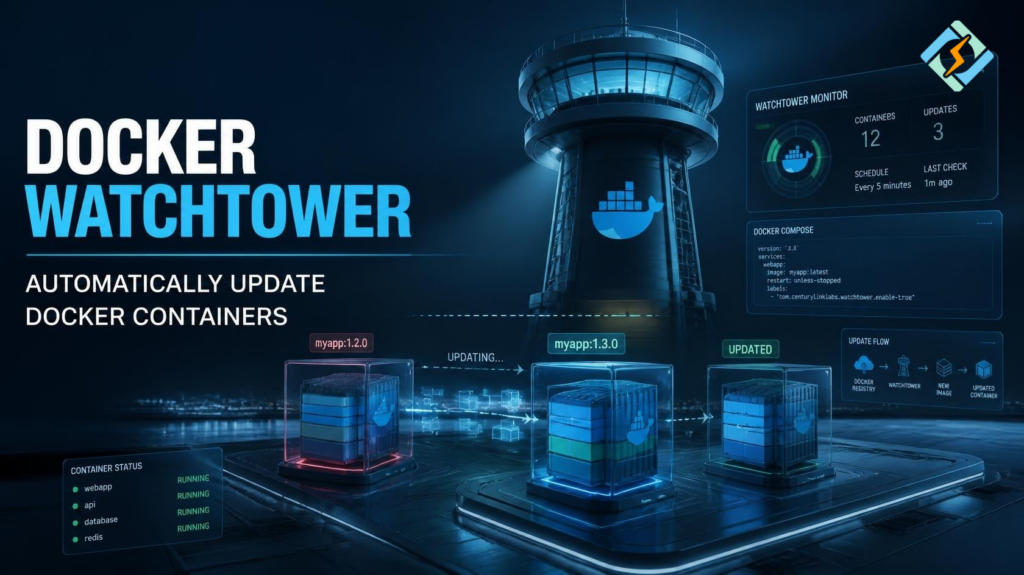
Docker Watchtower is a tool that monitors running Docker containers and can automatically update them when newer container images become available. It is useful for developers and server administrators who want to reduce the manual work involved in keeping containerized applications updated.
The key question is how to automate container updates without creating unnecessary downtime or security risks.
This guide explains how Watchtower works, how to run it with Docker, how Docker Compose fits into the setup, and what alternatives you should consider.
What Is Docker Watchtower?
Watchtower is a containerized application that monitors other Docker containers.
When it detects a newer image, it can pull the updated image and recreate the corresponding container.
The basic workflow looks like this:
Docker Registry
↓
New Container Image
↓
Watchtower
↓
Running Container
↓
Updated Container
Instead of manually checking every image, Watchtower can automate the process.
This can be useful when you manage several containers and want routine image updates to happen with minimal manual intervention.
Why Use Watchtower Docker?
Updating containers manually can become repetitive.
For example, you might normally need to:
docker pull image:tag

docker stop container

docker rm container

docker run ...Watchtower can automate much of this process.
Common benefits include:
- Automatic image updates
- Less manual maintenance
- Simple Docker integration
- Support for multiple containers
- Scheduled update checks
- Notification options
- Docker Compose compatibility
However, automatic updates are not always appropriate.
An application update can introduce a breaking change, configuration problem, or unexpected behavior.
For production systems, automatic deployment should always be used carefully.
How Does Watchtower Docker Work?
Watchtower communicates with the Docker daemon and monitors selected containers.
When it discovers that a newer image is available, it can:
- Check the image registry.
- Detect a newer image.
- Pull the new image.
- Stop the existing container.
- Recreate the container.
- Start the updated container.
The exact behavior depends on how Watchtower is configured.
This makes Watchtower more than an image downloader. It can actively manage the lifecycle of containers.
How Do You Run Watchtower With Docker?
Watchtower itself runs as a Docker container.
A basic example is:
docker run -d \

  --name watchtower \

  -v /var/run/docker.sock:/var/run/docker.sock \

containrrr/watchtowerThe Docker socket allows Watchtower to communicate with the Docker daemon.
That permission is powerful, so you should understand the security implications before using this configuration.
Once running, Watchtower can monitor containers according to its configuration.
What Is Watchtower Docker Compose?
Docker Compose can make Watchtower easier to manage, especially when you already use Compose for your applications.
A basic Compose configuration could look like:
services:

  watchtower:

    image: containrrr/watchtower

    volumes:

- /var/run/docker.sock:/var/run/docker.sockStart it with:
docker compose up -dCheck its status:
docker compose psView logs:
docker compose logs watchtowerThe actual configuration should be adjusted according to your update policy and security requirements.
Can Watchtower Update Every Docker Container?
It can monitor multiple containers, but you do not necessarily want every container to update automatically.
A better approach for important environments is to control which containers Watchtower manages.
For example, you may have:
Docker Host
|
+– Website
+– Database
+– Redis
+– Monitoring
+– Development App
Automatically updating a web application may be acceptable.
Automatically replacing a production database container without testing may be a bad idea.
Selective updates provide more control.
Is Docker Watchtower Safe?
Watchtower can be useful, but it needs careful configuration.
The biggest concern is the Docker socket.
A container with access to:
/var/run/docker.sockcan have significant control over the Docker environment.
That means you should not treat Watchtower as a harmless background utility.
Consider:
- Which containers it can manage
- Which images it can pull
- Where the host is exposed
- Whether automatic updates are appropriate
- How credentials are stored
- Whether updates are tested first
For production systems, controlled update schedules and staged deployments may be safer than automatically updating everything.
Watchtower Docker Compose Update Strategy
If you use Compose, you can combine Watchtower with a controlled update strategy.
For example, keep production services separated from development services.
Production
├── Stable App
├── Database
└── Reverse Proxy
Development
├── Test App
└── Test Database
Let automated updates happen in development first.
After testing the new image, update production manually.
This gives you much more control than blindly updating every container.
Docker Watchtower vs Manual Updates
| Feature | Watchtower | Manual Updates |
| Automation | High | Low |
| Control | Moderate | High |
| Maintenance effort | Low | Higher |
| Testing before update | Limited | Strong |
| Best for | Routine workloads | Critical production systems |
| Risk of unexpected updates | Higher | Lower |
The right option depends on how important uptime and version stability are.
What Is a Docker Watchtower Alternative?
Watchtower is not the only way to manage container updates.
Possible alternatives include:
- Diun
- Renovate
- Dependabot
- Kubernetes-based update systems
- CI/CD pipelines
- Manual image management
The best choice depends on what you want to automate.
Diun
Diun focuses on notifying you when new Docker images become available rather than automatically replacing running containers.
This can be a better approach when you want to review updates before deployment.
Renovate
Renovate can detect dependency and image updates and create update requests or pull requests.
It is useful when infrastructure changes should go through a review process.
CI/CD
A CI/CD pipeline can provide even more control.
You can automatically test a new image and deploy it only when the tests pass.
For important production applications, this is often a more controlled approach than automatic container replacement.
Watchtower vs Docker Watchtower Alternatives
| Tool | Main purpose | Automatic deployment |
| Watchtower | Container updates | Yes |
| Diun | Update notifications | No |
| Renovate | Dependency updates | Usually review-based |
| Dependabot | Dependency updates | Review-based |
| CI/CD | Tested deployments | Configurable |
If your priority is convenience, Watchtower is attractive.
If your priority is control, notifications or CI/CD may be better.
Can CyberPanel Work With Watchtower?

CyberPanel is a free and open-source web hosting control panel. It manages supported hosting and server services, while Watchtower manages Docker containers.
A server could potentially have:
Server
|
+– CyberPanel
| └── Websites
|
+– Docker
├── Application
└── Watchtower
However, avoid mixing automated container updates with critical hosting services unless you fully understand the deployment architecture.
For production systems, keep automatic update policies deliberate and make sure backups are available.
Frequently Asked Questions
Does Watchtower automatically restart containers?
When configured to update a container, Watchtower can recreate and restart it using the newer image.
Does Watchtower update Docker itself?
No. Watchtower is primarily designed to monitor and update container images and their associated containers. It does not function as a general Docker Engine updater.
What is the best Docker Watchtower alternative?
There is no single best alternative. Diun is useful for notifications, Renovate is useful for controlled dependency updates, and CI/CD is better when you want testing and approval before deployment.
Final Thoughts!
Docker Watchtower can save significant time by automating Docker container image updates. It is particularly useful for smaller environments where manually checking and updating containers becomes repetitive.
However, automation should not replace good deployment practices.
For non-critical services, automatic updates may be convenient. For production applications, databases, and other important workloads, consider notification-based updates or a CI/CD pipeline that tests new images before deployment.
If you use Watchtower Docker Compose, keep the configuration simple, protect Docker access, and decide carefully which containers should be managed automatically.
Start with a non-critical container, verify Watchtower’s update behavior, keep backups, and expand automation only after you know exactly how your applications respond to image updates.