On this page
Ansible playbooks can start small. A few tasks install packages, copy files, restart a service, and you are done. The trouble usually starts later, when the same playbook grows, more servers are added, and several people begin editing the code.
At that point, small inconsistencies become harder to spot. A task may use an outdated option. Another may rely on a shell command when an Ansible module would be a better fit. Someone else may copy an old example from a project that has not been updated in years.
The playbook may still run, but that does not mean it is clean or easy to maintain.
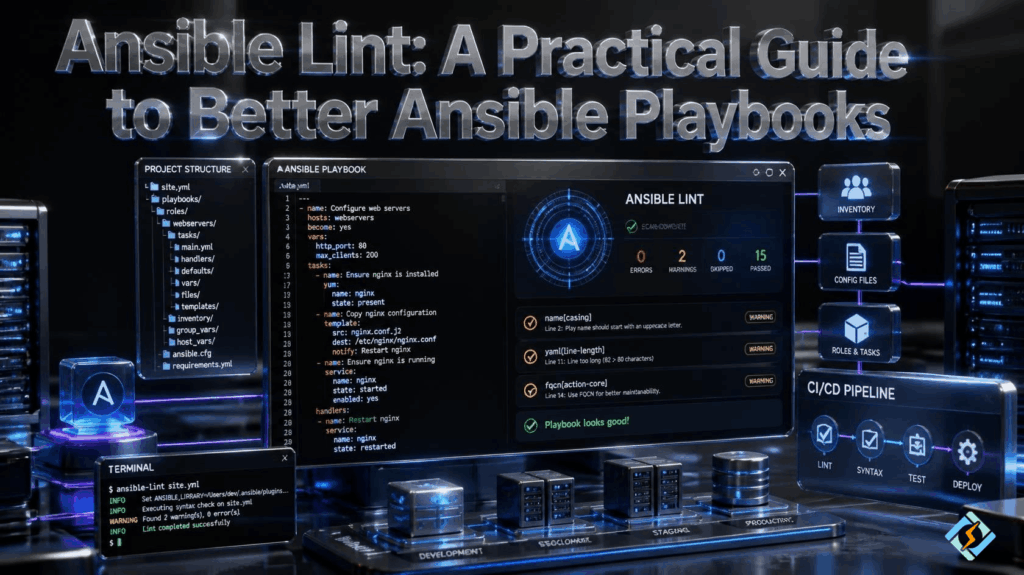
Ansible Lint is designed to catch these kinds of problems. It reviews Ansible content and reports practices that may cause trouble or go against recommended ways of writing automation.
It is not a replacement for testing. Instead, it gives you another check before your automation reaches a server.
What Does Ansible Lint Actually Do?
At its simplest, Ansible Lint reads your Ansible files and looks for known issues.
It can check playbooks, roles, task files, and other supported Ansible content. When it finds something that needs attention, it reports a rule and explains the problem.
For example, suppose a playbook uses a shell command to create a directory:
- name: Create application directory

ansible.builtin.shell: mkdir -p /opt/myappThere is an Ansible module specifically designed to manage directories:
- name: Create application directory

  ansible.builtin.file:

    path: /opt/myapp

state: directoryThe second version describes the desired state instead of asking the shell to perform an action.
That distinction matters in Ansible because the tool is built around managing states rather than simply running commands.
Ansible Lint can point you toward patterns like this.
Why Do Ansible Projects Need a Linter?
The longer you maintain automation, the easier it is for technical debt to creep in.
A playbook written six months ago may use a perfectly valid approach. A newer version of Ansible may introduce a better module or deprecate part of the old approach. Without regular checks, those older patterns can remain in the project for years.
There is also the human factor.
Two developers can solve the same problem in completely different ways. Both solutions might work, but one could be much easier to maintain.
An Ansible linter gives a team a shared baseline.
It can help identify:
- Deprecated or discouraged practices
- Poor module usage
- Potentially unsafe settings
- Unnecessary command and shell usage
- Problems with task structure
- Naming and readability issues
- File permission concerns
- Other known Ansible problems
It does not make a playbook automatically good. It simply makes problems easier to see.
How Do You Install ansible-lint?
The package is distributed through Python’s package ecosystem and is available on PyPI, the Python Package Index.
If Python and pip are already available on your Linux machine, a common installation method is:
python3 -m pip install ansible-lintThen check the installation:
ansible-lint --versionYou should see the installed version in the output.
For a development project, I would generally avoid installing every Python dependency globally. A virtual environment keeps the project’s tools separate from the rest of the system.
For example:
python3 -m venv .venv

source .venv/bin/activate

python3 -m pip install ansible-lintThe exact installation method can vary depending on your Linux distribution and Python setup.
What Is ansible-lint on PyPI?
If you searched for ansible lint PyPI, you are essentially looking for the Python package distribution of Ansible Lint.
PyPI is the main public repository for Python packages. It makes installing and updating Python-based tools straightforward.
For Ansible developers, this is useful because Ansible Lint can be installed alongside other development dependencies rather than being treated as a separate system application.
In a team environment, it is also worth keeping the tool version under control. If one developer runs a much newer version than the CI server, the two environments may produce different results.
That can create unnecessary confusion.
How Do You Run Ansible Lint?
Once it is installed, checking a playbook is simple:
ansible-lint playbook.ymlYou can also run it from an Ansible project directory:
ansible-lintIf everything meets the enabled checks, the command can finish without reporting findings. If something needs attention, the output identifies the relevant rule and location.
The useful part is what you do next.
Do not change a task just because a warning appeared. Read the finding first. Understand why the rule exists and decide whether the code really needs changing.
That habit prevents linting from becoming a pointless exercise in making warnings disappear.
What Kind of Problems Can Ansible Lint Find?
Ansible Lint has rules covering different parts of Ansible development.
Some are straightforward. For example, a task without a useful name is difficult to understand when you are looking through a long deployment log.
Other checks are more technical. They can identify deprecated features, questionable permissions, command usage, or patterns that make automation less predictable.
The exact rules can change as Ansible Lint develops, so the output you see today may not be identical to what another project gets with an older release.
That is one reason to treat linting as part of the project’s tooling rather than a one-time check.
Can Ansible Lint Improve Idempotency?
Yes, although it is important to understand its role.
Idempotency means that running an automation task repeatedly should not cause unnecessary changes once the desired state has already been reached.
Consider this:
– name: Install Nginx
ansible.builtin.shell: apt install nginx -y
It tells the operating system to run a command. Ansible has no clear description of the desired package state in the task itself.
A package module is more appropriate:
– name: Install Nginx
ansible.builtin.apt:
name: nginx
state: present
update_cache: true
Now the intention is clear: Nginx should be installed.
Ansible can work with that desired state more effectively.
This is one of the reasons Ansible encourages modules over using shell commands for tasks that already have dedicated modules.
Is Ansible Lint the Same as a Syntax Check?
No, and this difference is easy to miss.
A syntax check answers a basic question: Can Ansible parse the playbook?
You can perform one with:
ansible-playbook –syntax-check playbook.yml
Ansible Lint goes further. It looks at how the automation has been written and checks it against its rules.
So a playbook can pass a syntax check and still produce several lint findings.
Neither tool proves that your automation will work correctly in production. They simply catch different classes of problems before execution.
For important automation, you want actual testing as well.
Should You Put Ansible Lint in CI/CD?
If several people work on the same Ansible repository, adding linting to CI is a sensible step.
Imagine someone submits a pull request that changes a deployment role. The CI system can run Ansible Lint automatically before the change is merged.
A basic workflow could be:
Pull request
|
v
Ansible Lint
|
v
Automated tests
|
v
Code review
|
v
Merge
This catches simple problems early.
It also saves reviewers from spending their time on issues that an automated check can identify in seconds.
Linting should not be the only CI check. A playbook can pass linting and still fail during execution, so functional testing remains important.
What Should You Do When a Project Has Hundreds of Findings?
This is where people often give up on linting.
You run it against an old project and suddenly see a long list of findings. Fixing every item at once sounds like a project of its own.
Do not do that.
Start with the findings that matter most. Look for deprecated features, unsafe configurations, incorrect module usage, and other issues that could affect reliability.
Then work through the less urgent findings as you touch each role or playbook.
This approach is much more realistic for a large existing codebase.
It also means you can test smaller changes instead of modifying the entire automation repository in one go.
Can You Ignore an Ansible Lint Rule?
There are situations where you may need to.
A project can have a legitimate reason for using a pattern that a rule discourages. In that case, an exception may make sense.
What you want to avoid is disabling rules simply because fixing the finding is inconvenient.
If every warning gets ignored, the tool loses its purpose.
A good exception should be deliberate and understandable to the next developer who works on the project.
How Does CyberPanel Fit Into an Ansible Workflow?

CyberPanel and Ansible are useful for different parts of Linux server management.
Ansible is primarily an automation tool. You can use it to repeat configuration and deployment tasks across servers.
CyberPanel is a web hosting control panel. provides a web-based interface for managing hosting environments, websites, domains, databases, email, and other hosting-related tasks.
They can therefore work alongside each other.
For example, Ansible could handle repeatable infrastructure tasks, while CyberPanel gives the hosting team a simpler interface for day-to-day website management.
Ansible Lint sits one step earlier. It checks the automation itself before that automation is used.
A hosting workflow might look something like:
Ansible
|
v
Ansible Lint
|
v
Linux Server
|
v
CyberPanel
|
v
Websites and Hosting Services
The tools are not competitors. They solve different problems.
What Are Some Practical Ansible Lint Habits?
You do not need a complicated process to get value from Ansible Lint.
Run it while developing rather than waiting until the playbook is finished. Keep the tool version reasonably consistent between local machines and CI. When you get a finding, read it instead of immediately suppressing it.
It is also worth keeping your lint configuration with the project.
That way, the rules are visible to everyone working on the repository.
For new projects, introducing linting early is easier than cleaning up years of accumulated automation later.
For older projects, take it slowly. Fix meaningful problems as you maintain the code.
Frequently Asked Questions
Can Ansible Lint check an entire Ansible repository?
Yes. You can run it from a project directory so it can inspect supported Ansible content across the repository rather than checking one playbook at a time.
Does Ansible Lint need a running Ansible server?
No. It is a development and analysis tool. It reviews your Ansible content locally or in a CI environment and does not require a remote managed server just to perform the linting.
Can teams create their own standards around Ansible Lint?
Yes. Teams can configure the tool and decide which rules and practices fit their projects. This makes it possible to establish a consistent standard without forcing every Ansible project to follow exactly the same workflow.