On this page
Switching from Windows to Linux does not always mean leaving Windows software behind. Some applications have good Linux alternatives, while others still work best on Windows. That can be frustrating when you have already moved your main desktop to Linux but occasionally need a Windows-only program.
WinBoat Linux takes an interesting approach to this problem. Instead of asking you to install Windows alongside Linux or depend entirely on compatibility layers, WinBoat runs a Windows environment inside Linux and brings its applications into your Linux desktop.
The result is a setup where you can keep using Linux as your main operating system while opening Windows applications when you need them.
WinBoat is still a beta project, so it is not something to install blindly on a production machine. It has an interesting design, though, and it may be useful for Linux users who need access to software that does not behave well with Wine or similar tools.
What Is WinBoat Linux?
WinBoat is an open-source application designed to run Windows applications on Linux with desktop integration.
It does not work like Wine, which translates Windows API calls so that Windows programs can run directly on Linux. WinBoat takes a different route.
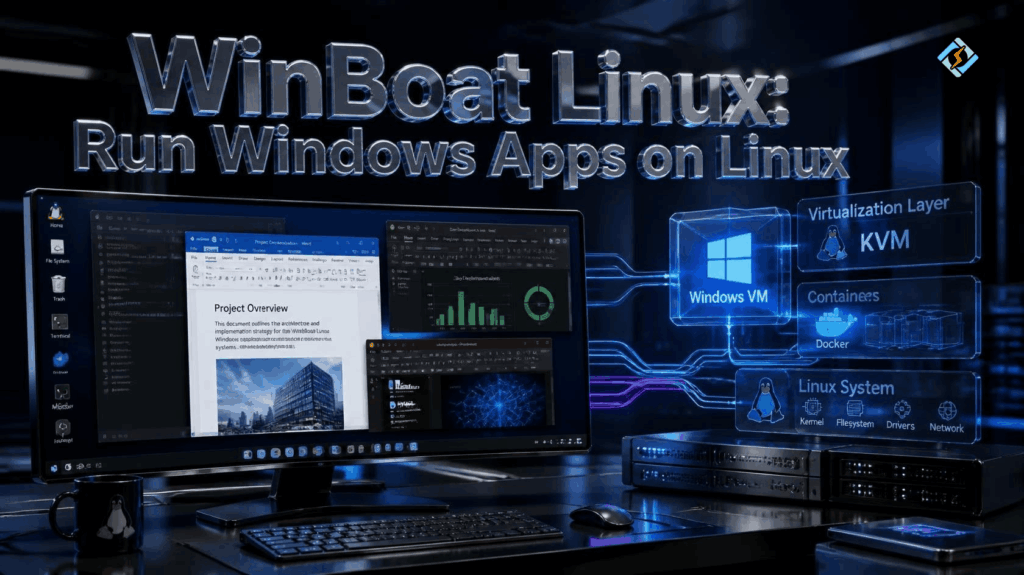
It runs Windows in a virtual machine inside a containerized environment. Docker or Podman handles the container side, while KVM provides hardware virtualization. WinBoat then uses FreeRDP and Windows RemoteApp technology to bring Windows applications into the Linux desktop.
That sounds complicated behind the scenes, but the idea is fairly simple from the user’s point of view.
You install WinBoat, configure the Windows environment, install the Windows software you need, and then use those applications from your Linux desktop.
You can also open the complete Windows desktop when you need it.
Why Would You Use WinBoat?
The main reason is compatibility.
Linux has excellent alternatives for many everyday applications. LibreOffice can handle office work, GIMP and Krita cover different parts of image editing, and there are countless Linux-native development tools.
But there are still situations where an alternative is not enough.
Perhaps your employer uses a Windows-only application. Maybe you have an older project created in a particular Windows program. Or perhaps you rely on a specialized application that does not work correctly through Wine.
WinBoat is aimed at these situations.
The project specifically highlights applications that have had problems with Wine or CrossOver, including examples such as parts of the Adobe ecosystem, Affinity Photo, Paint Tool SAI, Acrobat, and Microsoft Office.
That does not mean every Windows application will work perfectly. The project itself warns that it is still in beta.
How Does WinBoat Work?
WinBoat’s architecture is one of the more interesting things about it.
The Linux application itself is built with Electron. Behind the scenes, Windows runs in a virtual machine that is placed inside a Docker or Podman container.
WinBoat communicates with the Windows environment through its guest server. For individual Windows applications, it uses FreeRDP together with Windows RemoteApp to display them as separate windows on the Linux desktop.
So the process is roughly:
Linux desktop
↓
WinBoat
↓
Docker or Podman
↓
Windows virtual machine
↓
Windows application
↓
FreeRDP / RemoteApp
↓
Linux desktop window
This is quite different from simply installing a Windows program with Wine.
There is more infrastructure involved, but you also get a real Windows environment behind the application.
What Does WinBoat Need to Run?
WinBoat has some hardware and software requirements that you should check before installing it.
The current project documentation lists at least 4 GB of RAM, two CPU threads, and 32 GB of free storage for the selected installation location. Hardware virtualization through KVM must also be enabled in the system’s BIOS or UEFI settings.
If you use Docker, WinBoat requires Docker Engine and Docker Compose v2. Your Linux user also needs the appropriate Docker permissions.
Podman is supported as an alternative container runtime.
FreeRDP is another requirement. The project currently asks for a 3.x release with sound support.
There is one important detail here: Docker Desktop is not supported. WinBoat expects a suitable Linux container setup rather than Docker Desktop.
Can You Use WinBoat Linux Mint?
Yes, WinBoat Linux Mint is a practical combination to consider.
Linux Mint is based on Ubuntu, which makes it a familiar environment for many desktop Linux users. WinBoat provides a Debian package, and its documentation also offers an AppImage, so there are convenient ways to install it on Debian-based distributions.
However, there is a difference between “supported” and “completely trouble-free.”
There have been WinBoat reports from Linux Mint users involving installation problems and individual Windows applications failing to appear or launch correctly. For example, an issue reported with WinBoat 0.9.0 involved Linux Mint with Cinnamon and X11, Docker Engine, and FreeRDP.
That does not mean WinBoat cannot work on Mint. It means you should expect some troubleshooting, especially because the project is still beta software.
How Do You Install WinBoat on Linux Mint?
The easiest route is to start with the prerequisites rather than installing WinBoat first.
Make sure virtualization is enabled in BIOS or UEFI. Then install and configure Docker or Podman, depending on which runtime you plan to use.
You also need Docker Compose v2 if you choose Docker and a compatible FreeRDP installation.
Once those pieces are ready, download the appropriate WinBoat Linux package from the project’s official releases. The project currently offers a .deb package for Debian-based systems, along with AppImage and other formats.
For Linux Mint, the .deb package is the obvious place to start.
The important part is not rushing through the installation. If WinBoat cannot start, checking Docker, virtualization, permissions, and FreeRDP first can save a lot of time.
What Windows Apps Can You Run?
WinBoat is designed to run Windows applications rather than simply provide a remote Windows desktop.
That distinction is one of its biggest attractions.
When integration works correctly, a Windows application can appear alongside your Linux applications instead of forcing you to work inside a full-screen Windows desktop.
You can also access the complete Windows desktop when that is more convenient.
The actual experience depends on the application.
Some programs may work well. Others can have problems with graphics, hardware access, application integration, or RemoteApp behavior. Because WinBoat is still under development, compatibility should be checked for the specific software you depend on.
Does WinBoat Replace Wine?
Not really.
Wine and WinBoat solve the Windows-on-Linux problem in different ways.
Wine attempts to make Windows applications work directly within Linux by providing compatible Windows APIs. It does not require a full Windows installation for each application.
WinBoat instead provides an actual Windows environment and exposes its applications to Linux.
That can make WinBoat attractive when a particular application does not behave properly with Wine.
The trade-off is resource usage.
A Windows virtual machine needs additional memory, storage, CPU resources, and virtualization support. Wine can be much lighter when an application works well with it.
So if your Windows program already runs perfectly under Wine, there may be little reason to switch.
What About WinBoat vs Dual Boot?
Dual booting gives Windows and Linux their own separate environments. It is reliable, but switching between them requires restarting the computer.
WinBoat is more convenient when you only need Windows occasionally.
You can stay inside Linux and launch the Windows software when necessary.
The downside is that both operating environments are active at the same time. That means higher resource usage and more moving parts.
For someone with a powerful desktop and an occasional need for Windows software, this may be a reasonable trade-off.
For gaming or workloads that need maximum hardware performance, a native Windows installation or another virtualization setup may still make more sense.
Does WinBoat Need a Windows License?
Yes.
WinBoat does not provide a Windows license for you.
The project’s documentation states that the Windows images are provided as trial versions and that users need to supply their own license key if activation is required.
This is an important point because installing WinBoat does not give you a free licensed copy of Windows.
You are still responsible for complying with Microsoft’s licensing requirements for the Windows installation and software you use.
Can WinBoat Access Linux Files?
WinBoat provides filesystem integration so that the Linux home directory can be mounted inside Windows.
This makes moving files between the two environments much easier than maintaining completely separate systems.
It is particularly useful when you work on a Linux project but need to open a file in a Windows application.
You should still be sensible about what you expose to the Windows environment. Sharing everything simply because it is convenient is not always the best approach, especially on a machine containing sensitive files.
Is WinBoat Good for Linux Beginners?
It can be, but I would not call it a beginner-only application.
The WinBoat interface is intended to simplify the setup process, which is a big advantage. You do not have to manually build the entire Windows virtual machine from scratch.
However, the prerequisites are still fairly technical.
You may need to understand Docker or Podman, KVM, FreeRDP, Linux permissions, and basic troubleshooting.
If something fails, knowing how to inspect a Docker container or check whether virtualization is enabled can make a big difference.
That is especially true on Linux Mint, where community reports show that individual setups can behave differently.
What Are the Main Advantages of WinBoat?
WinBoat’s biggest advantage is convenience.
You get a Windows environment without having to reboot into Windows every time you need one application.
Other useful features include:
- Windows applications integrated into the Linux desktop
- Full Windows desktop access
- Automated setup through the WinBoat interface
- Linux filesystem integration
- Docker and Podman support
- FreeRDP-based application integration
- Resource monitoring
- Experimental USB passthrough
- Open-source MIT licensing
The project is also actively developing, so its capabilities may change over time.
What Are the Downsides?
The biggest issue right now is maturity.
WinBoat is explicitly described as beta software. The developers warn users to expect bugs and some troubleshooting.
There are also more components involved than with a simple Wine installation.
You have the Linux host, container runtime, Windows VM, FreeRDP, and WinBoat itself. If something goes wrong, finding the exact cause can take time.
Resource usage is another consideration.
Running a Windows environment inside Linux naturally requires more system resources than running a native Linux application.
For an older computer, that may be enough reason to choose another solution.
What Role Does CyberPanel Have Here?

CyberPanel is not an alternative to WinBoat, and the two tools are designed for completely different jobs.
WinBoat is focused on running Windows applications on a Linux desktop.
CyberPanel is a web hosting control panel.
If you run websites on a Linux VPS, CyberPanel can handle many hosting tasks through a browser. You do not need a graphical Windows environment just to manage websites, domains, databases, email, or other common hosting functions.
That can actually reduce the situations where you need a heavy desktop virtualization setup.
A practical environment might look like this:
Linux desktop
├── WinBoat → Windows applications
└── Browser → CyberPanel → Web hosting
Each tool handles the job it was designed for.
Frequently Asked Questions
Does WinBoat work on Linux Mint Cinnamon?
It can, but the experience can depend on the specific Mint version, display setup, FreeRDP configuration, and other components. There have been reports from Mint users involving application launch and installation problems, so it is worth checking current project issues if you encounter a problem.
Does WinBoat work with Wayland?
WinBoat is designed to work with modern Linux desktop environments, but application integration can depend on the graphics stack and FreeRDP setup. If a specific application does not behave correctly, checking the current WinBoat issues is worthwhile because compatibility problems are still being worked on.
Is WinBoat suitable for a production workstation?
It depends on how critical the Windows applications are to your work. Since WinBoat is still beta software, I would avoid making it the only way to access essential business software until you have tested your specific applications and hardware thoroughly.
Final Thoughts
WinBoat Linux is an interesting solution for people who like Linux but still need Windows applications.
Its biggest difference from Wine is that it gives those applications access to a real Windows environment running inside Linux. You can open individual Windows programs from the Linux desktop or use the full Windows desktop when needed.
WinBoat Linux Mint is also worth considering, especially for users already running Mint on compatible hardware. Just keep expectations realistic. The project is still in beta, and some users have reported installation and application integration problems.
If your Windows software already works well with Wine, you may not need WinBoat. If it does not, however, WinBoat offers a different approach that could be a better fit.
For Linux hosting users, there is also no reason to use WinBoat for tasks that can be handled directly through a web-based control panel. CyberPanel can take care of many hosting tasks from your browser, leaving WinBoat for the Windows applications you actually need.
Ready to get more from your Linux environment? Explore CyberPanel for simpler Linux hosting management and keep WinBoat for the Windows applications that Linux cannot replace.