

On this page
Terraform concat() combines two or more lists and returns them as one list. It is useful when values are stored in separate lists but need to be processed together.
This guide explains how terraform concat works, how to combine lists, how to use it with variables and objects, and why concat() is not the right function for joining strings.
What Is Terraform Concat?
The Terraform concat() function combines two or more lists into a single list while keeping the elements in their existing order.
Its basic syntax is:
concat(list1, list2, ...)For example:
concat(
  ["web", "api"],
  ["database", "cache"]
)The result is:
[
  "web",
  "api",
  "database",
  "cache",
]The first list comes first, followed by the second list.
You can pass more than two lists to the function:
concat(
["web"],
["api"],
["database"],
["cache"]
)Result:
[
  "web",
  "api",
  "database",
  "cache",
]How Does the Terraform Concat Function Work?
Terraform functions take arguments inside parentheses and return a value based on those arguments. The concat() function expects two or more lists and produces a new list containing their elements.
Consider two lists:
locals {
  frontend = ["nginx", "apache"]
  backend  = ["mysql", "redis"]
}You can combine them with:
concat(local.frontend, local.backend)Terraform returns:
[
  "nginx",
  "apache",
  "mysql",
  "redis",
]The order matters. Terraform does not sort the values automatically.
concat(
  ["c", "a"],
  ["d", "b"]
)returns:
[
  "c",
  "a",
  "d",
  "b",
]It does not return:
[
  "a",
  "b",
  "c",
  "d",
]What Happens to Empty Lists?
An empty list can be passed to concat().
concat(
["web", "api"],
[]
)Result:
[
"web",
"api",
]This can be useful when one of your input lists is optional.
How to Concatenate Two Lists in Terraform
The most common use of terraform concat is combining two related lists.
For example:
locals {
production_servers = [
"server-01",
"server-02"
]
staging_servers = [
"server-03",
"server-04"
]
all_servers = concat(
local.production_servers,
local.staging_servers
)
}The all_servers value becomes:
[
"server-01",
"server-02",
"server-03",
"server-04",
]This is useful when different parts of a Terraform configuration produce separate collections, but a later expression needs to work with all of them.
For example, you might keep production and staging values separate for readability, then combine them only where required.
How to Concatenate Multiple Lists
concat() is not limited to two lists.
locals {
web = ["nginx", "apache"]
app = ["nodejs", "python"]
db = ["mysql", "postgresql"]
packages = concat(
local.web,
local.app,
local.db
)
}The result is:
[
"nginx",
"apache",
"nodejs",
"python",
"mysql",
"postgresql",
]Terraform processes the arguments from left to right.
This makes concat() useful when a configuration has several independently defined collections.
How to Use Terraform Concat With Variables
You can also pass variables to concat().
variable "base_packages" {
type = list(string)
default = [
"curl",
"wget"
]
}
variable "extra_packages" {
type = list(string)
default = [
"git",
"vim"
]
}
locals {
packages = concat(
var.base_packages,
var.extra_packages
)
}The resulting list is:
[
"curl",
"wget",
"git",
"vim",
]Using variables this way keeps the function reusable. You can change either input without changing the concat() expression itself.
If you are working with more complex Terraform configuration, understanding HCL syntax and collection types makes these expressions easier to maintain. You can learn more in our guide to Terraform HCL.
Can Terraform Concat Combine Lists of Objects?
Yes. The elements do not have to be simple strings.
For example:
locals {
web_servers = [
{
name = "web-01"
tier = "frontend"
},
{
name = "web-02"
tier = "frontend"
}
]
api_servers = [
{
name = "api-01"
tier = "backend"
},
{
name = "api-02"
tier = "backend"
}
]
all_servers = concat(
local.web_servers,
local.api_servers
)
}The result is one list containing all four objects:
[
{
name = "web-01"
tier = "frontend"
},
{
name = "web-02"
tier = "frontend"
},
{
name = "api-01"
tier = "backend"
},
{
name = "api-02"
tier = "backend"
}
]This is useful when separate collections contain objects with the same general structure.
Terraform Concat List: What You Need to Know
The terraform concat list use case is straightforward: provide lists as arguments and Terraform combines their elements.
For example:
concat(
["a", "b"],
["c", "d"]
)produces:
[
  "a",
  "b",
  "c",
  "d",
]Terraform also allows arguments containing different element types in some cases. For example, the official documentation shows that concat() can work with mixed element types and can preserve a nested list as an element rather than recursively flattening it.
Consider:
concat(
  ["a", "b"],
  [["c", "d"], "e"]
)The nested list remains an element of the resulting collection:
[
  "a",
  "b",
  [
    "c",
    "d"
  ],
  "e"
]This is an important difference between concat() and flatten().
concat() combines the supplied lists. It does not recursively flatten nested lists.
Terraform Concat vs Flatten
These two functions can look similar because both work with lists, but they solve different problems.
concat()
Use concat() when you have separate lists that should become one list.
concat(
  ["web", "api"],
  ["db", "cache"]
)Result:
[
  "web",
  "api",
  "db",
  "cache"
]flatten()
Use flatten() when you have nested lists and need to remove the nested list structure.
flatten([
["web", "api"],
["db", "cache"]
])Result:
[
  "web",
  "api",
  "db",
  "cache"
]The output can look identical in simple examples, but the input structure is different.
A useful way to remember it is:
concat()joins separate lists.flatten()removes nested list levels.
If your data already consists of separate lists, use concat(). If a list contains other lists, flatten() may be the better choice.
Can You Use Terraform Concat Strings?
This is where Terraform users often get confused.
Despite searches for terraform concat strings and terraform string concat, the concat() function is designed for lists, not direct string concatenation. HashiCorp documents concat() as a function that takes two or more lists.
This is not the correct approach:
concat("Hello", "World")If your goal is to combine strings, use string interpolation, format(), or join() depending on the structure of your data.
Terraform String Concat With Interpolation
For a small number of strings, interpolation is usually simple:
locals {
  first_name = "Hasib"
  last_name  = "Iftikhar"

  full_name = "${local.first_name} ${local.last_name}"
}The result is:
"Hasib Iftikhar"You can also place expressions directly inside a string:
"${local.first_name}-${local.last_name}"Result:
"Hasib-Iftikhar"Terraform String Concat With join()
If you already have a list of strings, join() is the better choice.
join(
  " ",
  ["Terraform", "concat", "function"]
)Result:
"Terraform concat function"The first argument defines the separator. The second argument is the list of strings. HashiCorp documents join() specifically for producing a string by combining the elements of a list with a chosen separator.
You can use different separators:
join(
  "-",
  ["web", "server", "01"]
)Result:
"web-server-01"For a comma-separated value:
join(
  ", ",
  ["web", "api", "database"]
)Result:
"web, api, database"Terraform Concat vs Join
The easiest way to distinguish the two functions is to look at what you need as the final result.
| Function | Input | Output | Main use |
|---|---|---|---|
concat() | Two or more lists | One list | Combine lists |
join() | Separator + list of strings | String | Combine strings |
flatten() | List containing nested lists | Flat list | Remove nested list levels |
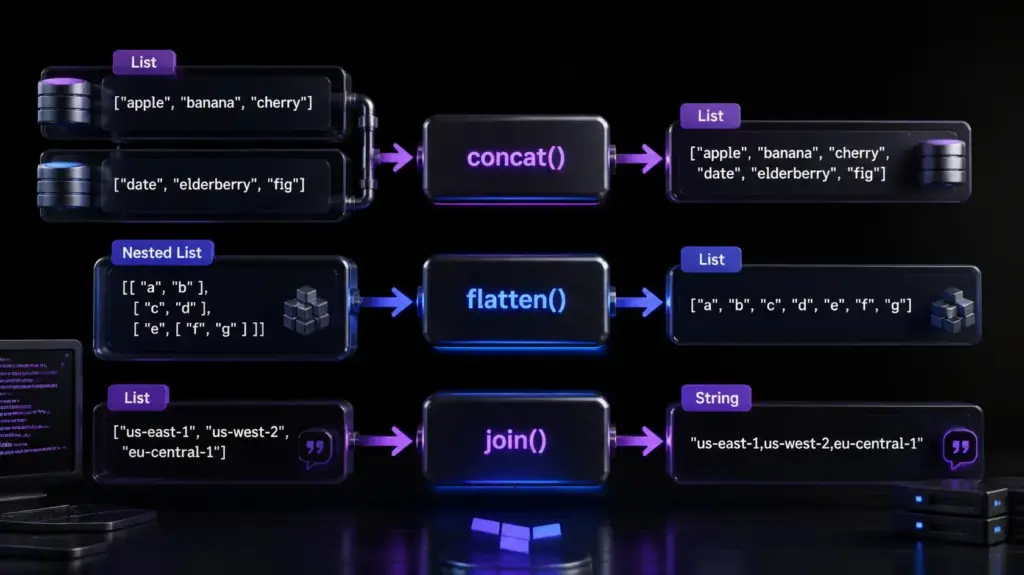
For example:
concat(
  ["web", "api"],
  ["db"]
)returns a list:
[
  "web",
  "api",
  "db"
]But:
join(
  ", ",
  ["web", "api", "db"]
)returns one string:
"web, api, db"join() also has a related split() function. split() takes a string and produces a list by dividing it at a specified separator.
What Happens When You Use Different List Types?
Terraform uses a type system for collection values, so the types of the elements you pass to a function matter.
A simple example is:
concat(
  ["one", "two"],
  ["three"]
)Both arguments contain strings, so the result is straightforward.
With objects, the object structures should also match how you intend to use the resulting collection.
For example:
locals {
  first = [
    {
      name = "web-01"
      role = "web"
    }
  ]

  second = [
    {
      name = "web-02"
      role = "web"
    }
  ]

  servers = concat(local.first, local.second)
}Keeping similar object structures makes the resulting collection easier to work with later.
How to Test Terraform Concat
You do not need to create a cloud resource just to test a Terraform expression.
The Terraform CLI providesterraform console, which lets you experiment with expressions interactively.
Run:
terraform consoleThen test:
concat(["web", "api"], ["db", "cache"])Terraform should return:
[
  "web",
  "api",
  "db",
  "cache",
]Try an empty list:
concat(["web", "api"], [])You can also test nested lists:
concat(
  ["web"],
  [["api", "db"]]
)This helps you see exactly how concat() treats nested values before using the expression in a larger configuration.
For broader configuration checks, you can also use terraform validate to check whether your Terraform configuration is syntactically valid and internally consistent.
Common Terraform Concat Mistakes
1. Passing strings instead of lists
This is a common mistake:
concat("web", "api")concat() expects lists, not individual strings.
Use:
concat(
["web"],
["api"]
)If the desired result is a single string, use join() or string interpolation instead.
2. Expecting concat() to flatten nested lists
Consider:
concat(
  ["web"],
  [["api", "db"]]
)The nested list is not recursively unpacked.
If you need to remove nested list levels, use flatten().
3. Using concat() when join() is needed
If your final value needs to be:
"web-api-db"then concat() is not the right function.
Use:
join(
  "-",
  ["web", "api", "db"]
)4. Forgetting the argument count
concat() needs two or more lists.
A single list does not need concat():
["web", "api"]is already a list.
5. Assuming concat() sorts values
It does not.
concat(
  ["b", "a"],
  ["d", "c"]
)keeps the supplied order:
[
  "b",
  "a",
  "d",
  "c"
]If you need sorted output, sorting is a separate operation.
Best Practices for Terraform Concat
Keep these practices in mind when using concat():
- Use
concat()for combining lists, not direct strings. - Keep related collections separate when that makes the configuration easier to read.
- Use
flatten()when the actual problem is nested list structure. - Use
join()when the desired result is a string. - Keep object structures consistent when combining lists of objects.
- Test unfamiliar expressions with
terraform console. - Avoid using
concat()when a simple list literal is enough. - Preserve clear variable names so the source of each list is obvious.
For larger Terraform configurations, understanding other collection functions can help you choose the right expression instead of forcing one function to handle every data transformation. CyberPanel’s Terraform Length Function guide is useful when you need to count elements in a collection.
FAQs
Does Terraform concat preserve list order?
Yes. concat() keeps the elements in the order they appear in the input lists. It does not sort the resulting list.
Does Terraform concat remove duplicate values?
No. concat() only combines the elements. If two input lists contain the same value, that value remains duplicated in the resulting list. Use distinct() separately when duplicate removal is required.
Should I use concat or join for strings?
Use join() when you have a list of strings and need one string as the result. concat() produces a list, while join() produces a string using the separator you specify.
Final Takeaway
Terraform concat() is a simple way to combine two or more lists into one collection. It keeps the elements in their supplied order and does not recursively flatten nested lists.
- Use
concat()when your problem is combining lists. - Use
flatten()when your problem is nested lists.
Use join() when your goal is turning a list of strings into one string.
When you are unsure how an expression behaves, test it with terraform console before adding it to a larger configuration.
Ready to test Terraform concat? Open terraform console, try your list expression with real values, and verify the output before adding it to your configuration.



One Response