
On this page
Want a Linux with speed, stability, and friendliness combined? Meet Xenia Linux. Xenia Linux also brings a unique mascot to life, representing its community, creativity, and lightweight efficiency.This guide will teach you about Xenia Linux, the mascot of Xenia Linux, and how this distro can fit both beginners as well as professionals.
If you’ve ever been curious about trying Linux, there’s never been a better time to try. This post includes everything you need to get started with any popular distribution.
What Is Xenia Linux?
Xenia is a lightweight Linux distribution that runs well without much of a headache. It’s built on a rock-solid Linux kernel and comes with a user-friendly desktop environment that even runs well on aging hardware. Linux Xenia mascot stands in the community. It has creativity, energy, and accessibility.
Key benefits include:
- Fast boots and resource-friendly
- Friendly and engaging user interface
- Optimized for both desktops and servers
- Lightweight yet functional apps
- Community-focused development
Meet the Linux Mascot Xenia
The Linux Xenia mascot is more than just a figure. It represents the friendly and welcoming spirit of the Xenia Linux user community. The mascot is used in the tutorials, wallpaper, and other promotional items to give it a face. So that learning becomes fun for someone who has never learnt Linux before.
Why the Mascot Matters
- Humanizes the tech environment
- Encourages community participation
- Makes documentation visually engaging
- Inspires creativity in open-source contributions
Why Choose Linux Xenia?
Xenia Linux shines in a lot of respects:
| Feature | Benefit |
|---|---|
| Speed | Lightweight for older machines |
| Simplicity | Easy installation and interface |
| Community | Guided support and forums |
| Customization | Flexible desktop environments |
| Security | Up-to-date Linux kernel patches |
With these advantages, it is very compatible for students, business people, and hobbyists.
Xenia Linux Guide: How Do You Start?
Here are the steps on how you can download and run Xenia Linux:
- Go to the Xenia Linux official website.
- Choose your version according to your hardware.
- Download the ISO file.
- Make a bootable USB using Rufus or Etcher
- Finally, restart your system and install Xenia Linux
When you install it, you’ll also receive the mascot-themed wallpapers and everything on your menus will be easy to move through because of its light layout.
Xenia Linux vs Other Distros
This contrast reveals why Xenia Linux is very popular among those who require performance, entertainment, and flexibility all-in-one.
| Aspect | Xenia Linux | Traditional Heavy Distros |
|---|---|---|
| Resource Usage | Very Low | High |
| Community Mascot | Yes | Rarely |
| Beginner Friendly | Yes | Varies |
| Customization | High | Moderate |
| Server Hosting | Supports CyberPanel | Varies |
Role of CyberPanel in Xenia Linux
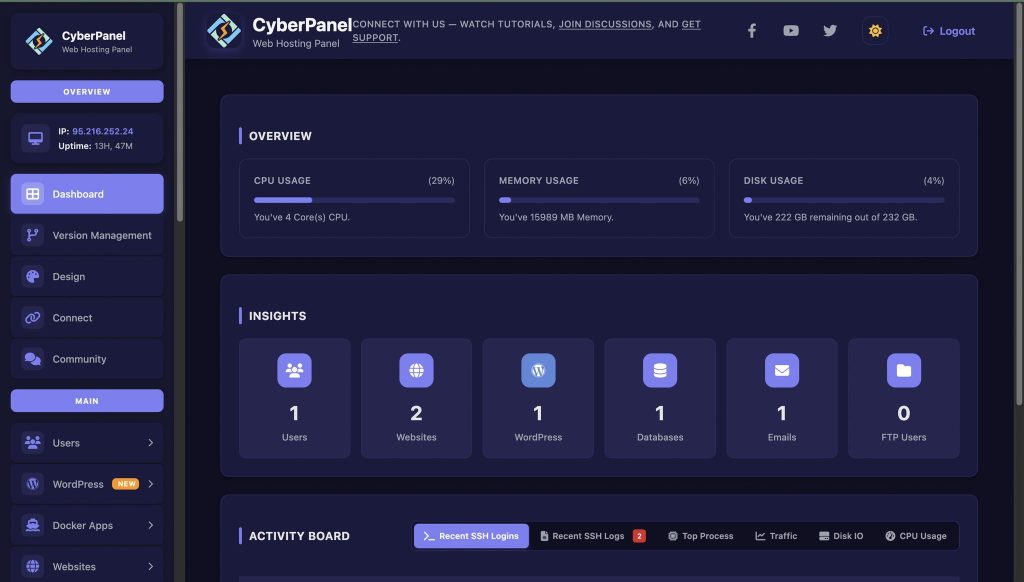
If you want to host websites or manage servers on it, CyberPanel is there for you. It is a free and open-source web hosting control panel. It is easy for novices to install and manage servers, but also offers advanced features to power users and developers.
Here are some aspects of CyberPanel that stand out:
- Quick website deployment
- Database management
- DNS control
- Security automation
Together, Xenia Linux and CyberPanel provide users with a solid, fast platform that they can use for personal projects or business needs.
Final Thoughts!
In conclusion, Xenia Linux embodies pace, simplicity, and a vibrant community identity with its mascot. Whether a noob or pro, both Xenia Linux are rock-solid foundations at speed.
So, are you now ready to have a try at the Xenia Linux download? Begin digging into the mascot and your first website with CyberPanel. And bring speed, performance, and fun to your system today!
People Also Ask
Can I use Xenia Linux on a Raspberry Pi or other ARM-based processor?
Even though it is mainly x86-oriented, community builds for ARM devices do exist, allowing for running lightweight Xenia Linux on small boards.
What is the update frequency cycle of Xenia Linux?
Systems remain stable, secure, and fast with excellent kernel and software updates.
Can I customize the Linux Xenia mascot in wallpapers and themes?
Yes, it allows theme customization, including mascot-inspired wallpapers and icons to create a personal desktop environment.


