On this page
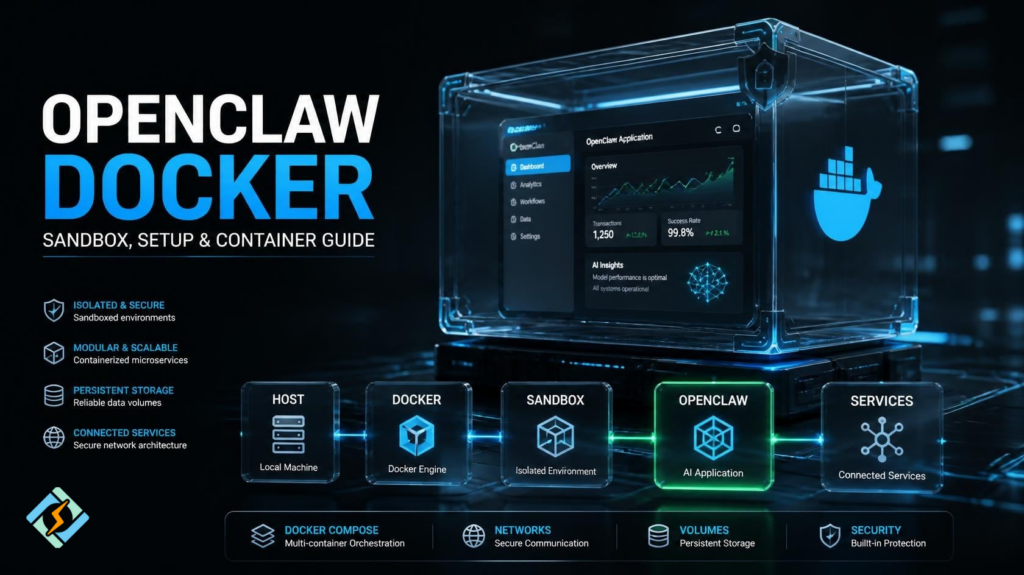
OpenClaw Docker is a useful setup for running OpenClaw inside a containerized environment instead of installing and managing everything directly on the host system. Docker can isolate the application, simplify deployment, and make it easier to control the environment where OpenClaw runs.
If you are searching for OpenClaw Docker, OpenClaw Docker sandbox, Docker OpenClaw, or Docker Hub OpenClaw, you are likely trying to understand how to containerize OpenClaw, whether a Docker sandbox is available, and how to manage the application safely.
This guide explains the relationship between OpenClaw and Docker, how the setup works, and what you should consider before using it.
What Is OpenClaw Docker?
OpenClaw Docker refers to running OpenClaw inside a Docker container.
Instead of installing OpenClaw directly on the host operating system, Docker creates an isolated environment for the application.
The basic structure looks like this:
Host Operating System
↓
Docker
↓
OpenClaw Container
↓
OpenClaw Application
This approach can make application management easier because dependencies and runtime components can remain inside the container.
Docker also makes it easier to remove and recreate the environment without changing the rest of the host system.
Why Run OpenClaw in Docker?
Containerizing an application can be useful when you want a predictable environment.
With Docker, you can:
- Isolate OpenClaw from the host
- Recreate the environment quickly
- Manage configuration separately
- Keep dependencies inside the container
- Move the setup between compatible systems
- Manage persistent data with volumes
- Connect OpenClaw to other containers
For development and testing, this can be especially convenient.
However, Docker isolation is not the same thing as complete security isolation. Container permissions, mounted directories, network access, secrets, and Docker socket access still need careful configuration.
How Does the OpenClaw Docker Setup Work?
A typical deployment may contain several layers:
Linux/macOS Host
↓
Docker Engine
↓
OpenClaw Container
↓
Configuration
↓
Persistent Volumes
The container provides the runtime environment, while volumes can preserve data when the container itself is removed.
This distinction is important.
A container is generally disposable. Data that needs to survive container recreation should be stored outside the container’s writable layer.
What Is the OpenClaw Docker Sandbox?
The term OpenClaw Docker sandbox generally refers to using Docker as an isolated environment around OpenClaw.
A sandbox can reduce the application’s direct interaction with the host system, depending on how the container is configured.
For example, you can restrict:
- Filesystem access
- Network access
- Linux capabilities
- Mounted directories
- Available resources
- Container permissions
A safer container should receive only the permissions it actually needs.
Avoid mounting the entire host filesystem simply because it is convenient.
Can OpenClaw Use Docker Volumes?
Yes, persistent volumes can be useful when OpenClaw needs to retain configuration or application data.
A simplified example is:
docker volume create openclaw-dataYou can then attach the volume to a container according to the application’s required directory structure.
The important idea is:
Container
↓
Temporary Runtime
Volume
↓
Persistent Data
If the container is deleted, the volume can remain available.
Can Docker Compose Run OpenClaw?
Docker Compose can be useful when OpenClaw is part of a larger application stack.
A Compose project could contain:
OpenClaw
+
Database
+
Redis
+
Other Services
You could manage these services from one project rather than starting every container individually.
A typical workflow is:
docker compose up -dCheck the services:
docker compose psStop them:
docker compose downThe exact Compose configuration depends on the OpenClaw version and the services your deployment requires.
What About Docker Hub OpenClaw Images?
If you search for Docker Hub OpenClaw, you may find container images associated with OpenClaw or community projects.
Do not assume that every image with an OpenClaw-related name is official.
Before using an image, check:
- Publisher
- Documentation
- Update history
- Image tags
- Configuration instructions
- Required permissions
- Exposed ports
- Environment variables
Using an untrusted container image can introduce unnecessary security risks.
Never treat a Docker image as trustworthy simply because its name looks correct.
Docker OpenClaw Security Considerations
Security deserves special attention when running an application in Docker.
Avoid unnecessary privileges.
For example, giving a container unrestricted access to the Docker socket can effectively provide powerful control over the Docker host.
You should also avoid exposing administrative interfaces directly to the public Internet unless they are properly secured.
Useful precautions include:
- Use strong credentials
- Limit exposed ports
- Keep images updated
- Avoid unnecessary Linux capabilities
- Restrict filesystem mounts
- Protect environment variables
- Use dedicated networks
- Back up persistent data
Docker improves isolation, but secure configuration is still your responsibility.
OpenClaw Docker vs Direct Installation
| Factor | Docker | Direct Installation |
| Isolation | Stronger | Lower |
| Reproducibility | High | Depends on host |
| Cleanup | Easy | May require manual removal |
| Portability | High | More environment dependent |
| Resource overhead | Some | Lower |
| Configuration | Container-based | Host-based |
Docker is particularly attractive for testing, repeatable deployments, and environments where you want OpenClaw separated from other applications.
A direct installation may be simpler for a small personal setup.
Can CyberPanel Be Used With OpenClaw Docker?

CyberPanel is primarily a web hosting control panel, while OpenClaw is an application that can be deployed in its own environment.
If your server setup supports the required Docker workflow, you can keep application containers separate from your hosting management layer.
A simplified architecture could look like:
Server
├── CyberPanel
│ └── Websites
│
└── Docker
└── OpenClaw
The exact deployment should depend on your server configuration and the resources required by OpenClaw.
Frequently Asked Questions
Is OpenClaw available as a Docker container?
OpenClaw-related Docker images may be available, but you should verify the image’s publisher and documentation before deploying it.
Can I move an OpenClaw Docker setup to another server?
Yes, containerized applications are generally easier to reproduce on another compatible host. Remember to migrate persistent volumes and configuration as well.
Can Docker Compose manage OpenClaw?
Yes, Compose can manage OpenClaw alongside other required services when the application architecture calls for multiple containers.
Final Verdict
OpenClaw Docker provides a practical way to isolate and manage OpenClaw inside a containerized environment. It can simplify testing, deployment, upgrades, and moving the application between systems.
The most important thing is not simply getting the container running. Configure it carefully.
Use persistent volumes for important data, limit permissions, review Docker images before installation, and avoid exposing unnecessary services.
If you are building a larger environment, Docker Compose can make the setup easier to manage.
Start with the smallest OpenClaw container configuration you need, test it locally, secure its permissions, and only then move the deployment to a production server.