On this page
A free cPanel alternative can help VPS owners manage websites, databases, domains, email, DNS, SSL, and server services without adding a recurring control panel license to every server. For agencies, developers, and hosting resellers, moving to an open-source control panel can also provide more control over the software stack and server costs.
The right choice depends on what you need from your hosting panel. Some platforms focus on traditional shared hosting, while others are designed for modern VPS workloads, application hosting, WordPress, or multi-server environments.
In this guide, we compare several established free and open-source options, explain what you should check before switching, and show why CyberPanel is particularly relevant if your VPS workload is centered around websites and WordPress.
Why Look for a Free cPanel Alternative?
cPanel remains a widely used commercial hosting control panel, but its VPS licensing is a recurring cost.
As of 2026, cPanel’s Cloud licenses for VPS and cloud instances start at $29.99 per month for Solo, which supports one account. The Admin plan supports up to five accounts at $35.99 per month, Pro supports up to 30 accounts at $53.99 per month, and Premier starts at $69.99 per month for up to 100 accounts, with additional accounts charged separately.
That cost can matter when a business operates several VPS servers.
For example, a reseller managing five VPS servers with a $29.99 monthly Solo license on each would spend about $149.95 per month on those licenses alone, before server, backup, email, monitoring, or other software costs.
An open-source panel changes that equation.
Instead of paying a control panel license for every server, you can choose software that is free to use and spend your budget on infrastructure, support, security, backups, and other services.
However, free software does not mean zero operating cost. You still need to account for:
- VPS infrastructure
- Server administration
- Backups
- Monitoring
- Security
- Email delivery
- Support
- Premium extensions, if applicable
The goal is therefore not simply to find software with a $0 license price. It is to find a platform whose total setup and operating requirements make sense for your workload.
What Is a Free cPanel Alternative?
A free cPanel alternative is a hosting control panel that can perform many of the server and website management tasks normally handled through cPanel without requiring a paid cPanel license.
A typical control panel can provide a graphical interface for tasks such as:
- Creating websites
- Managing domains
- Creating databases
- Managing DNS
- Configuring SSL
- Managing email
- Creating hosting accounts
- Managing files
- Setting up backups
- Managing PHP versions
- Monitoring server resources
The exact feature set varies significantly between panels.
Some are full hosting platforms designed for resellers and multiple customers. Others are lighter server management tools designed primarily for developers and application owners.
That distinction is important when choosing a panel for a VPS.
What Should You Look for in an Open Source Control Panel?
Do not choose a control panel based only on the word “free.”
Start by looking at the features your server actually needs.
1. Website Management
The panel should make it easy to create domains, subdomains, document roots, databases, SSL certificates, and application environments.
2. User and Account Management
If you manage client websites, you may need separate users, permissions, quotas, and reseller functionality.
3. Web Server
Check whether the panel uses Apache, NGINX, OpenLiteSpeed, or another web server.
The web server affects configuration, caching, compatibility, and resource usage.
4. PHP Management
Multiple PHP versions can be important when managing websites with different application requirements.
5. Email
If you plan to host email on the same VPS, check whether the panel provides mail services and tools for spam filtering, authentication, and mailbox management.
6. Backups
Check whether the panel supports local and remote backups and whether destinations such as S3-compatible storage, Google Drive, or other cloud services are available.
7. Security
Look for features such as:
- Firewall management
- SSL
- Two-factor authentication
- Malware scanning
- ModSecurity
- User isolation
- SSH controls
8. Migration
If you are leaving cPanel, migration support becomes especially important.
A panel may have excellent features but still require substantial manual work if your existing accounts cannot be migrated easily.
Which Free cPanel Alternatives Are Available?
Several established projects can be considered depending on your requirements.
| Control Panel | License / Model | Main Web Stack | Suitable For |
|---|---|---|---|
| CyberPanel | Free and open source | OpenLiteSpeed | WordPress, websites, VPS hosting |
| HestiaCP | Open source GPLv3 | NGINX + Apache | Websites, email, smaller hosting setups |
| ISPConfig | Open source BSD | Apache / NGINX | Multi-server and hosting environments |
| Virtualmin | Free GPL edition + Pro | Apache / NGINX | Advanced hosting administration |
| CloudPanel | Free | NGINX | Modern applications and VPS workloads |
These panels are not identical replacements.
The right option depends on whether you need reseller hosting, email, multi-server management, WordPress tools, application deployment, or a lightweight VPS management experience.
CyberPanel

CyberPanel is a free and open-source web hosting control panel built around OpenLiteSpeed.
The current CyberPanel site describes the free foundation as including OpenLiteSpeed, unlimited websites, and core hosting functionality. Premium add-ons and hosted services are optional.
This makes CyberPanel particularly relevant for users who want a VPS panel without licensing fees while still having a graphical interface for managing websites.
CyberPanel provides tools for:
- Websites
- WordPress
- Databases
- DNS
- SSL
- Backups
- Security
- File management
Its OpenLiteSpeed foundation also makes it different from panels that are built primarily around Apache or NGINX.
For WordPress users, CyberPanel provides WordPress management features and LSCache integration.
You can also read our detailed guide on how to choose the right VPS for CyberPanel hosting before selecting your server.
Why Consider CyberPanel?
CyberPanel is worth considering when your main workload involves websites, WordPress, and VPS-based hosting.
The current platform also supports additional tools for backups, security, and application management.
For a hosting reseller, the absence of a recurring base control panel license can simplify the software-cost calculation.
Instead of:
VPS + cPanel license
you can build around:
VPS + CyberPanel + optional services
That does not mean every CyberPanel deployment will cost nothing. Cloud infrastructure, backups, email delivery, premium add-ons, and administration can still create costs.
HestiaCP
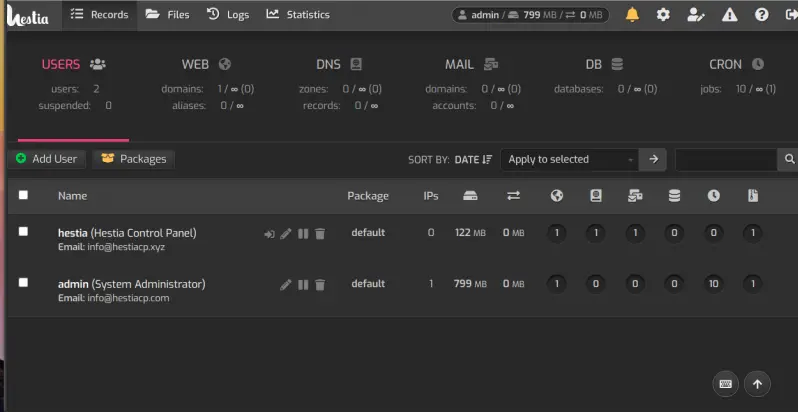
Hestia Control Panel is another open-source option.
Hestia is released under the GPLv3 license and focuses on providing a relatively straightforward interface for managing web hosting services.
Its feature set includes:
- Multiple users
- SFTP and SSH chroot jails
- Two-factor authentication
- Web domains
- TLS certificates
- DNS
- MySQL
- PostgreSQL
- PHP
- Backups
- Rclone-based cloud storage
Hestia’s current feature documentation also lists support for automated backups through SFTP, FTP, and Rclone with more than 50 cloud storage providers.
This makes Hestia useful for users who want a traditional hosting-oriented environment without a commercial control panel license.
ISPConfig
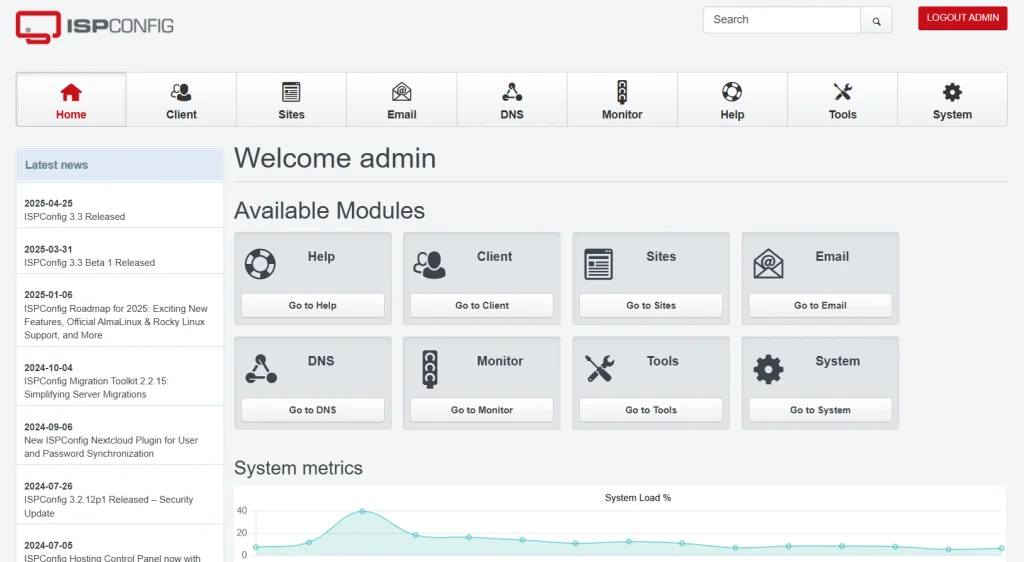
ISPConfig is an open-source Linux hosting control panel released under the BSD license.
It is particularly notable for multi-server management.
The project supports single-server installations as well as multi-server and mirrored cluster configurations. It provides separate administrator, reseller, and client access levels.
Its supported services include:
- Apache
- NGINX
- Postfix
- Dovecot
- PureFTPd
- BIND
- PowerDNS
- MariaDB
- MySQL
ISPConfig also supports hosting features such as websites, email accounts, FTP users, databases, DNS, shell users, and SSL.
For a hosting company managing multiple servers, its multiserver architecture can be an important consideration.
Virtualmin
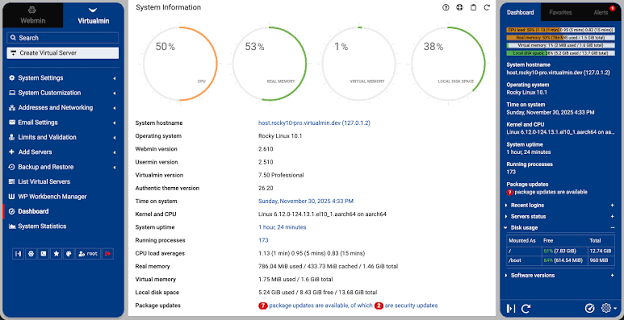
Virtualmin provides a free GPL edition alongside its commercial Pro edition.
It is designed for Linux servers and can manage websites, WordPress, mail, DNS, databases, SSL certificates, users, containers, and backups from a web interface.
Virtualmin supports Apache and NGINX and provides multiple PHP versions.
Its approach is particularly suited to administrators who want a flexible hosting environment while retaining significant control over the underlying Linux system.
It can also be useful for organizations migrating away from commercial panels because the project explicitly supports migration scenarios from platforms such as cPanel, Plesk, and DirectAdmin.
CloudPanel
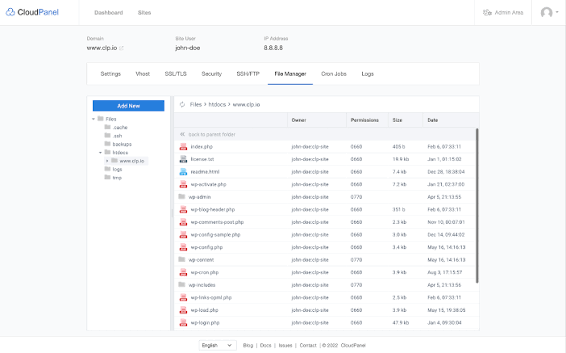
CloudPanel takes a somewhat different approach.
It is a free server control panel focused on simplicity and modern application workloads.
The official project lists support for:
- PHP applications
- Node.js
- Python
- Static websites
- Reverse proxies
- WordPress
Its technology stack includes NGINX, PHP-FPM, Redis, and Node.js. The current documentation also lists support for major cloud providers and both x86 and ARM systems.
CloudPanel can therefore be attractive to developers and agencies that primarily deploy applications rather than traditional shared hosting environments.
However, its approach is different from a traditional cPanel-style hosting stack, particularly if you require extensive reseller, email, or shared-hosting functionality.
How Do Free cPanel Alternatives Compare?
The following comparison focuses on the types of workloads each platform is designed to support rather than declaring one universal winner.
| Requirement | CyberPanel | HestiaCP | ISPConfig | Virtualmin | CloudPanel |
|---|---|---|---|---|---|
| Free option | Yes | Yes | Yes | Yes | Yes |
| Open source | Yes | Yes | Yes | Yes | Yes |
| WordPress | Strong focus | Supported | Supported | Supported | Supported |
| Web hosting | Yes | Yes | Yes | Yes | Yes |
| Reseller features | Yes | Yes | Yes | Yes | Limited / workload dependent |
| Email hosting | Yes | Yes | Yes | Yes | More limited focus |
| Multi-server | Limited | Limited | Strong | Supported | Not its primary focus |
| Web server | OpenLiteSpeed | NGINX + Apache | Apache / NGINX | Apache / NGINX | NGINX |
| Cloud backups | Supported | Supported | Supported | Supported | Supported |
| Best fit | Websites and WordPress | Traditional hosting | Multi-server hosting | Flexible Linux hosting | Modern applications |
Feature availability can change between releases and editions, so check the project’s current documentation before deploying a production server.
Free vs Paid cPanel: What Are You Actually Saving?
The most obvious difference is the recurring software license.
For example, cPanel currently lists these Cloud VPS plans:
| cPanel Plan | Accounts | Current Monthly Price |
|---|---|---|
| Solo | 1 | $29.99 |
| Admin | Up to 5 | $35.99 |
| Pro | Up to 30 | $53.99 |
| Premier | Up to 100 | $69.99 |
| Additional Premier accounts | Above 100 | $0.49/account |
These prices are based on cPanel’s current 2026 pricing information and exclude VAT.
Annual pricing is also available for some Cloud tiers. cPanel currently lists annual prices of $329.49 for Solo, $395.49 for Admin, and $593.49 for Pro.
The financial impact becomes more noticeable as the number of servers increases.
Suppose an agency operates:
1 VPS: $29.99/month
5 VPS servers: $149.95/month
10 VPS servers: $299.90/month
That is only the control panel license cost.
A free open-source panel can remove that specific recurring license expense.
But there is another side to the calculation.
If your team spends several hours maintaining an unfamiliar panel, troubleshooting migrations, or manually configuring services that cPanel previously handled for you, some of the apparent savings can move into administration costs.
So compare total operating cost, not just the license.
What Is a VPS Panel Without Licensing Fees?
A vps panel without licensing fees is a control panel that can be installed on your own VPS without requiring a recurring commercial panel subscription.
This can be useful for:
- Freelancers
- Digital agencies
- Developers
- Hosting resellers
- Small hosting companies
- Businesses running multiple VPS servers
The key benefit is predictable software licensing.
For example, if you add another VPS, you do not necessarily need to add another commercial control panel subscription.
This can make open-source software particularly interesting for agencies managing multiple client servers.
Is an Open Source Control Panel Really Free?
Usually, the core software can be used without purchasing a commercial license.
But “free” should not be interpreted as “the entire hosting operation costs nothing.”
You may still pay for:
- VPS hosting
- Backup storage
- Premium extensions
- Email delivery
- Monitoring
- CDN services
- Domain names
- Technical support
- Managed services
Open-source software also requires maintenance.
You are responsible for:
- Updates
- Security
- Backups
- Server configuration
- Troubleshooting
- Access management
For a business, these operational requirements should be included in the budget.
What Is the Best Free Web Hosting Panel for WordPress?
If WordPress is your main workload, look beyond basic domain and database management.
Check for:
- WordPress installation
- Staging
- Automatic updates
- Backup management
- SSL
- PHP version control
- Caching
- Database management
- File management
- Security tools
CyberPanel is particularly focused on WordPress hosting and integrates OpenLiteSpeed with LiteSpeed Cache.
This combination can be useful for agencies managing multiple WordPress websites from VPS infrastructure.
You can also review our guide to VPS hosting control panels for a broader look at how different panel architectures compare.
What About Performance?
A control panel does not determine website performance by itself.
Your results depend on:
- Web server
- CPU
- RAM
- Storage
- Network
- PHP configuration
- Database configuration
- Caching
- Application code
- Traffic
- Number of websites
This is why comparing control panels only by screenshots or interface design can be misleading.
CyberPanel uses OpenLiteSpeed as its core web server, while other panels use Apache or NGINX-based stacks.
If performance is a priority, evaluate the complete stack rather than the panel name.
What About Security?
An open-source control panel still needs to be secured.
Open source does not automatically mean secure, just as commercial software does not automatically mean insecure.
Before deploying any panel, review:
- Supported operating systems
- Update frequency
- Security advisories
- Firewall configuration
- Panel access
- Two-factor authentication
- SSH configuration
- User isolation
- File permissions
- Backup strategy
- Malware protection
For CyberPanel deployments, our VPS security checklist covers practical hardening steps such as account separation, SSH security, firewall configuration, 2FA, and application-layer protection.
How Do You Migrate From cPanel to a Free Alternative?
Migration should be treated as a project, not a one-click installation.
A typical migration involves:
Step 1: Inventory the Existing cPanel Server
Record:
- Domains
- Subdomains
- Databases
- Database users
- Email accounts
- DNS records
- SSL certificates
- Cron jobs
- PHP versions
- Redirects
- Application configuration
- Storage usage
Step 2: Create Verified Backups
Back up website files and databases before changing anything.
Keep at least one copy outside the existing server.
Step 3: Prepare the New VPS
Install your chosen control panel on a clean, supported operating system.
Do not install a new panel on a server already running conflicting services unless the panel documentation specifically supports that setup.
Step 4: Import Website Data
Move:
- Website files
- Databases
- Database users
- DNS records
- SSL configuration
- Application settings
The exact process depends on the destination panel.
Step 5: Test Before DNS Changes
Use a temporary hostname, hosts-file entry, staging URL, or another appropriate method to test the migrated websites before switching production traffic.
Check:
- Homepage
- Login
- Forms
- Database connections
- Media
- Cron jobs
- SSL
- Redirects
Step 6: Switch DNS
Once testing is complete, update the relevant DNS records.
Keep the old server available until you have confirmed that the migration is successful.
Can You Migrate cPanel Accounts to CyberPanel?
Yes. CyberPanel provides an auto-importer for cPanel accounts.
Its documentation describes importing cPanel backup archives into CyberPanel using the cPanel importer.
This can make CyberPanel particularly relevant to businesses considering a move away from cPanel.
The migration process still needs testing because a cPanel account can contain more than website files.
A real account may include:
- Databases
- DNS settings
- Cron jobs
- SSL configuration
- Application-specific settings
Before migrating production customers, test the process with a representative account.
For a broader migration strategy, CyberPanel also documents cloud migration strategies, including cPanel-to-CyberPanel migration through its auto-importer.
What Should Agencies Consider Before Switching?
Digital agencies have different requirements from individual website owners.
If you manage client websites, consider:
Client Isolation
Can each client have a separate account and appropriate permissions?
Branding
Can the panel fit into your agency’s workflow?
Backup Management
Can you automate backups without manually handling every site?
PHP Management
Can different client websites run compatible PHP versions?
Security
Can administrators and clients use separate access levels?
Scalability
Can you manage additional websites without creating unnecessary administration work?
Migration
Can you move existing customer sites without rebuilding everything manually?
Support
Does your team have enough Linux knowledge to troubleshoot the panel when something goes wrong?
These questions are often more important than the initial license price.
What Should Hosting Resellers Consider?
Hosting resellers need to think beyond individual websites.
A reseller-oriented setup may require:
- Customer accounts
- Reseller accounts
- Resource limits
- DNS management
- Backups
- SSL
- Account suspension
- Multiple PHP versions
- Server monitoring
- Migration tools
- Billing integration
ISPConfig, HestiaCP, Virtualmin, and CyberPanel all approach these requirements differently.
ISPConfig, for example, explicitly supports administrator, reseller, and client access levels and multiserver management.
CyberPanel provides a different approach built around OpenLiteSpeed and website-focused management.
The important question is not whether a panel has a long feature list. It is whether its features match the hosting business you are actually operating.
What Are the Downsides of Moving Away From cPanel?
Switching from a familiar commercial panel has trade-offs.
Your team may already know cPanel’s interface, terminology, workflows, APIs, and migration tools.
Moving to another platform can require:
- Staff training
- New documentation
- Migration testing
- New support procedures
- New automation
- Different backup workflows
- Different email configuration
- Different troubleshooting processes
Some third-party software may also have tighter integration with cPanel than with an open-source alternative.
Before moving an entire hosting business, test the replacement panel with a small number of non-critical websites.
When Should You Choose an Open Source Control Panel?
An open-source panel can make sense when:
- Recurring control panel licenses are a concern
- You manage multiple VPS servers
- You have Linux administration skills
- You want more control over the server stack
- You prefer community-driven software
- You want to customize the hosting environment
- Your applications do not depend on proprietary panel integrations
It may not be the right approach if your business depends heavily on commercial integrations or your team does not have the technical resources to maintain the server environment.
Free cPanel Alternative: What Should You Choose?
There is no single control panel that fits every VPS.
Consider the workload first.
CyberPanel fits users who want a free, open-source panel centered around websites, WordPress, and OpenLiteSpeed.
HestiaCP is a traditional open-source hosting panel with web, mail, DNS, database, and backup features.
ISPConfig is particularly relevant to administrators who need multiserver management and reseller/client access.
Virtualmin provides a flexible Linux hosting environment with a free GPL edition and a broader commercial Pro edition.
CloudPanel focuses on simple management of PHP, Node.js, Python, static websites, and reverse proxies on modern cloud infrastructure.
The best choice for your VPS depends on the applications you run, the number of customers you manage, the services you need, and the amount of administration your team can handle.
Frequently Asked Questions
What is the best free cPanel alternative?
The right choice depends on your requirements. CyberPanel, HestiaCP, ISPConfig, Virtualmin, and CloudPanel all provide free options, but they target different hosting and server-management workflows.
Is there a completely free alternative to cPanel?
Yes. Several open-source projects provide free editions or free software for managing Linux servers. However, server hosting, backups, support, and other infrastructure services can still cost money.
Can hosting resellers use free control panels?
Yes. Some open-source panels provide reseller and client management features. ISPConfig, for example, explicitly supports administrator, reseller, and client access levels.
Final Takeaway
A free cPanel alternative can be a practical way to reduce recurring control panel licensing costs while retaining a graphical interface for VPS and website management.
The important step is to compare the entire hosting workflow rather than choosing a panel simply because it is free.
For WordPress and website-focused VPS hosting, CyberPanel provides a free and open-source foundation built around OpenLiteSpeed. HestiaCP provides a traditional open-source hosting environment, ISPConfig focuses strongly on multi-server and reseller administration, Virtualmin offers a flexible Linux hosting stack, and CloudPanel targets modern application workloads.
If you are moving an existing cPanel environment, test the migration first, verify backups, check every customer-facing service, and only then move production DNS.
The result should not simply be a cheaper license. It should be a hosting environment that your team can operate, secure, migrate, and scale with confidence.