
On this page
Chimera Linux is being watched as a new player that promises to inject some fresh design into the Linux industry. It combines the speed of a modern system with tools best suited to students, developers, and casual users. It’s popular because it eschews cluttered configurations and provides a minimalist space to work, code, or learn.
In this guide, we will not only be giving you a clear view of Chimera Linux, what it does, and how similar it is to the distro Chimera OS Linux that has been missing in release since 2013, but also show you how you can install Chimera Linux safely. You also find an unbiased review and tips to decide if this system is for you.
Let’s get started!
What Is Chimera Linux?
Chimera Linux is a self-hosted GNU/Linux based on the musl C library and the LLVM toolchain. It is lightweight, fast, and for people who want a system that follows open-source principles.
Key points
- Works on many devices
- Utilizes quick tools for efficient operation
- Good for coding and learning
- Is not reliant on deprecated Linux fragments
Linux Chimera Features
You won’t see this from many other distros. Chimera Linux is fast and has a clean package base. It keeps the system on the light side, so beginners and more advanced users both don’t feel stuck.
Main features
- Performance, even on old machines, is still smooth
- Small updates
- Stable system
- Good support for development tools
- Easy command structure
Chimera Linux Review
Chimera Linux is popular among users because to boots fast and consumes less memory, but the applications remain stable. It doesn’t force a bunch of unwanted software onto your system, so you only hang on to what you actually need.
What users like
- Clean layout
- Fast response
- Clear package system
- Good for coding
- Easy to maintain
- What users mention as concerns
- Small community
- Fewer ready-made apps
- Needs basic terminal knowledge
Chimera OS Linux vs Chimera Linux
| Feature | Chimera Linux | Chimera OS Linux |
|---|---|---|
| Goal | A fast general Linux system | A gaming focused system |
| Users | Developers, learners, daily use | Gamers, Steam users |
| Tools | musl, LLVM | Gaming drivers |
| Package system | Simple, clean | Game ready |
| Best for | Work and learning | A gaming-focused system |
How to Install Chimera Linux?
Here are the steps to Install Chimera Linux:
- Download the Chimera Linux image.
- Write it to a USB.
- Boot your computer from the USB.
- Open the installer.
- Set your disk and region.
- Finish setup and restart.
- Update the system with basic commands.
Here is the basic command:
sudo apk update
sudo apk upgrade
What Tools Should You Use with Chimera Linux?
Here are the your helpful tools to make the system smooth for work or study:
- Neovim for editing
- Firefox for browsing
- Git for coding
- Foot terminal for lightweight tasks
- btop for system monitoring
Role of CyberPanel in Chimera Linux
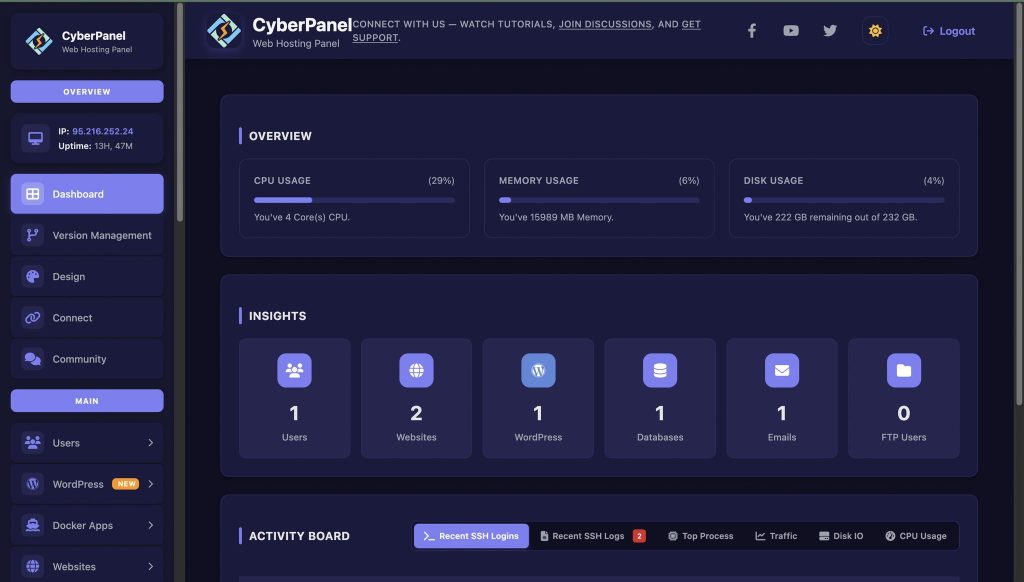
CyberPanel is a next-gen web hosting control panel. It works well for those who prefer to run websites or servers in Chimera Linux. It’s easier to host with neat menus and smooth controls.
How CyberPanel helps
- Quick website setup
- DNS tools
- Database setup
- Backup support
- File management
- Strong security settings
CyberPanel is a good choice for Chimera Linux, as it shares the same goals of being fast and providing clarity and control.
Final Thoughts!
Chimera Linux is the best lightweight Python-based Linux for people who want a fast and lean system with no extra clutter. That makes it great for coding, studying and everyday use. For gaming alone, Chimera OS Linux is still your best option, but for a workable workspace in general, you’ll want Chimera Linux.
If you also require website or server tools, the inclusion of CyberPanel gives your system power and control. Combine, and you have a clean and useful Linux setup.
Begin trying out Chimera Linux now and establish a solid workflow using CyberPanel for enhanced control and performance!
People Also Ask
1. Is Chimera Linux good for beginners?
Yes, it works well for beginners who want a fast system. It has a clean setup and does not overload users with many tools.
2. Can Chimera Linux run games?
It can run some games, but it is not built for gaming. Chimera OS Linux is better for that purpose.
3. Does Chimera Linux work on virtual machines?
Yes, you can install it on most virtual machines, including VMware and VirtualBox.


