
On this page
Any DevOps team will have at least one thing in common. A culture of frequently committing code and tracking all of the changes. This culture has a name: Git.
Git is not merely a tool that developers use to store their code; it is the foundation of the DevOps pipeline, allowing one to keep track of changes, identify the source of errors, and perform rollbacks when necessary.
This article provides an overview of Git and DevOps, discusses the collaboration strategies used in DevOps to organize development, and describes how Git fits into the continuous integration/deployment (CI/CD) framework. Azure DevOps Git and its relationship with pipelines are also considered. Several recommendations are made for implementing Git in DevOps.
What Is Git in DevOps?
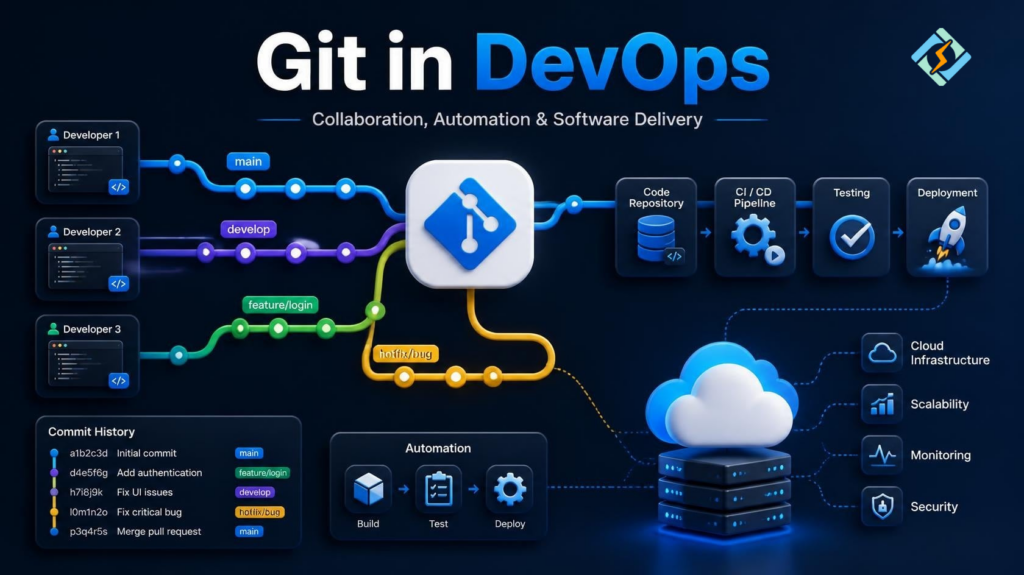
Git in DevOps is a version control system that underpins the source code repository in the DevOps framework. It allows for tracking all changes made to the code, facilitates collaboration among developers, and serves as the foundation for automatically building, testing, and deploying code changes. In other words, Git is an integral element of the DevOps collaboration model.
DevOps, in turn, is a methodology that promotes the culture of continuous development and delivery of software. And Git is the tool that allows one to implement the necessary automation. One can think of Git as a shared repository where all team members save their code changes. In Git, one can always view the complete history of changes and revert to a previous version of the code if necessary. Git enables teams to collaborate effectively while maintaining the integrity of the project’s codebase.
Why Git and DevOps Are Closely Related
Git and DevOps are closely related because the former supports the key pillars of the latter: speed, automation, and collaboration.
First, Git enables faster development and deployment of code changes. Git allows developers to work with the code repository in parallel, creating different versions of the code and merging them when they are ready for production. With Git, one does not have to wait for all changes to be approved by the repository before making them available for testing and deployment, as in the past. Git allows developers to test their code changes locally before pushing them to the repository and automatically merging them with the main branch.
Second, Git allows for automating the most time-consuming and error-prone tasks in the development process. A single commit or push command can trigger the entire pipeline of building, testing, and deploying code changes.
Third, Git facilitates collaboration among developers by allowing them to work on the same codebase remotely and merge their changes when they are ready for production.
The absence of either Git or DevOps would undermine the efficiency of the other. Without Git, the automation of the development process would be impossible. At the same time, without DevOps methodology, Git would be unable to provide the benefits of speed, reliability, and collaboration.
Azure DevOps Git and Its Relationship with Pipelines
The DevOps lifecycle consists of several stages, ranging from planning to monitoring. Git plays a critical role in the DevOps pipeline, spanning from planning and coding through building and testing to releasing, deploying, operating, and monitoring. Git is primarily involved in the first stages of the pipeline, providing the necessary source code to build and test the application.
However, Git also facilitates the later stages of the pipeline, as developers can use the information stored in Git to roll back the application to the previous working version when defects or failures are detected. Moreover, Git allows for linking the code changes to the work items, so that the changes can be easily traced back to the requirements or tasks they were supposed to address. The following steps illustrate how Git fits into the DevOps lifecycle:
- Planning: In Git, the requirement or task to be implemented is linked to the specific ticket in the issue tracking system.
- Coding: The code changes are committed to the repository.
- Building: The commit triggers the CI pipeline, which builds the code.
- Testing: The tests are executed, and the results are reported.
- Releasing: The code is merged into the main branch and tagged with the version number.
- Deploying: The code is deployed to the test and production environments.
- Operating and Monitoring: If any issues arise, the code can be rolled back to the previous version using the information stored in Git.
How Git Connects to CI/CD
Git serves as the foundation for implementing CI/CD. Any commit or push command can be linked to specific CI/CD pipelines that can be triggered automatically or manually. These pipelines contain the instructions for building, testing, and deploying the code changes. For example, a developer can push the code to the Git repository, and the pipeline can be triggered by the commit or pull request command to start building and testing the code.
If the tests pass, the pipeline can deploy the code to the test or production environment. If the tests fail, the pipeline will stop, indicating the failed stage and the cause of the failure.
This way, Git is essential in creating CI/CD pipelines, as it contains the necessary code changes to implement. In addition, Git helps organize the testing and deployment of code changes in the DevOps pipeline.
Common Git Workflows in DevOps
There is no universal Git workflow, as the choice of the workflow depends on the specific needs of the team and the project. Some of the most common Git workflows used in DevOps are the following:
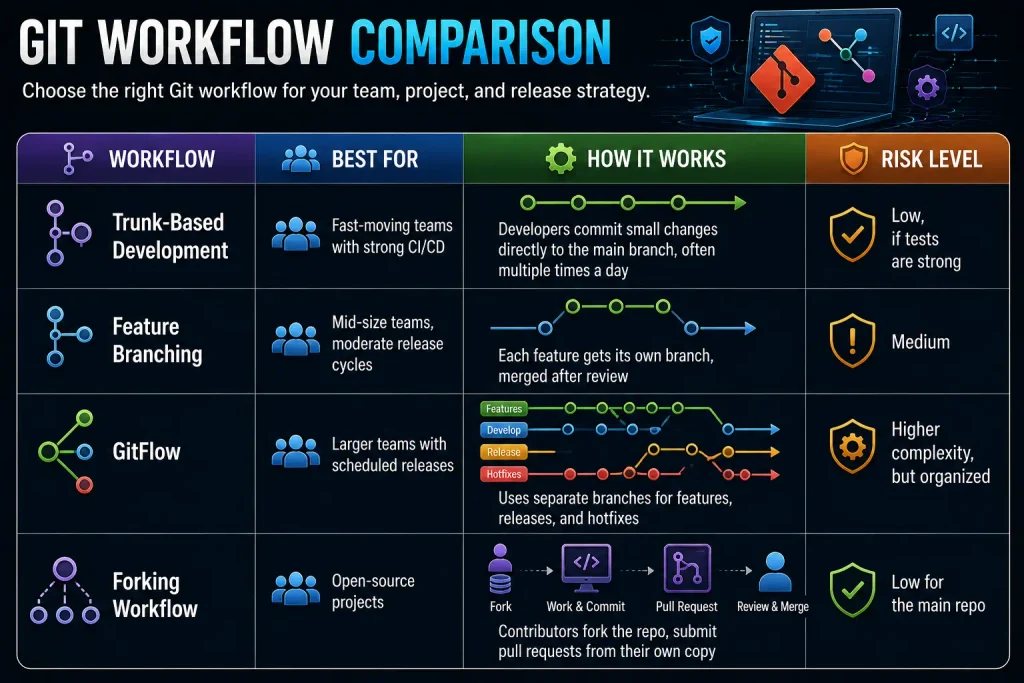
The choice of the workflow depends on the project’s specific needs and constraints. For example, trunk-based development allows for shorter feedback loops and is conducive to frequent releases, while Gitflow is more suitable for projects with planned releases.
Git for DevOps: Best Practices
Implementing these Git best practices will make it possible to reap the benefits of using the tool in DevOps:
- Make small and frequent commits: This practice helps to avoid the need to roll back large chunks of code if an error occurs.
- Write clear and descriptive commit messages: This practice makes it easier to understand the changes that have been made and why they were made.
- Protect the trunk: This practice ensures that only reviewed and tested code changes are merged into the trunk, thus preventing errors.
- Use semantic versioning: This practice helps to manage the code versions in a standardized way, thus avoiding confusion about what changes were made in which version.
- Automate testing: This practice makes it possible to detect errors early in the development process, thus reducing the cost and time of fixing them.
- Keep the branches short-lived: This practice helps minimize the risk of merge conflicts, especially when working with other developers.
Azure DevOps Git: Key Features and Comparison to Standard Git
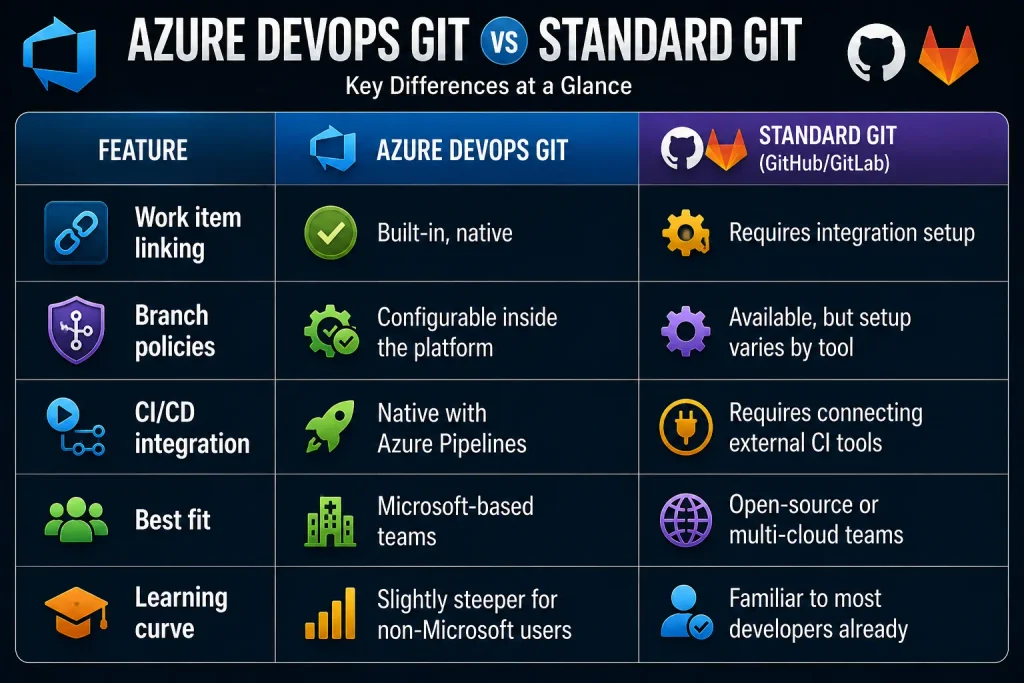
Azure DevOps Git is Microsoft’s implementation of the Git system that is fully integrated into the Azure DevOps platform. Git as a system is similar to the alternatives described above, but the main advantage of Git in Azure DevOps is the level of integration with other services such as Azure Boards, Azure Pipelines, and Azure Artifacts.
The main benefits of using Azure DevOps include:
- Ability to track work items: The ability to correlate commits and pull requests with tasks and bugs directly in Azure Boards.
- Code quality policies: The ability to define branch policies in Azure DevOps, including code reviews, builds, and associated work items before merging code into a repository.
- Azure Pipelines can be triggered directly by Git commits without the need for additional plugins or configuration, allowing you to implement a complete CI/CD process within a single Azure DevOps platform.
- The benefit of using the Azure DevOps solution for Git repositories is the ability to take advantage of the entire suite of Microsoft tools.
For organizations that already use Microsoft services such as Office 365 and Microsoft Teams, this is a convenient and seamless solution. For organizations that want to remain independent from a single vendor, other Git platforms such as GitHub or GitLab may provide greater flexibility and choice.
Git for DevOps: Common Mistakes to Avoid
When using Git in DevOps, one should avoid the following common mistakes:
- Force pushing: This mistake should be avoided, as it can lead to the loss of code changes in the repository.
- Merge conflicts: This mistake should also be avoided, as it can cause errors when merging changes from different branches.
- Lack of code reviews: This mistake should be avoided, as code reviews help detect errors and ensure code quality.
- Long-lived branches: This mistake should be avoided, as it increases the risk of merge conflicts and code duplication.
- Lack of version control: This mistake should be avoided, as it makes it difficult to manage code versions and roll back changes when necessary.
These mistakes can be challenging to avoid when using Git in DevOps, as they often stem from human error. However, they can be minimized by implementing specific measures, such as enforcing branch protection policies or conducting code reviews.
How Git Can Help Rollback Changes
Git can be used to roll back changes in several ways:
- One can use the log command to view the history of changes and identify the commit that needs to be rolled back.
- One can use the revert command to undo the changes made in a particular commit.
- One can use the bisect command to find the commit that caused the error.
- One can use tags to roll back to a specific version of the code.
This is why Git isn’t just a coding tool in DevOps. It’s part of the incident response toolkit too.
The Role of CyberPanel in Git-Based DevOps

Git takes care of the code, but that code still needs a server to run. This is where CyberPanel can be useful in a DevOps workflow. CyberPanel is a free and open-source web hosting control panel that provides an easier way to manage the server environment where websites and applications are hosted.
A common workflow starts with developers pushing code to a Git repository. The CI/CD pipeline can then build and test the changes before sending the approved version to the production server. CyberPanel can be used on that server to manage websites, domains, SSL certificates, and other hosting tasks needed to keep the application running.
This can be helpful when a team is handling several websites or projects. Developers can focus on code and Git workflows, while server-related tasks can be managed from one place.
CyberPanel does not replace Git or CI/CD tools. Instead, it works alongside them. Git tracks code changes, CI/CD handles automated testing and deployment, and CyberPanel provides the hosting environment for running deployed applications.
For teams that want more control over their hosting environment without paying for a proprietary control panel, a free and open-source option like CyberPanel can be a practical part of the DevOps setup.
Comparison Table: Git’s Role Across the DevOps Pipeline
| DevOps Stage | Git’s Role | Outcome |
| Planning | Links commits to tickets | Traceable requirements |
| Development | Tracks every code change | Clear history, easy debugging |
| Build | Triggers CI pipelines | Automated, consistent builds |
| Testing | Provides code for automated test runs | Fewer bugs reach production |
| Release | Tags stable versions | Predictable rollbacks |
| Deployment | Feeds deployment pipelines | Faster, safer releases |
| Monitoring | Supports root-cause tracing | Quicker incident resolution |
Frequently Asked Questions
Does using Git automatically make a team “DevOps”?
No. Git is a tool, not a methodology. A team can use Git and still work in silos with slow, manual releases. DevOps requires automation, shared ownership between development and operations, and continuous feedback loops. Git supports that culture, but it doesn’t create it on its own.
Can small teams benefit from Git-based DevOps practices, or is it only for large organizations?
Small teams often benefit more. With fewer people, branch protection rules and small, frequent commits are easier to enforce consistently, and the payoff (faster debugging, fewer surprise conflicts) shows up almost immediately.
What happens when two developers edit the same file at the same time?
Git flags this as a merge conflict. It doesn’t pick a winner automatically; it shows both versions and asks a human to decide how to combine them. This is a feature, not a flaw. It prevents silent data loss.
Is it better to use Git submodules or a monorepo for DevOps pipelines?
It depends on how tightly your services depend on each other. Monorepos simplify dependency management and make cross-project changes easier to test together, but they can slow down CI as the codebase grows. Submodules keep repos smaller and independent, but require more careful version syncing. Teams with closely linked microservices often lean toward monorepos; teams with loosely coupled services often prefer separate repos.
Can Git work well without any CI/CD tool connected to it?
Yes, but it loses most of its DevOps value. Git without CI/CD still tracks changes and supports collaboration, but builds, tests, and deployments would need to happen manually, which reintroduces the slow, error-prone process DevOps is meant to remove.
Final Thoughts
Git in DevOps is not a fad; it is an infrastructure. Each automated build, each safe rollback, and each fast release is based on accurate tracking of changes in Git and disciplined use of this great tool.
Regardless of whether your team is using standard Git with GitHub or GitLab or working in the confines of Azure DevOps Git with native pipelines, some basic techniques and conventions will help you free up time for more critical tasks.
These simple but extremely useful techniques should allow you to ensure that the main branch is always in a state ready for production deployment. You will also find that Git becomes much less intimidating than you thought, and your releases will become increasingly boring and reliable. And that is precisely what should happen in the field of DevOps.

It’s interesting to see how Git serves not just as a code repository but as a crucial element in ensuring software delivery is both fast and reliable. The emphasis on a culture of frequently committing code really resonates with me. related tool