On this page
Manually setting up a Kubernetes cluster is usually not a very enjoyable task. You work through installing packages on one machine, exchanging tokens between nodes, setting up the network, restarting services, and then repeating the process if the cluster is expanded. This kind of arrangement might suffice for an experimental setting, but it can become extremely inconvenient when dealing with a real infrastructure.
This is largely why a number of DevOps teams end up using K3s Ansible. K3s is a minimalistic Kubernetes distribution built for edge computing, home labs, small cloud clusters, and other resource-limited setups. Ansible Yet is a great choice for automating recurring infrastructure tasks over a number of servers.
Here, you will be taught on the synergy between K3s and Ansible, how to completely automate installation, how roles can be a great aid in cluster management, and what a typical K3s automation workflow in 2026 looks like.
Why Should Ansible Be Used For Deploying K3s?
K3s is by far less complex to set up than regular Kubernetes. But if the question is “What problem does Ansible solve?” the answer is consistency.
If no automation is used, the setting up of clusters is based on manual instructions and human memory. Such a way leads to environmental differences, and scaling becomes more difficult.
By using Ansible K3s scripts, this is possible:
- Automatic provisioning of many nodes.
- Consistent installation of K3s in all environments.
- Centralized management of server and agent configuration.
- Fast rebuilding of k3s clusters in case of breakdowns.
- Infrastructure setup under version control.
- If a team manages edge nodes, VPS clusters, or development environments, the amount of time saved by this method is enormous.
Understanding The Basic K3s Architecture
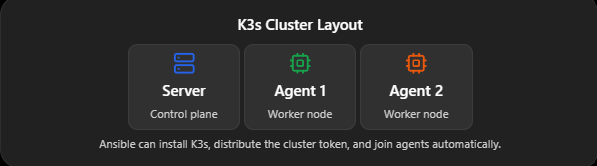
A typical K3s cluster contains:
- Server nodes (control plane)
- Agent nodes (worker nodes)
The server node generates a cluster token that agents use to join the cluster. Ansible can automate this entire process.
A simple architecture looks like this:
Preparing Ansible For K3s Installation
Initially, deploying K3s requires that Ansible can connect to all your target nodes via SSH.
For example, the inventory might look like:
Further, you should test whether you can reach them:
If you get a positive response to the ping, your control node is all set to automate cluster creation.
Ansible K3s Install
By far, the easiest workflow to install K3s with Ansible is to invoke the official K3s installation script.
Install K3s Server
A simple sample playbook that works:
With this, the control-plane node gets installed, and the K3s service is started automatically.
Retrieve The Cluster Token
The token is a prerequisite for the agent nodes to become cluster members.
Install K3s Agents
Worker nodes have to be informed of the token they have to use to join the cluster.
If you run the playbook, the worker nodes will be integrated into the cluster automatically.
Verifying The Cluster
At the server node, executing:
You should see:
This shows that the production of the K3s cluster by Ansible worked without issues.
Using Ansible Roles for K3s
Roles are Ansible’s best bet for managing all the K3s components that come with such a modularized approach.
Clusters that keep scaling might put your playbooks on the impossible-to-maintain list.
Enter the role.
The point of a role would be to put tasks, variable templates, and handlers together into one module that could be used again and again.
You’d typically have this:
Using roles has a ton of benefits:
Makes your project structure look neat.
- The logic of the cluster is reusable.
- With other benefits, easier maintenance is one.
- Also, helps keep different things separate.
- A playbook that uses this role can be just a line or two:
Starting k3s in a cluster environment needs several tasks and configurations. Fortunately, there are already community roles that cover:
- Cluster in HA mode
- MetalLB integration
- Traefik configuration
- Longhorn storage
- Customization of container runtime
Still, for DevOps teams, this is exactly the reason why searches for Ansible K3s role are on the rise.
Advanced K3s Automation Techniques
After setting up the minimum functioning cluster, you call on Ansible to do all the heavy lifting.
Keep a watchful eye on continuous deployments and cluster rollback possibilities.
- Install Helm Automatically
- Deploy Kubernetes Add-ons
In fact, the kubernetes.core.k8s module can be used to run manifest files without leaving Ansible.
For the production environment, you may choose automation for:
- Multiple server nodes
- External datastore configuration
- Load balancer setup
- Certificate management
This is the reason why some call Ansible the king of production automation, as the same playbook can be used again and again to rebuild or scale the cluster.
Common Errors & Solutions
Now, let’s discuss some errors and their solutions:
Agent Failed To Join The Cluster
These are the usual suspects:
- Invalid token
- Firewall blocking port 6443
- Wrong server IP or hostname
Check if you can connect:
- kubectl Not Working
- kubeconfig export on server node:
Repeated Reinstallation On Every Run
Use creates: in shell tasks to keep playbooks idempotent.
Best Practices For K3s Ansible Projects
- Define separate inventory groups for servers and agents.
- Use the Ansible Vault to keep tokens confidential.
- Ensure that the playbooks are capable of running multiple times without changing the system state after the first run.
- Put the entire cluster configuration under version control.
- Do not run playbooks directly in production; always do a staging test first.
- Instead of using one huge playbook, it is better to use roles.
How CyberPanel Fits Into Kubernetes Workflows?

Typically, K3s clusters are developed by many teams to run web applications, APIs, and containerized services. Still, it is equally important to manage the surrounding infrastructure.
CyberPanel is a web hosting control panel that is free, open-source, and based on OpenLiteSpeed. It can be a great addition to K3s environments by taking care of the traditional hosting aspects like website management, SSL automation, database backups, and server administration on Linux systems.
A typical workflow might be something like this:
- Ansible sets up the servers.
- K3s is used for running containerized applications.
- CyberPanel administers the extra web hosting services and administrative tasks.
Combining these will equip teams with the powerful and flexible tools of Kubernetes as well as the down-to-earth server management utilities.
Conclusion
Using K3s and Ansible together provides a quick, easily replicable, and scalable way to deploy Kubernetes. You no longer have to set up clusters manually; you can simply codify the whole environment and re-create it reliably every time.
If you are only testing in a home lab, controlling edge devices, or operating small production clusters, k3s Ansible automation will not only reduce mistakes but also accelerate rollouts and make it easier to maintain infrastructure as it grows.
FAQs
Can Ansible Install K3s Automatically?
Yes. Ansible can fully automate K3s server and agent installation across multiple nodes.
Do I Need Ansible Roles For K3s?
No, but roles make large or reusable K3s deployments much easier to manage.
Can Ansible Build A High-Availability K3s Cluster?
Yes. Ansible can automate multi-server K3s deployments, load balancers, and external datastore configuration.