
On this page
If you’re a fan of PewDiePie and curious about how he uses Linux for gaming, streaming, and productivity, you’re in the right place. Many think Linux is complicated, but with the right setup, it can be as smooth as any Windows or macOS system.
PewDiePie Linux isn’t just about installing a distro; it’s about customizing your system for speed, stability, and gaming performance. Whether it’s Arch Linux for power users or Linux Mint for a beginner-friendly interface, his setup is designed to make multitasking, streaming, and gaming efficient.
In this guide, we’ll break down how PewDiePie sets up Linux, including tips on installing Arch Linux or Linux Mint, optimizing your environment, and customizing it with themes, software, and drivers. You’ll also see which packages he uses for streaming, content creation, and gaming. By the end, you’ll have a clear roadmap to set up Linux just like PewDiePie.
What Is PewDiePie Linux?
PewDiePie Linux is not a special Linux version. It simply means the Linux setup that matches PewDiePie’s simple and clean style.
Most people use the name for two systems:
- PewDiePie Arch Linux
- PewDiePie Linux Mint
Both are good. One is advanced. One is beginner-friendly.
Why Gamers Like Linux PewDiePie Setup
- Fast
- Clean
- No heavy background apps
- Easy streaming
- Smooth gaming
- No bloat
- Looks clean and modern
Why Choose Arch Linux or Linux Mint?
Arch Linux:
- Lightweight and fast
- Full control over system customization
- Best for advanced users or tech enthusiasts
Linux Mint:
- Beginner-friendly interface
- Stable and pre-configured packages
- Easy multimedia and streaming support
PewDiePie often prefers Arch Linux for gaming PCs and Linux Mint for secondary or streaming machines because of the balance between control and usability.
| Feature | Arch Linux | Linux Mint |
|---|---|---|
| Best For | Power users | Beginners |
| Speed | Very fast | Fast |
| Setup | Hard | Easy |
| Custom look | Full control | Moderate |
| Updates | Rolling | Stable |
| Good for gaming | Yes | Yes |
How to Set Up PewDiePie Linux (Step-by-Step)
1. Install Your Chosen Linux Distro
- Download ISO: Arch Linux or Linux Mint official website
- Create a bootable USB with Rufus or Etcher
- Boot into USB and follow installation instructions
2. Customize the Desktop Environment
- Use XFCE, KDE Plasma, or Cinnamon
- Apply gaming-friendly themes
- Adjust window effects for speed
3. Install Essential Software
- Steam for Linux (Proton for Windows games)
- OBS Studio for streaming
- Discord, Chrome, and media players
4. Optimize System Performance
- Enable GPU drivers (NVIDIA/AMD)
- Install performance tools:
htop,glances - Configure power management for gaming
5. PewDiePie’s Extra Tweaks
- Customize terminal with
zshorfish - Add wallpapers and icons matching personal branding
- Set up hotkeys for quick streaming or game launching
Simple Commands You May Use
These work in both Arch and Mint:
sudo apt update
sudo apt upgrade
For Arch:
sudo pacman -Syu
These commands update your system.
Software PewDiePie Style Users Install
Here are easy tools that match a clean and creative setup:
- OBS Studio for recording
- Steam Proton for games
- GIMP for basic editing
- Audacity for simple audio work
- Google Chrome for browsing
- Discord for chat
- Shotcut for basic editing
These work well in both Arch Linux and Linux Mint.
Role of CyberPanel with PewDiePie Linux
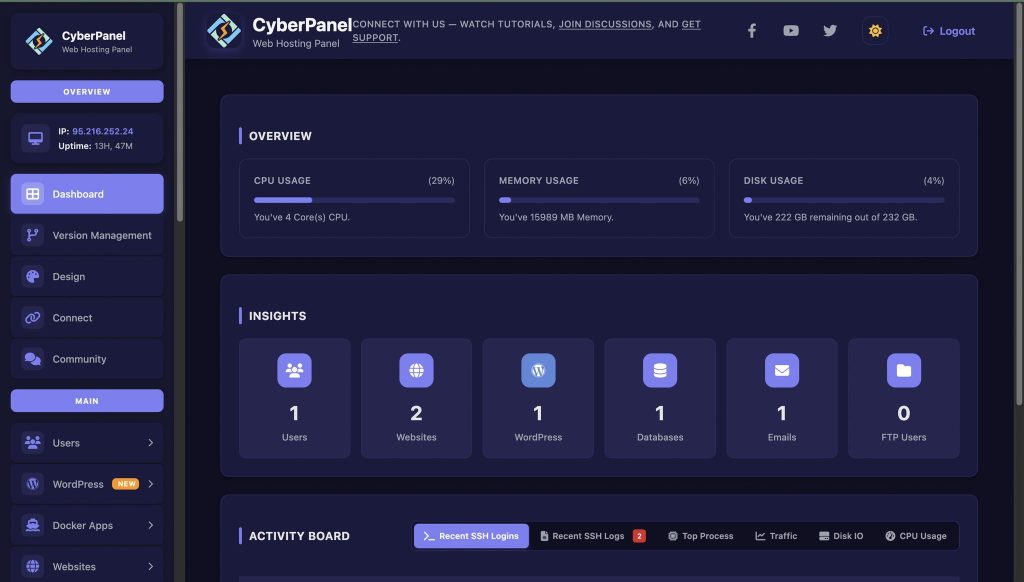
While PewDiePie primarily uses Linux for gaming and streaming, CyberPanel can enhance Linux for server management or hosting personal websites. Installing CyberPanel on a Linux Mint or Arch server allows you to:
- Manage websites easily
- Handle databases and DNS efficiently
- Secure your Linux server with built-in controls
- Automate backups for smooth operations
Even if you’re a gamer or streamer, integrating CyberPanel, your web hosting control panel, makes hosting game-related websites or fan content easy.
People Also Ask
1. Does Arch Linux work well on older laptops?
Yes, it can. Since Arch lets you pick very light desktop environments, older laptops often run better on Arch than on heavy systems. The key is choosing a light layout.
2. Is Linux Mint good for dual boot with Windows?
Yes. Mint has an installer that detects Windows and sets dual boot without extra steps. It is a common choice for new users.
3. Are game controllers supported on a PewDiePie Linux setup?
Most USB and wireless game controllers work out of the box. Steam also adds extra support for many models.
Final Thoughts!
The PewDiePie Linux setup is clean, simple, and fast. You can use Arch Linux if you like full control or Linux Mint if you want an easy system. Both are great for gaming, school, work, and daily use. With a few tools and small changes, you can enjoy a smooth system that works like PewDiePie’s style.
If you want to host a website or manage a server, CyberPanel gives you easy tools to do it.
This setup is friendly for beginners, helpful for students, and powerful for gamers.


