
On this page
Imagine that your automation could make decisions like a true operator, leaving some tasks to go through without interference! This illustrates the contrast between simple playbooks and automation powerful enough for production. Syntax errors are rarely the cause of automation failures. Logic errors are often to blame. That’s where ‘Ansible When’ can be so important.
A service should restart only if a config changes, and a task should only fail as a result of a particular precondition; certain steps should only execute on particular hosts.
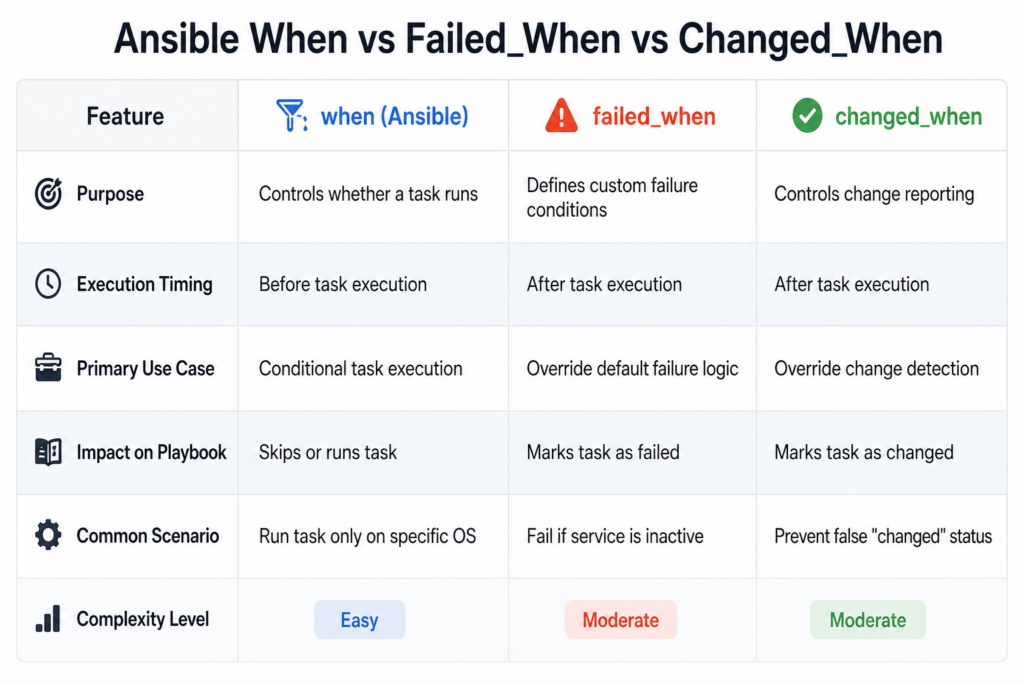
By using When Ansible, you have definitive control over when a task runs. With Ansible Fail When, you define exactly what constitutes a failure.
And with Ansible changed_when you decide if a task should report as changed or not.
If you’ve ever faced unnecessary task executions, false failures, or confusing results, this guide will show you how to fix that with clear logic, real examples, and production-ready patterns.
What Is Ansible When?
Ansible provides the when condition to control task execution. It allows a task to run only if a condition evaluates to true. Here is a basic example:
- name: Install nginx only on Ubuntu
  apt:
    name: nginx
    state: present
when: ansible_os_family == "Debian"This command checks system fact, runs the task only ‘if condition’ matches, and avoids unnecessary execution.
Logical Operators in Ansible When
There is an option to create complex conditions using operators. Here is an example:
when: ansible_os_family == "Debian" and ansible_memtotal_mb > 1024Here are the supported operators:
- and
- or
- not
Common Mistakes to Avoid
Here are the common mistakes you should avoid:
Oversuing conditions:
A large number of conditions make reading a hassle.
Neglecting failed_when:
Results in a false success statement.
Incorrect variable usage:
Breaks condition logic.
Misusing changed_when:
It can create confusing output.
Best Practices for Conditional Logic
Here are the best practices to follow:
- Focus on keeping conditions simple.
- Prefer to use more meaningful variable names.
- You should combine logic only when needed.
- Always document complex conditions.
Real-World Use Cases
Now, let’s discuss some real-world use cases:
Environment-Based Deployment
Run tasks only in production.
Service Validation
Fail playbooks when services are unhealthy.
Smart Restarts
Restart services only when needed.
Compliance Checks
Stop execution if conditions are not met.
Using Conditions with Loops
Here is an example of conditional loop execution:
- name: Install packages selectively
  apt:
    name: "{{ item.name }}"
    state: present
  loop:
    - { name: "nginx", install: true }
    - { name: "apache2", install: false }
when: item.installEach loop item is evaluated separately. This allows fine-grained control inside loops, which is critical for scalable automation.
Using changed_when with Command Output
Here is an example of accurate change detection:
- name: Check if user exists
  command: id myuser
  register: user_check
  ignore_errors: true
changed_when: falseThis is important because it avoids false positives, keeps reports clean, and improves trust in automation.
Debugging Conditional Logic
Here is how to debug conditions:
- name: Debug variable
  debug:
var: nginx_statusHere are some tips for you:
- always print registered variables
- verify actual values before writing conditions
- avoid guessing logic
Role of CyberPanel

CyberPanel is your free and open-source web hosting control panel. It works alongside automation tools ot manage application environments. Here is the combined workflow:
- Ansible When controls execution logic
- Failed_When ensures correctness
- Changed_When maintains clean reporting
- CyberPanel manages hosting and services
Conclusion
Ansible When, along with Ansible Failed_When and Ansible Changed_When, turns automation from basic execution to ability to think on its own. Your playbooks will be aware, controlled, and predictable.
That differentiates automation from production. You can’t afford to miss any of these conditions. They are imperatively necessary for building scalable and maintainable automation workflows.
Choose one of your playbooks and insert a when condition to synchronize and suppress execution. Then use failed_when for validation and changed_when for clean reporting. Welcome to immediate improvement in your automation code quality.
FAQs
Is failed_when evaluated before or after execution?
After execution, based on task results.
Does when support loops?
Yes, each loop iteration evaluates the condition separately.
Can Ansible When use registered variables?
Yes, you can use registered outputs to create dynamic conditions.