
On this page
Would you like to allow a stubborn task that refuses to fit neatly into the playbook when you have automated half your infrastructure with Ansible? It may be a legacy shell script, a complex setup routine, or a quick fix that already works perfectly outside Ansible. Obviously, you would not like to rewrite everything to bring it into your automation. Ansible Script is what exactly comes at that time.
Ansible gives you a practical bridge. With the Ansible Script Module, you can run existing scripts on remote systems while still keeping control, consistency, and repeatability. This approach allows you to integrate them into structured automation without breaking your workflow. No matter whether you are dealing with Ansible Scripts written in Bash, Python, or any executable format.
In this guide, we will walk you through Ansible Scripting the correct way, with real examples, clear patterns, and production-focused practices.
Let’s get started!
What Is Ansible Script?
Ansible provides the Ansible Builtin script module. It executes local scripts on remote machines. It transfers a script from the control node to the target machine, executes it on the remote system, and returns the output to Ansible.
Unlike modules such as command or shell, the Ansible Script Module works with full script files instead of inline commands.
Working of Ansible Script Module
When you are running a script using Ansible:
- Firstly, the script is copied to the remote host.
- Then, it is executed using the system shell.
- After that, the output is captured and returned.
- Finally, the temporary files are cleaned automatically.
This process makes Ansible Scripting simple. It is all without requiring permanent file placement on servers.
Basic Example of Ansible Script
Here are a few examples of Ansible Script:
Sample Bash Script (local file)
#!/bin/bash
echo "Hello from Ansible Script"Playbook Example
- name: Run local script on remote host
  hosts: all
  tasks:
    - name: Execute script
ansible.builtin.script: script.shWhat happens
script.shis copied to the remote host- executed immediately
- output is returned in playbook results
Passing Arguments to Ansible Scripts
You can pass arguments just like a normal shell execution.
- name: Run script with arguments
ansible.builtin.script: script.sh arg1 arg2Example script
#!/bin/bash
echo "Argument 1: $1"
echo "Argument 2: $2"This makes Ansible Scripts flexible for dynamic use cases.
Using Ansible Script with Variables
Variables make scripts reusable across environments.
- name: Run script with variable
ansible.builtin.script: script.sh {{ inventory_hostname }}Benefit
- It avoids hardcoding
- It improves scalability
- It adapts to different hosts
Handling Output and Results
It is important to capture output for automation logic:
- name: Run script and capture output
  ansible.builtin.script: script.sh
  register: script_output

- name: Show output
  debug:
var: script_output.stdoutThis is important because it enables conditional logic, allows validation, and supports debugging.
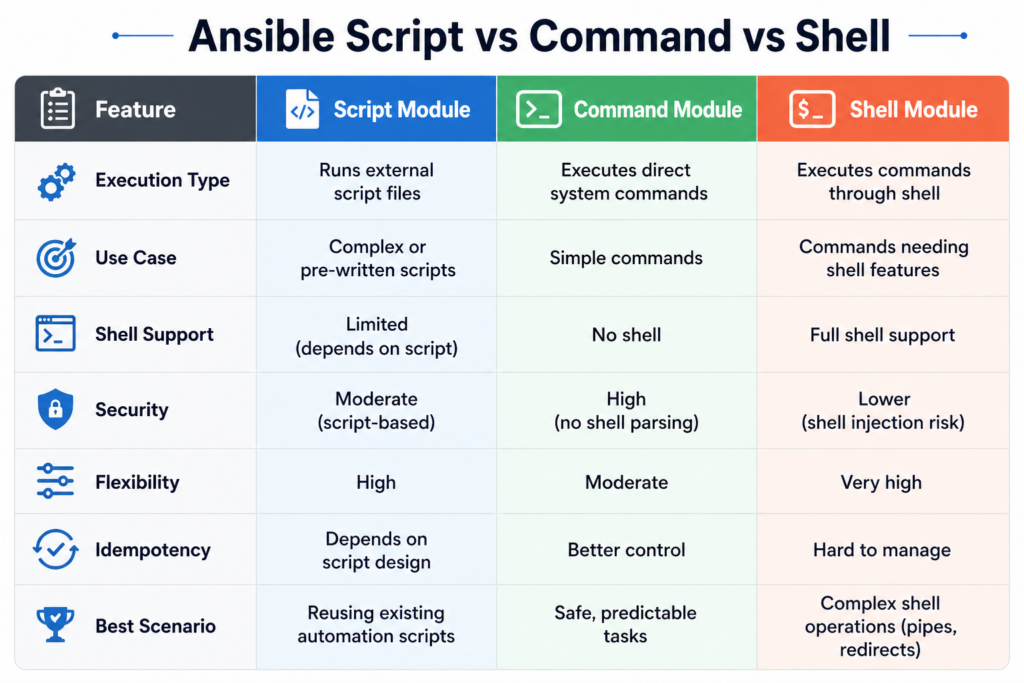
Real-World Use Cases of Ansible Scripting
1. Legacy Script Integration
Run existing deployment scripts without rewriting.
2. Complex Installations
Handle multi-step setups inside a script.
3. System Maintenance
Execute cleanup or monitoring scripts.
4. Quick Automation
Use scripts for rapid implementation before converting to modules.
Conditional Script Execution
- name: Run script only on Ubuntu
  ansible.builtin.script: script.sh
when: ansible_os_family == "Debian"It is useful as it avoids unnecessary execution and ensures environment-specific behavior.
Common Mistakes in Ansible Script Usage
Here are the common mistakes to avoid:
Not Making Script Executable
You should always add execute permissions.
Hardcoding Paths
Always use variables instead.
Ignoring Idempotency
Scripts should not cause repeated unwanted changes.
No Error Handling
Always validate script output.
Best Practices for Ansible Script
You should follow these best practices:
- Keep the scripts simple and focused
- Always use variables for flexibility
- Validate output using register
- Make sure not to overuse scripts when the modules are there
- Eases the transition from writing scripts to native Ansible tasks
When You Have To Avoid Ansible Script?
Avoid when:
- a native Ansible module already exists
- you need strict idempotency
- you want detailed state control
In such cases, native modules provide better reliability.
Role of CyberPanel in Automation Workflow

CyberPanel is a free and open-source web hosting control panel. It can complement Ansible scripting in real deployments. Ansible Script executes custom setup scripts. Ansible manages infrastructure. And CyberPanel handles hosting and the application layer.
For example, you can use Ansible scripts to configure servers and then manage websites through CyberPanel, creating a complete automation pipeline
Advanced Pattern: Script + Validation
- name: Run deployment script
  ansible.builtin.script: deploy.sh
  register: result

- name: Fail if deployment fails
  fail:
    msg: "Deployment failed"
when: "'ERROR' in result.stdout"Conclusion
Ansible Script is a really useful feature. It is the workhorse that connects scripting and automation.
The Ansible Builtin script module enables you to utilize the existing logic while still making use of the power of Ansible orchestration. That said, the real power emerges when you use it thoughtfully, check the output, and take small steps toward a well-structured automation.
If used effectively, it will instantly save you time and effort while making your automation far more flexible without sacrificing any control. Choose one current bash or Python script from your environment and include it using the Ansible Script Module.
Then improve it by adding variables, output validation, and conditional execution. Such a small step will enhance your automation level.
FAQs
Does the Ansible Script module require Python on remote hosts?
No, it can run scripts without requiring Python, depending on the script type.
Is Ansible Script idempotent?
Not inherently. You must design scripts to avoid repeated changes.
How do I debug script failures in Ansible?
Use register and debug to inspect stdout and stderr outputs.