On this page
If you are looking for a Linux setup that feels modern, fast, and ready for daily use, Omarchy Linux is worth knowing about. It is a Linux distribution built around Arch Linux, but it takes a different approach from a typical Arch installation.
Instead of starting with a blank system and configuring everything yourself, Omarchy gives you a preconfigured desktop environment with tools, shortcuts, themes, and applications already selected. The goal is simple: give users a polished Linux desktop without making them spend hours putting it together.
But what is Omarchy Linux, exactly? And how is it different from regular Arch Linux? Let’s break it down.
What Is Omarchy Linux?
Omarchy Linux is a Linux distribution based on Arch Linux. It was created by DHH, the founder of 37signals, with a focus on creating a beautiful and practical desktop operating system.
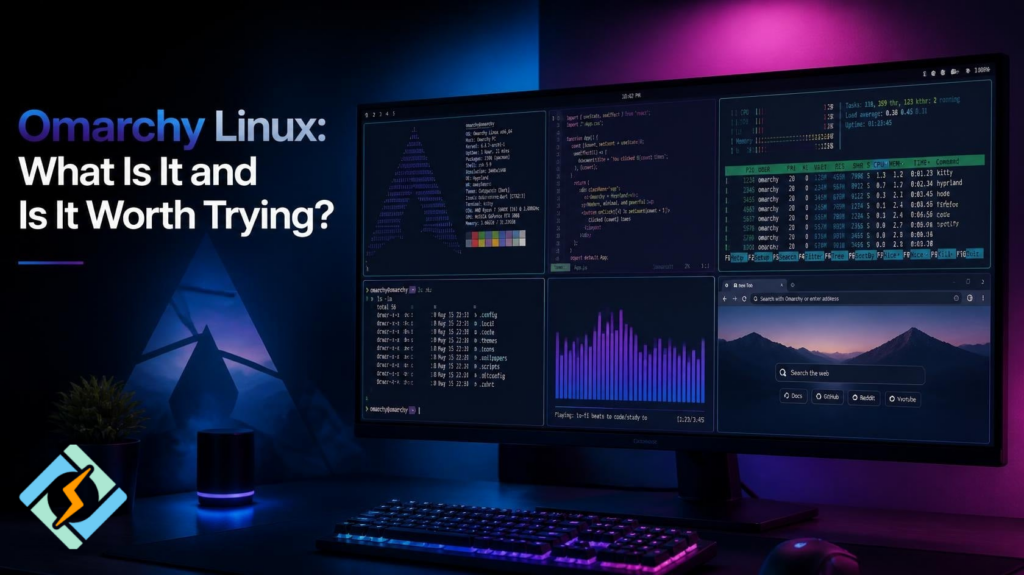
It uses the Hyprland Wayland compositor as its main desktop environment. Rather than offering a traditional desktop such as GNOME or KDE Plasma, Omarchy is designed around a tiling workflow.
This means windows can automatically arrange themselves on the screen instead of simply floating around like traditional desktop applications.
Omarchy also comes with many settings already configured. You get a complete desktop experience soon after installation.
In simple terms:
Arch Linux gives you the building blocks. Omarchy gives you a ready-made setup built from those blocks.
Why Was Omarchy Created?
A fresh Arch Linux installation gives you a lot of control. That is one of its biggest strengths.
It is also one of its biggest challenges.
You normally need to choose and configure many parts of the system yourself. This can be fun if you enjoy building your Linux desktop. It can also become frustrating if you simply want a working computer.
Omarchy takes a different route.
The idea is to provide an opinionated system where many decisions have already been made for you. The desktop, keyboard shortcuts, applications, themes, terminal setup, and other components work together from the beginning.
You can still change them later.
This makes Omarchy interesting for people who like the Arch ecosystem but do not want to spend days configuring their desktop.
How Does Omarchy Linux Work?
Omarchy is built on top of Arch Linux, so it benefits from the Arch ecosystem.
That includes access to the Arch repositories and the Arch User Repository, commonly known as AUR.
The major difference is the experience.
A standard Arch installation starts with very little. You decide what you want to install and configure.
Omarchy starts with a much more complete desktop.
Its setup includes:
- Hyprland
- Wayland
- A configured terminal
- A selection of useful applications
- Custom themes
- Keyboard shortcuts
- System utilities
- Development tools
- Automatic configuration for various desktop components
The exact software included can change over time as the project develops.
What Is Omarchy Linux Used For?
Omarchy can be used as a general desktop operating system.
You can browse the web, write documents, watch videos, manage files, communicate online, and perform development work.
It can also be useful for programmers and technical users.
Because it is based on Arch Linux, users get access to a large collection of Linux software. Developers can install programming languages, editors, containers, command-line tools, and other development software.
The tiling workflow can also be useful when working with several applications at once.
For example, you could have a code editor, terminal, browser, and documentation open together without constantly dragging windows around.
What Makes Omarchy Linux Different?
The biggest difference is that Omarchy is opinionated.
Traditional Linux distributions often try to support many desktop styles and workflows. Omarchy chooses a particular direction.
It focuses on:
- Keyboard-driven navigation
- Tiling windows
- Minimal visual design
- Fast workflows
- Modern Linux technologies
- Preconfigured software
- Easy customization
This can be great if its design matches the way you work.
However, it may not feel natural to everyone.
If you prefer a classic Windows-style desktop with a taskbar, start menu, and floating windows, Omarchy may take some time to understand.
Is Omarchy Linux the Same as Arch Linux?
No.
Omarchy Linux is based on Arch Linux, but it is not simply a standard Arch installation.
Think of Arch as the foundation and Omarchy as a complete desktop system built on that foundation.
| Feature | Arch Linux | Omarchy Linux |
| Base | Arch Linux | Arch Linux |
| Desktop | User chooses | Preconfigured |
| Window management | User chooses | Hyprland |
| Setup | Highly manual | More automated |
| Customization | Extremely high | High |
| Default workflow | Minimal | Opinionated |
| Target user | Linux enthusiasts | Users wanting a ready setup |
This distinction is important because someone searching for Linux omarchy may assume it is just another Arch desktop theme. It is more than that. Omarchy provides a complete system configuration and workflow.
What Desktop Does Omarchy Linux Use?
Omarchy uses Hyprland, a dynamic tiling Wayland compositor.
Hyprland has become popular among Linux users who want a modern tiling desktop.
Instead of treating every application window as a separate floating object, Hyprland can automatically organize windows into layouts.
You can move between applications with keyboard shortcuts and quickly change the layout of your workspace.
This makes Omarchy especially interesting for people who spend much of their time in terminals, code editors, and browsers.
Is Omarchy Linux Good for Beginners?
It can be, but there is an important catch.
Omarchy is easier than building the same type of Arch setup yourself. Many components are already configured, which removes a lot of initial work.
However, it is still based on Arch Linux and uses a tiling workflow.
A complete Linux beginner may find the keyboard-driven interface confusing at first.
If you have used Linux before and want to try something different, Omarchy can be much easier to approach.
If you have never used Linux, a traditional distribution such as Ubuntu, Linux Mint, or Fedora may provide a gentler starting point.
What Are the Advantages of Omarchy Linux?
One of the biggest advantages is less configuration work.
You do not have to start with an empty Arch environment and build every part yourself.
Other benefits include:
- Fast and lightweight desktop experience
- Modern Wayland-based workflow
- Keyboard-focused navigation
- Arch Linux software ecosystem
- Strong customization options
- Preconfigured applications and utilities
- Attractive default design
- Good environment for developers
It also gives experienced Linux users a starting point they can modify instead of rebuilding everything from scratch.
What Are the Downsides?
Omarchy is not perfect for everyone.
Its biggest limitation may actually be its strongest feature: the opinionated design.
You are given a particular workflow. If you do not like tiling window managers, you may spend time changing the system until it behaves differently.
Arch-based systems also require users to be comfortable with Linux maintenance.
You should understand basic package management, system updates, configuration files, and troubleshooting.
So while Omarchy reduces setup work, it does not remove the need to learn Linux.
Should You Try Omarchy Linux?
If you like Arch Linux, modern desktop design, keyboard shortcuts, and tiling window management, Omarchy Linux is definitely worth exploring.
It is particularly appealing if you want an Arch-based system without manually assembling every part of the desktop.
If you prefer a traditional desktop, however, Omarchy may not be the right choice.
The best way to think about it is this:
Omarchy is not trying to be Linux for everyone. It is trying to make one particular Linux workflow feel complete from day one.

CyberPanel is a free and open-source web hosting control panel. If you manage Linux servers or websites, tools such as CyberPanel can make server management easier. Omarchy is primarily designed as a desktop operating system, while CyberPanel focuses on managing web hosting environments.
Final Thoughts
So, what is Omarchy Linux?
It is an Arch Linux-based distribution that combines the Arch ecosystem with a carefully configured Hyprland desktop. It gives users a ready-to-use environment instead of asking them to build everything from scratch.
For experienced Linux users, it can save a lot of setup time. For developers and keyboard-focused users, its workflow can also be very efficient.
But its approach is not universal. Omarchy makes strong choices about how the desktop should work. If those choices fit your style, you may love it. If they do not, another Linux distribution may be a better option.
Either way, Omarchy is an interesting example of how Linux can be customized into a complete desktop experience without losing the flexibility that makes Arch popular.
Frequently Asked Questions About Omarchy Linux
1. Can Omarchy Linux run on an old computer?
Omarchy is designed around a lightweight tiling desktop, but hardware support still depends on the rest of the system. Older computers may run it well, while very old hardware can have problems with graphics, Wi-Fi, or other components.
2. Can I install Omarchy Linux alongside Windows?
Yes, you can set up Omarchy in a dual-boot configuration with Windows. However, partitioning and bootloader configuration require care. Always back up important files before changing disk partitions.
3. Can I change the Omarchy Linux desktop?
Yes. Omarchy is highly customizable. You can change themes, applications, keybindings, configuration files, and other parts of the desktop. However, major changes may require some knowledge of Linux configuration.