
On this page
Imagine your automation is capable of installing and managing Python packages on any server remotely without a manual login.
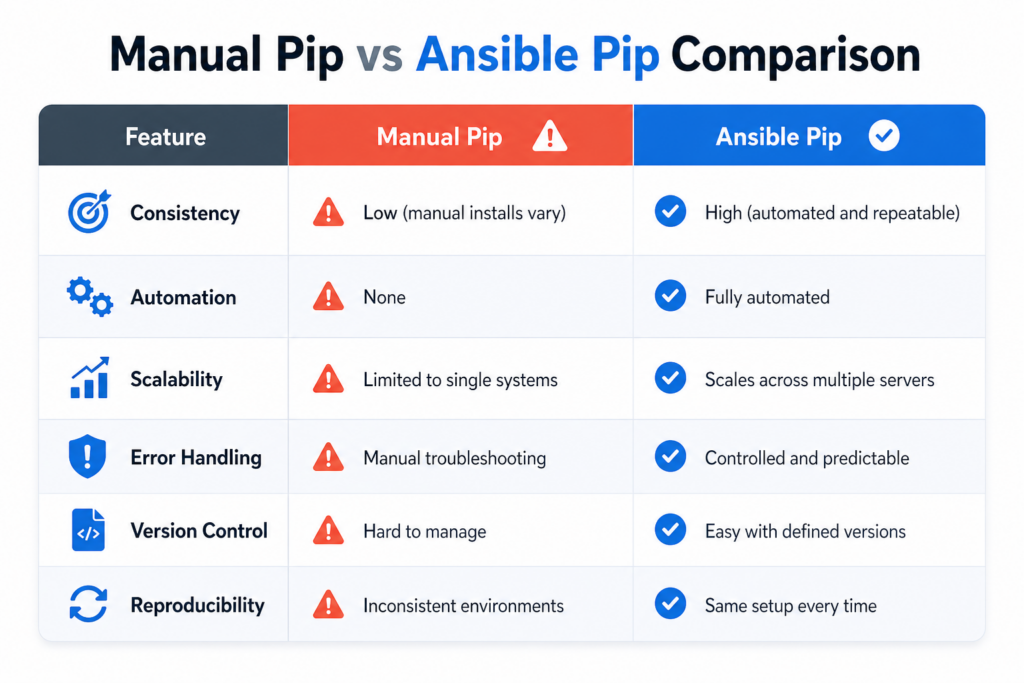
That is actually the loophole many teams are encountering. You can set up servers, deploy apps, and manage services, but when it comes to Python dependencies, things often go wrong. Someone installs a package manually. Another server lacks it. Versions gradually change. As a result, your environment becomes inconsistent.
And this is why Ansible Pip is a must-have.
Normally, you might be running Python packages outside your automation. With the Ansible Pip Module, however, you can bring them directly into your playbooks. You can install, upgrade, or remove packages simultaneously on multiple systems in a consistent, reliable manner. Whether you are using Pip Install Ansible to get started or managing dependencies at scale with Pip Ansible, this method will keep control in your hands.
On the other hand, many installations go wrong because of the lack of virtual environments, wrong Python paths, or not handling versions properly.
In this tutorial, you will learn how to use Ansible Pip correctly, with plenty of examples, simple explanations, and production-ready methods.
What is Ansible Pip?
Ansible offers the Ansible Pip Module for handling Python libraries remotely. It allows you to:
- Install Python packages
- Upgrade or downgrade versions
- Remove packages
- Manage virtual environments
No more running manual commands. All has been defined within your playbook.
Pip Install Ansible: How to Get Started
You have to install Ansible before using the module. Here is the command:
pip install ansibleThis command will install Ansible using Python package manager, prepare your control node, and enable automation workflows.
Ansible Pip Module Explained
The Ansible Pip Module is used inside playbooks to manage Python packages. Here is the basic example:
- name: Install requests package
  ansible.builtin.pip:
name: requestsIn the above example, we can see that it connects to the target host. Then installs the package using pip. And ensure the package is present. This is the simplest use of Ansible Pip.
Installing Specific Package Versions
Version control is critical in production.
- name: Install specific version
  ansible.builtin.pip:
name: requests==2.31.0This is important because it avoids breaking changes, ensures consistency, and improves reliability.
Installing Multiple Packages
- name: Install multiple packages
  ansible.builtin.pip:
    name:
      - flask
      - django
- numpyThis approach simplifies dependency management across servers.
Using Requirements File
You should use a requirements file instead of listing packages manually.
- name: Install from requirements
  ansible.builtin.pip:
requirements: /path/to/requirements.txtDoing this provides you with cleaner playbooks, centralized dependency management, and easier updates.
Virtual Environments Management with Pip Ansilbe
The most important practice is using virtual environments.
- name: Install package in virtualenv
  ansible.builtin.pip:
    name: flask
virtualenv: /opt/myenvWhy this is important
- isolates dependencies
- avoids system conflicts
- improves stability
Removing & Upgrading Packages
Now, let’s see how to upgrade and remove packages:
Upgrade Package
- name: Upgrade package
  ansible.builtin.pip:
    name: requests
state: latestRemove Package
- name: Remove package
  ansible.builtin.pip:
    name: requests
state: absentCommon Mistakes with Ansible Pip
A lot of users fail to do all it takes to avoid problems that are likely to occur solely on account of small negligence.
Not utilizing virtual environments
This leads to dependency conflicts.
Wrong Python interpreter
Results in installing failures.
Pip on remote host is missing
The module cannot run.
No version control
Creates inconsistent environment.
Best Practices for Using Ansible Pip
To keep automation reliable:
- Must always use virtual environments
- Define precise package versions
- Use requirement files
- Make sure that pip is installed on targets
- Test changes prior to deployment
Real-World Use Cases
Application Deployment
Install dependencies before running apps.
CI/CD Pipelines
Keep the settings the same in each phase.
Data Science Workloads
Manage libraries like NumPy, Pandas, TensorFlow.
Microservices
Handle service-specific dependencies in a clean way.
Role of CyberPanel

CyberPanel is a free and open-source web hosting control panel. It complements automation workflows where application hosting is involved. Ansible Pip manages Python dependencies. CyberPanel handles server configuration, application hosting, and web services management.
Conclusion
Ansible Pip is a lightweight yet robust method of handling Python dependencies on multiple systems. Using the Ansible Pip Module will automate the installations and make sure you are consistent and that each environment is the same.
After installing, you have to follow best practices.
Automation is not just about speaking tasks from A to Z. It is just as much about controlling, steadiness, and reliability.
Pick a deployment you already have and replace vanilla pip commands with the Ansible Pip Module. Use a requirements file and a virtual environment first. You will never return to inconsistencies again once you see the power of it. Then scale it to all your estate.
FAQs
Can Ansible Pip install private packages?
Yes, with proper repository access or authentication setup.
Is Ansible Pip idempotent?
Yes, it ensures packages are installed only if needed.
How do I debug pip failures in Ansible?
Check verbose logs and ensure pip and Python paths are correctly configured.