

On this page
Have you ever tried to understand a Linux command? Well, the answer is right there in your terminal! Linux man pages (manual pages) are internal documentation, which gives detailed information about almost every command in the system. Learning Linux commands man pages will benefit you whether you are a newbie or a system administrator.
This means that you will no longer need to search through the web for command syntax and options, as you will have the official documentation immediately available at your Linux command prompt. The Linux man page system provides a complete breakdown of command descriptions, arguments, options, examples, and even other related commands. There are thousands of pages of manuals, and knowing how to search and interpret these can help you find ways to streamline your processes.
In this article, we’ll look into a guide to the man command Linux, the Linux find man page, navigation basics, and more. By the end, you’ll know how man pages Linux commands function, as well as how to use them to enhance your Linux skills.
What Are Linux Man Pages?
Man pages are official reference materials for the system commands, programming functions, configuration file formats, and more. Pages are organized into several sections according to their purpose:
Section 1: User commands (e.g., ls, cd)
Section 2: System calls (ex: open, read)
Section 3: Library functions (e.g., printf, malloc)
Section 4: Special files (like /dev/null)
Section 5: Config files (e.g., fstab, passwd)
Section 6: Games and screensavers
Section 7: Miscellaneous (e.g., macro packages)
Section 8: System administration commands (iptables, fdisk, etc)
To access a man page, use:
man <command>How to view the manual for the Is command:
man lsNavigating Man Pages in Linux
After you open up a Linux man page, you can navigate it using the following keyboard shortcuts:
Arrow Keys / Page Up / Page Down → Moving Up and Down
/term→ Search a specific keyword
n / N → Go to next / previous search match
q → Exit the man page
How to Find a Specific Linux Man Page
We call these manual pages in different sections; sometimes, a command has many of them. To specify a section, use:
man [section] commandTo view the manual for passwd in section 5 (configuration files), for example, run:
man 5 passwdType the following keyword in all man pages Linux command:
man -k <keyword>Example:
man -k networkThis will list all commands about “network.”
Linux Find Man Page
The whatis command is used to know if a command has a man page:
whatis lsOutput:
ls (1) - list directory contentsThis shows that ‘ls’ is a command found in section 1 of man pages.
To show where a command’s located, use:
whereis lsOutput:
ls: /bin/ls /usr/share/man/man1/ls.1.gzExamples of Using Man Pages in Linux
Man pages to check for file permissions
Learn the file permissions by looking at chmod man:
man chmodThis section describes how to set permissions on files with chmod.
Lists of Networking-Related Man Pages
man -k networkThat makes it easy to find networking commands.
How CyberPanel Helps in Managing Linux Commands
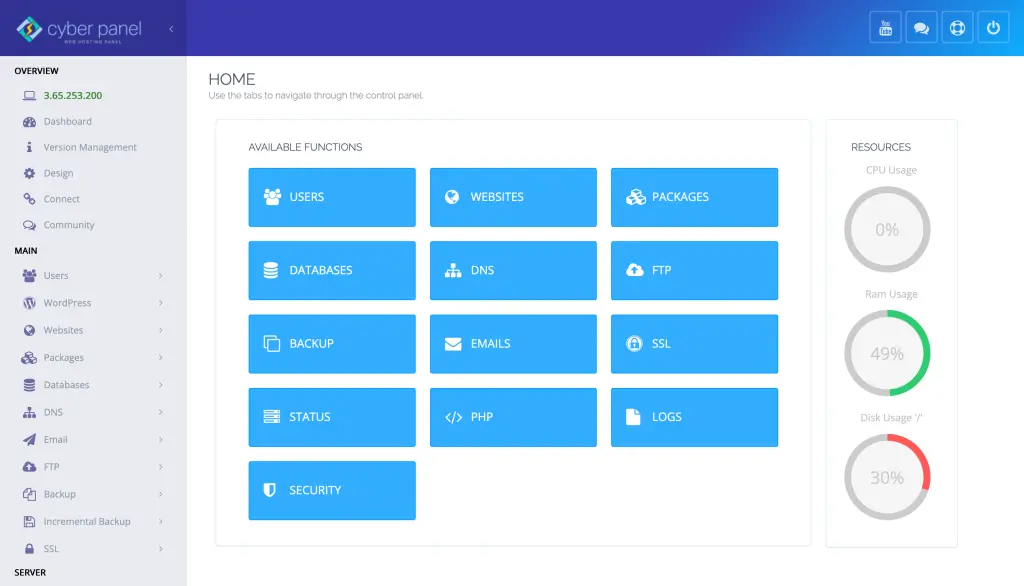
CyberPanel is a web hosting control panel that anyone can use to manage their Linux server via a graphical user interface (GUI) for typical server tasks. Finally, rather than just relying on Linux man pages, users can:
- Log in from CyberPanel’s dashboard and manage files
- Run commands using CyberPanel terminal
- Manage security settings without manually using iptables or firewall-cmd
With CyberPanel, users can handle Linux administration efficiently while still having access to traditional command-line tools when needed.
FAQs on Linux Man Pages
1. Why do we require man pages in Linux?
Official documentation on Linux commands, system functions, and configuration files exists in the form of man pages.
2. How do I exit a man page?
Press q to quit a man page.
3. Can I search within a man page?
Yes in case you need to look for a particular keyword in a man page, use /search_term.
4. What if I don’t know exactly what the command is named?
Use man -k to see related commands.
5. How can I identify what section a command is in?
Execute whatis to check for available sections for that command.
Final Thoughts!
Understanding Linux man pages is one of the critical skills for working efficiently in a Linux environment. However, these manuals are a great source of information whenever you are looking for Linux commands for man pages or trying to Linux find man page or Linux man page reference.
CyberPanel is an alternative with a graphical interface for server management in addition to command-line access. Use man pages Linux now and get some skills in Linux!

Magnificent beat I would like to apprentice while you amend your site how can i subscribe for a blog web site The account helped me a acceptable deal I had been a little bit acquainted of this your broadcast offered bright clear idea
What i do not understood is in truth how you are not actually a lot more smartlyliked than you may be now You are very intelligent You realize therefore significantly in the case of this topic produced me individually imagine it from numerous numerous angles Its like men and women dont seem to be fascinated until it is one thing to do with Woman gaga Your own stuffs nice All the time care for it up
I was suggested this web site by my cousin Im not sure whether this post is written by him as no one else know such detailed about my trouble You are incredible Thanks
I do not even know how I ended up here but I thought this post was great I do not know who you are but certainly youre going to a famous blogger if you are not already Cheers
I just wanted to drop by and say how much I appreciate your blog. Your writing style is both engaging and informative, making it a pleasure to read. Looking forward to your future posts!
I’ve been following your blog for quite some time now, and I’m continually impressed by the quality of your content. Your ability to blend information with entertainment is truly commendable.
I loved as much as youll receive carried out right here The sketch is attractive your authored material stylish nonetheless you command get bought an nervousness over that you wish be delivering the following unwell unquestionably come more formerly again as exactly the same nearly a lot often inside case you shield this hike
Pharmazee I really like reading through a post that can make men and women think. Also, thank you for allowing me to comment!