On this page
What if your caching layer had the ability to instantly scale, automatically recover, and never be the bottleneck?
Such a promise would be wonderful if it weren’t for the fact that Redis can be a little difficult when in production. A single-node setup may be good enough for testing. But real production work needs high availability, persistence, and scalability. This is the area where most deployments end up failing.
When you choose to run Redis on Kubernetes, you have to think about your problem in a totally different way.
Instead of handling the individual instances manually, you should orchestrate everything. To automatically restart, scale, or upgrade the instances without downtime, Kubernetes is the perfect platform for running Redis in a production environment. However, deploying Redis is just the beginning. To have a Redis Cluster on Kubernetes, you need the right architecture.
Deploying Redis on Kubernetes or scaling using a Redis Cluster on Kubernetes or simply deploying Redis on Kubernetes using Helm, the main task is to do everything properly without unnecessarily complicating your setup.
After reading this guide, you will be able to deploy Redis confidently, know the common mistakes to avoid, and even save some time as well as performance.
What is Redis on Kubernetes Exactly?
Redis is a type of server that keeps the most recent data in memory for quick access and can be used for caching, queues, and live applications.
Kubernetes is a system to handle applications inside containers on a large scale. Running Redis on Kubernetes means:
Redis is implemented in containers. Kubernetes is in charge of scaling and recovery. Deployment becomes automated and repeatable. Instead of literally controlling servers, you describe what your infrastructure should be like using code.
Why Combine Redis with Kubernetes?
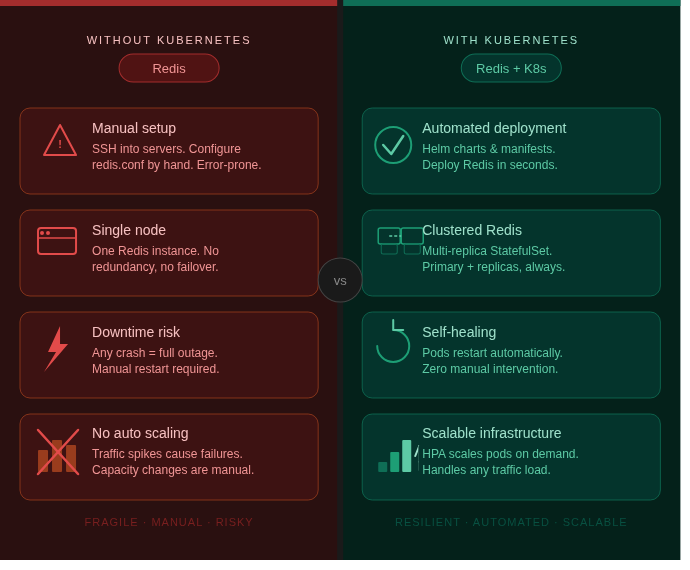
Deploying Redis as part of your Kubernetes clusters is much more than just a move to the latest trend. It addresses actual issues related to operations.
If set up correctly, it can be your:
- failover without manual intervention
- scaling out on demand
- deployment made simple
- better use of resources
Nonetheless, if you don’t set it up correctly, you will probably add lots of complications. This is exactly the point where a good structure helps.
How to Deploy Redis on Kubernetes?
You can easily deploy Redis on Kubernetes by using a Deployment and Service. Here is a basic Redis deployment illustration for you:
apiVersion: apps/v1
kind: Deployment
metadata:
  name: redis
spec:
  replicas: 1
  selector:
    matchLabels:
      app: redis
  template:
    metadata:
      labels:
        app: redis
    spec:
      containers:
      - name: redis
        image: redis:7
        ports:
- containerPort: 6379Service Configuration
apiVersion: v1
kind: Service
metadata:
  name: redis-service
spec:
  selector:
    app: redis
  ports:
    - port: 6379
targetPort: 6379This gives you a single Redis instance and basic connectivity, which is suitable for testing. If you are in production, then you need clustering.
Redis Cluster on Kubernetes
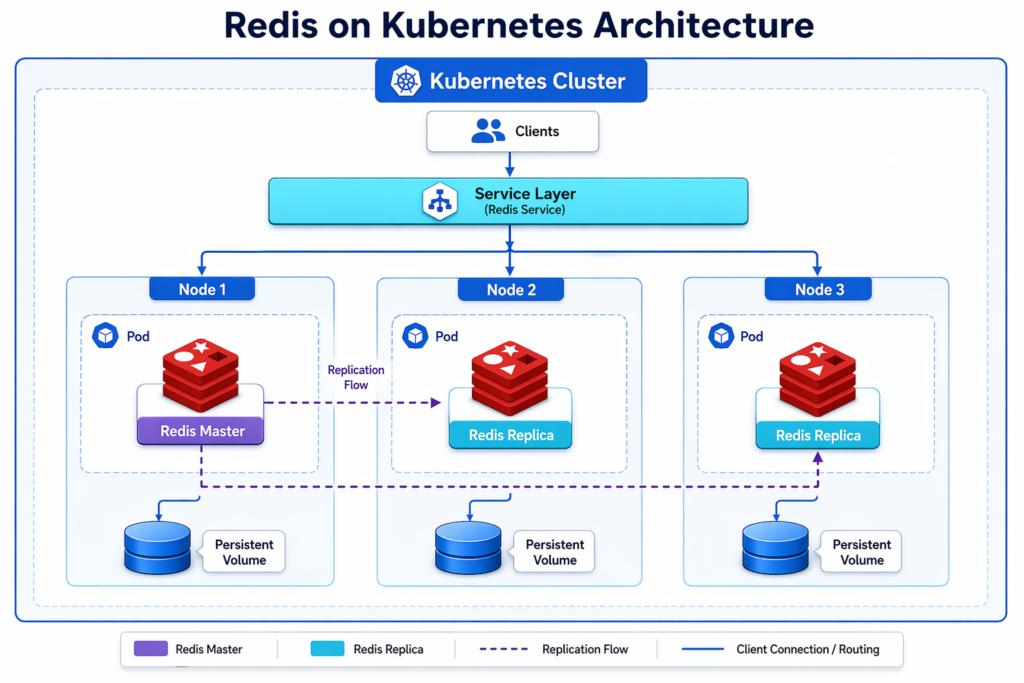
A Redis cluster on Kubernetes offers data sharing, high availability, and fault tolerance. Instead of one instance, you run multiple nodes that share the load.
Here are the key components with their relevant purposes:
| Component | Purpose |
|---|---|
| Master nodes | Handle writes |
| Replica nodes | Provide redundancy |
| StatefulSet | Maintains identity |
| Persistent Volume | Stores data |
You must use StatefulSets because Redis nodes need stable identities.
How to Deploy Redis Cluster on Kubernetes?
To deploy a Redis cluster on Kubernetes, you have to use StatefulSets instead of Deployments. Here is an example for you:
apiVersion: apps/v1
kind: StatefulSet
metadata:
  name: redis-cluster
spec:
  serviceName: "redis"
  replicas: 3
  selector:
    matchLabels:
      app: redis
  template:
    metadata:
      labels:
        app: redis
    spec:
      containers:
      - name: redis
        image: redis:7
        ports:
- containerPort: 6379You need StatefulSet for stable network identity, persistent storage, and predictable scaling. It is essential for cluster-based setups.
How to Deploy Redis on Kubernetes Using Helm?
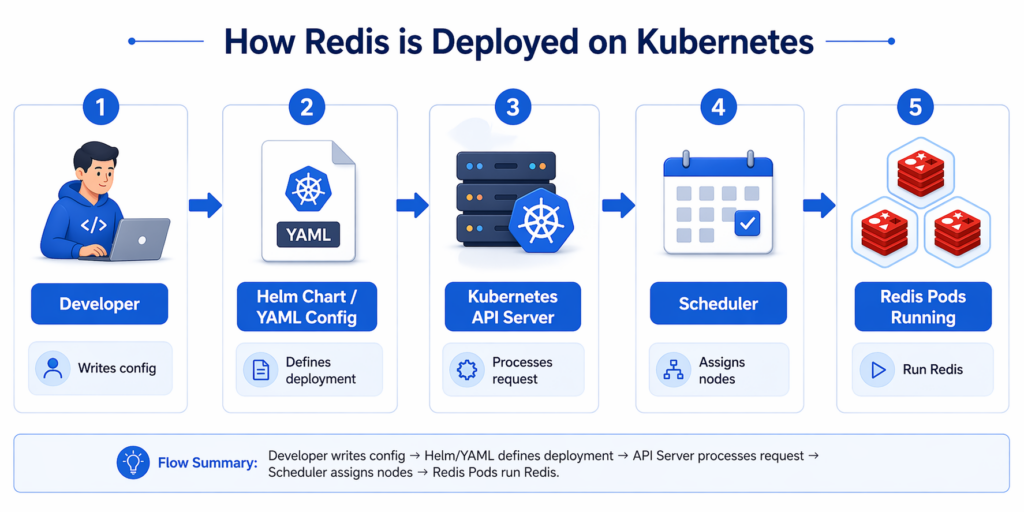
It is the most reliable way. You can deploy Redis on Kubernetes using Helm by using pre-built charts. Helm is here to simplify deployment by packaging configurations.
Install Redis with Helm
helm repo add bitnami https://charts.bitnami.com/bitnami
helm install redis bitnami/redisDeploy Redis Cluster with Helm
helm install redis-cluster bitnami/redis-clusterHelm is better because:
- ready-made configurations
- production-ready defaults
- faster deployment
- easy upgrades
Top Mistakes People Make When Running Redis on Kubernetes
You should avoid these mistakes:
Failure to keep persistence in mind
Redis will lose its data without persistent storage.
Switching Deployment to StatefulSet
Clusters require stable network identities.
Neglecting to set resources
This results in misperformance.
Missing on monitoring
You definitely won’t be able to detect faults at an early stage.
Best Practices You Have to Follow
- Utilize StatefulSets for your cluster
- Ensure persistence by use of volumes
- Keep track of your memory consumption
- Set resource limits
- Use Helm for faster setup
CyberPanel and Kubernetes-Based Workflows

CyberPanel is powered by the OpenLiteSpeed web hosting control panel. It works well alongside Kubernetes deployments in hybrid scenarios. Although Kubernetes is focused on orchestrating containers, CyberPanel is capable of managing:
- web hosting environments
- application servers
- DNS and domain management
Combined Workflow
- Kubernetes runs Redis
- Applications connect to the Redis cluster
- CyberPanel manages web apps using Redis
It is a great workflow for the teams that run both containerized and traditional workloads.
Conclusion
Deploying Redis in Kubernetes is a way to set up Redis in Kubernetes pods. But the real task is to build a Redis architecture on Kubernetes that can be scalable, fault-tolerant, and high-performing under load.
A very simple Redis deployment on Kubernetes can be considered for a single-node Redis instance. On the other hand, a Redis Cluster on Kubernetes provides almost all the scalability and availability features of a native Redis cluster. Deploying Redis on Kubernetes using Helm is a great way to get Redis up and running quickly with default settings. Whichever way you go, knowing your needs and selecting the right method will be the key.
It is a well-known fact that good architecture decisions can lead a system to a stable operating state, whereas poor ones will only cause difficulties, leading to fragility.
If you are new to Kubernetes and Redis, then you should first do a Redis installation using a Helm chart in your test environment. After two weeks, when it is stable, move to a version with a fully integrated clustered configuration, with StatefulSets and persistence. Also, before production, test the scaling and failure scenarios.
FAQs
Do I need persistent storage for Redis in Kubernetes?
Yes, if you want data durability. Otherwise, data will be lost on restart.
Can Redis Cluster auto-scale in Kubernetes?
It can scale manually or via operators, but native auto-scaling requires careful setup.
Is Helm necessary for deploying Redis?
Official Redis images or trusted Helm charts like Bitnami are commonly used.