On this page
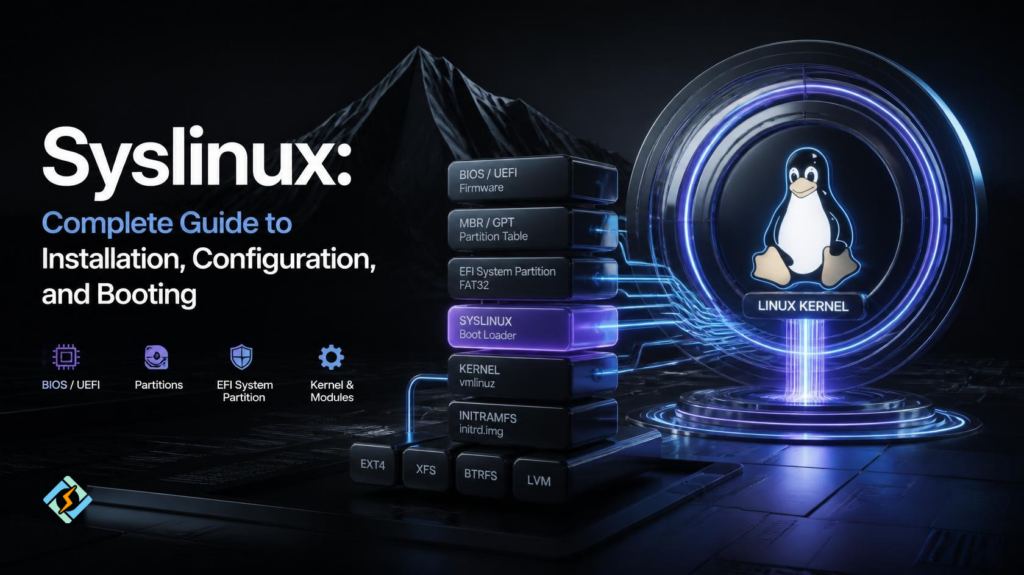
Syslinux is a collection of lightweight bootloaders used to start Linux and other operating systems from local drives, removable media, CDs, and networks. On Arch Linux, it can be installed through the syslinux package and configured for either BIOS or UEFI systems, although the setup differs between the two.
Syslinux is not a Linux distribution. It is software that runs during the boot process and helps load the operating system kernel. It can also provide a text or graphical boot menu, making it possible to choose between kernels or boot options.
If you are researching syslinux, you may also come across SysLinuxOS. Despite the similar name, they are different projects. SysLinuxOS is a Debian-based live Linux distribution built for system integrators, system administrators, network engineers, and advanced users.
What Is Syslinux?
Syslinux is a family of boot loaders designed for different boot environments. It can boot from storage devices and supports network booting through PXELINUX. The project supports several file systems, including FAT, NTFS, ext2, ext3, ext4, XFS, UFS/FFS, and some Btrfs configurations.
Think of Syslinux as a bridge between your firmware and Linux.
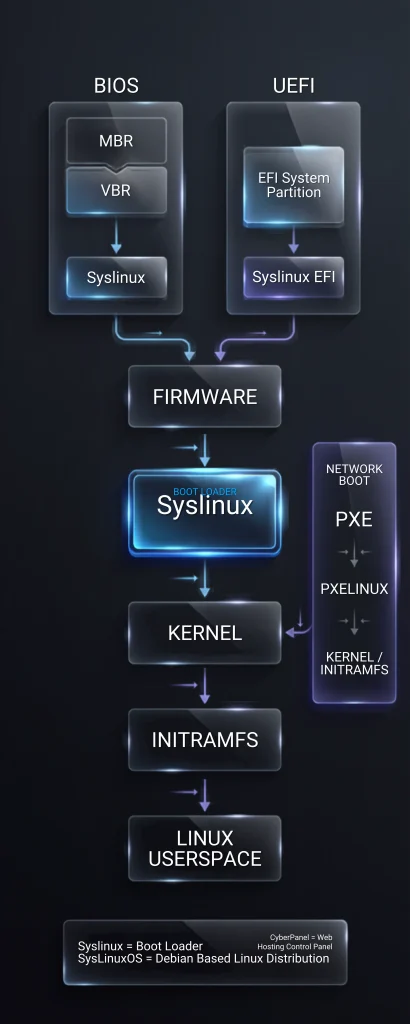
When you turn on a computer, the firmware looks for bootable code. Syslinux takes over the boot process, finds the required boot files, reads its configuration, and loads the Linux kernel and initramfs.
Its main components serve different purposes:
| Component | Main purpose |
| Syslinux | Boot loader for supported disk and removable media setups |
| EXTLINUX | Boot Linux from supported Linux file systems |
| PXELINUX | Network booting over PXE |
| ISOLINUX | Booting from ISO and optical media |
| MEMDISK | Loading certain disk images in supported environments |
The exact component you use depends on how you are booting the system.
Why Is Syslinux Used?
Syslinux is useful when you need a simple and configurable boot loader without the larger feature set of some alternatives.
Common uses include:
- Booting Linux installations
- Creating bootable removable media
- Setting up custom boot menus
- Network booting through PXELINUX
- Booting recovery environments
- Creating specialized Linux appliances
- Managing simple multi-boot configurations
It can also be useful in environments where administrators want direct control over boot configuration files.
Syslinux is not always the best choice, though. Your firmware mode, file system, Secure Boot requirements, and boot setup should all be considered before choosing it.
How Does Syslinux Work?
The boot process depends on whether the machine uses traditional BIOS or UEFI.
BIOS Boot
On a BIOS system, Syslinux can use boot code in the MBR or partition boot area. The boot process then reaches the Syslinux files on the boot partition.
The configuration file tells Syslinux which kernel to load and which parameters to pass to it.
A simplified configuration might look like this:
PROMPT 1

TIMEOUT 50

DEFAULT arch

LABEL arch

    LINUX ../vmlinuz-linux

    APPEND root=UUID=xxxxxxxx-xxxx-xxxx-xxxx-xxxxxxxxxxxx rw

INITRD ../initramfs-linux.imgHere, LINUX points to the kernel, APPEND passes kernel parameters, and INITRD identifies the initial RAM filesystem.
UEFI Boot
UEFI uses a different process. Syslinux provides EFI binaries that are placed on the EFI System Partition.
On Arch Linux, the UEFI configuration file is normally placed at:
esp/EFI/syslinux/syslinux.cfgThe BIOS and UEFI configuration syntax is similar, but the installation process is not. The ArchWiki also notes that the Arch-specific syslinux-install_update script does not support UEFI installation.
How Do You Install Syslinux on Arch Linux?
The first step is to install the Syslinux package:
sudo pacman -S syslinuxInstalling the package alone does not install the boot loader into the location from which the firmware will boot. You still need to install the appropriate boot code and create the configuration.
The correct procedure depends on your boot mode.
Before changing boot loader files, check your current partition layout and make sure you know which disk and partition contain your boot files.
You can inspect the disks with:
lsblkYou can check the partition table type with:
blkid -s PTTYPE -o value /dev/sdaReplace /dev/sda with the correct disk for your system.
Do not copy commands involving /dev/sda blindly. Writing boot code to the wrong disk can make the system unbootable.
How Do You Install Syslinux on a BIOS System?
For a BIOS-based Arch Linux installation, the ArchWiki provides both automatic and manual installation methods.
If you are using the Arch-specific installation script, install the required packages first when needed:
sudo pacman -S syslinux gptfdiskIf your /boot partition uses FAT, you may also need mtools.
For a standard Arch setup, the automatic installation command is:
sudo syslinux-install_update -i -a -mThe options install the required files, mark the partition active where applicable, and install the MBR boot code.
After that, edit:
/boot/syslinux/syslinux.cfgThe root partition and kernel paths must match your installation.
A typical entry can look like:
LABEL arch

    LINUX ../vmlinuz-linux

    APPEND root=UUID=YOUR-ROOT-UUID rw

INITRD ../initramfs-linux.imgReplace the example UUID with the actual UUID of your root partition.
The ArchWiki warns that the automatic script can set a default root partition that does not match your system. Check the configuration before rebooting.
How Do You Install Syslinux on a UEFI System?
UEFI installation requires a different approach.
First, make sure the EFI System Partition is mounted. ArchWiki recommends mounting the ESP at /boot for Syslinux because UEFI Syslinux needs access to the kernel and initramfs from the EFI System Partition.
You also need efibootmgr:
sudo pacman -S syslinux efibootmgrCreate the Syslinux directory:
sudo mkdir -p /boot/EFI/syslinuxCopy the UEFI Syslinux files:
sudo cp -r /usr/lib/syslinux/efi64/* /boot/EFI/syslinux/Then create a UEFI boot entry with efibootmgr. The exact disk and partition values depend on your ESP:
sudo efibootmgr --create \

  --disk /dev/sdX \

  --part Y \

  --loader /EFI/syslinux/syslinux.efi \

--label "Syslinux"Replace /dev/sdX and Y with the correct disk and EFI partition number.
The UEFI configuration file should then be created here:
/boot/EFI/syslinux/syslinux.cfgThe ArchWiki specifically notes that the BIOS configuration at /boot/syslinux/syslinux.cfg is separate from the UEFI configuration.
How Do You Configure Syslinux?
Syslinux uses a configuration file named syslinux.cfg.
The location depends on the installation:
| Boot mode | Typical configuration |
| BIOS | /boot/syslinux/syslinux.cfg |
| UEFI | esp/EFI/syslinux/syslinux.cfg |
A basic configuration can contain:
PROMPT 1

TIMEOUT 50

DEFAULT arch

LABEL arch

    MENU LABEL Arch Linux

    LINUX ../vmlinuz-linux

    APPEND root=UUID=YOUR-UUID rw

    INITRD ../initramfs-linux.img
PROMPT controls the boot prompt.
TIMEOUT controls how long Syslinux waits. The value is measured in tenths of a second, so 50 represents five seconds.
DEFAULT defines the entry selected automatically.
LABEL creates a boot entry.
MENU LABEL controls the text shown in a boot menu.
LINUX identifies the kernel.
APPEND passes parameters to the kernel.
INITRD identifies the initramfs.
Small path errors can prevent the system from booting, so check every path before restarting.
Can Syslinux Create a Boot Menu?
Yes. Syslinux can display a simple boot prompt or a more traditional text-based menu.
For example:
UI menu.c32

PROMPT 0

MENU TITLE Boot Menu

TIMEOUT 50

DEFAULT arch

LABEL arch

    MENU LABEL Arch Linux

    LINUX ../vmlinuz-linux

    APPEND root=UUID=YOUR-UUID rw

    INITRD ../initramfs-linux.img

LABEL fallback

    MENU LABEL Arch Linux Fallback

    LINUX ../vmlinuz-linux

    APPEND root=UUID=YOUR-UUID rw

INITRD ../initramfs-linux-fallback.imgAdditional .c32 modules are required for some menu configurations. The modules need to match the Syslinux installation, and their correct location depends on whether you are using BIOS or UEFI.
What File Systems Does Syslinux Support?
Syslinux supports several file systems, but support is not identical across every feature and boot mode.
ArchWiki lists support for FAT, NTFS, ext2, ext3, ext4, XFS, UFS/FFS, and uncompressed single device Btrfs among others. Some file system features are not supported, however.
This matters when planning a boot partition.
For example, a separate FAT32 /boot partition can simplify compatibility in some setups.
Syslinux also has an important limitation: it cannot freely access files stored on partitions other than the partition where it is installed. This can affect how you organize /boot, kernels, and initramfs files.
Does Syslinux Support Network Booting?
Yes. PXELINUX is part of the Syslinux package and is designed for PXE network booting.
Instead of loading the operating system from a local disk, a client can retrieve boot files from a network server.
A typical PXE environment includes:
- A DHCP server
- A TFTP server
- PXELINUX files
- A boot configuration
- The Linux kernel
- An initramfs or other required boot files
This makes PXE useful for system administrators who need to deploy or boot multiple machines over a network. Syslinux can therefore fit into larger provisioning and recovery workflows rather than being limited to desktop booting.
Is Syslinux Good for UEFI Systems?
Syslinux can boot on UEFI systems, but there are limitations worth knowing before choosing it.
The current ArchWiki documentation notes that UEFI Syslinux has limitations with chainloading other EFI applications, certain virtual machine environments, and Secure Boot. It also uses the deprecated EFI handover protocol.
That does not mean Syslinux is unusable on UEFI. It means you should check whether its limitations fit your machine.
If your setup depends on features such as proper Secure Boot support or easy chainloading of another EFI boot manager, another boot loader may be a better fit.
Syslinux vs GRUB: Which Should You Choose?
Syslinux and GRUB solve the same broad problem but have different designs.
| Feature | Syslinux | GRUB |
| Linux booting | Yes | Yes |
| BIOS support | Yes | Yes |
| UEFI support | Yes, with limitations | Yes |
| Boot menus | Yes | Yes |
| PXE support | Yes through PXELINUX | Available through GRUB network features |
| Configuration | Lightweight text configuration | More extensive configuration system |
| Secure Boot | No proper support in UEFI Syslinux | Depends on the distribution and setup |
| Complexity | Generally simpler | More feature rich |
| Best fit | Simple and specialized boot setups | Complex or flexible boot environments |
There is no universal winner.
Syslinux makes sense when you want a relatively focused boot environment and its limitations are acceptable. GRUB may be a better choice when you need broader boot features or a more flexible configuration.
What Is SysLinuxOS?
SysLinuxOS is not Syslinux.
SysLinuxOS is a separate Debian-based GNU/Linux distribution designed for system integrators and system administrators. Its current project documentation describes it as a ready-to-use environment for networking, diagnostics, monitoring, virtualization, system integration, and related technical work.
This distinction matters because the names are easy to confuse.
| Syslinux | SysLinuxOS |
| Boot loader collection | Linux distribution |
| Helps start operating systems | Is an operating system |
| Used during the boot process | Provides a complete working environment |
| Includes tools such as PXELINUX | Includes networking and administration tools |
| Not a desktop Linux distribution | Debian-based live distribution |
The current SysLinuxOS project provides MATE and GNOME editions and supports both live use and permanent installation.
So if you searched for syslinuxos because you wanted a Linux distribution, you are looking at a different project from Syslinux.
Where Does CyberPanel Fit?

Syslinux and CyberPanel solve very different problems.
CyberPanel is a web hosting control panel designed to manage websites and hosting services. Its feature set includes website management, DNS, email, SSL, databases, file management, Docker management, and WordPress tools.
Syslinux works much earlier in the system. Its job is to help boot the operating system.
CyberPanel comes into the picture after you have a supported server operating system running and want to manage websites and hosting services through a control panel. CyberPanel’s current supported installation platforms include Ubuntu 20.04+, AlmaLinux 8/9, Rocky Linux, and CloudLinux.
That means you should not think of Syslinux as a replacement for CyberPanel or vice versa. One handles booting. The other handles web hosting management.
What Are Common Syslinux Problems?
Most Syslinux boot problems come from configuration, paths, partitions, or boot mode mismatches.
Syslinux drops to a boot: prompt
This often means Syslinux could not find or use the expected configuration.
Check:
/boot/syslinux/syslinux.cfgfor BIOS installations, or the corresponding EFI path for UEFI.
Make sure the file exists, and the paths inside it are correct.
The kernel cannot be found
Check the path in the LINUX line:
LINUX ../vmlinuz-linuxThe path is relative to the configuration file location. A wrong directory can stop the kernel from loading.
The system cannot find the root partition
Check the APPEND line:
APPEND root=UUID=YOUR-UUID rwFind the correct UUID with:
blkidThen compare it with the UUID in your configuration.
Syslinux works in BIOS but not UEFI
Do not assume that a working BIOS configuration can simply be copied to UEFI.
UEFI Syslinux uses different files and a different installation location. The ArchWiki also notes that the automatic syslinux-install_update script does not support UEFI installation.
The system stops booting after a change
If you recently changed the boot partition, moved kernel files, changed UUIDs, or edited syslinux.cfg, review those changes first.
If the machine no longer boots, use an Arch Linux live environment, mount the installed system, and repair the configuration from a chroot environment.
What Should You Check Before Using Syslinux?
Before installing a boot loader, take a few minutes to understand your system.
Check these items:
| Check | Why it matters |
| BIOS or UEFI | Determines the installation method |
| MBR or GPT | Changes BIOS boot setup |
| Boot partition | Syslinux needs access to its boot files |
| File system | Not every feature works on every file system |
| Root UUID | Required for correct kernel parameters |
| Secure Boot | UEFI Syslinux has no proper Secure Boot support |
| Kernel path | A wrong path can stop booting |
| Backup | Lets you recover from configuration mistakes |
This is one area where rushing can create a bigger problem than the one you were trying to solve.
Useful Syslinux Configuration Options
Here are some options you are likely to encounter:
| Option | Purpose |
| PROMPT | Shows or hides the boot prompt |
| TIMEOUT | Sets the automatic boot delay |
| DEFAULT | Selects the default boot entry |
| LABEL | Defines a boot entry |
| MENU LABEL | Sets the displayed menu name |
| LINUX | Specifies the Linux kernel |
| KERNEL | Lets Syslinux detect the file type |
| APPEND | Passes kernel parameters |
| INITRD | Specifies the initial RAM filesystem |
| UI | Loads a menu interface module |
The exact configuration available depends on the Syslinux version and the modules installed with it.
Is Syslinux Still Worth Using?
Syslinux can still be a useful boot loader when its focused design fits the job.
It is especially relevant for custom boot environments, removable media, PXE deployments, and systems where a simple boot configuration is enough. It also remains part of the current Arch Linux documentation and installation ecosystem.
But it is not the obvious choice for every modern Linux machine.
UEFI introduces limitations that you should understand first. If your system relies on Secure Boot, complex EFI chainloading, or broad boot manager features, compare Syslinux with other options before changing the boot loader.
The right question is not simply, “Is Syslinux good?”
It is:
“Does Syslinux support the boot features my system actually needs?”
Frequently Asked Questions
Is Syslinux a bootloader?
Yes. Syslinux is a collection of bootloaders used to boot Linux and other systems from drives, removable media, CDs, and networks. It includes components such as PXELINUX for network booting.
What is PXELINUX used for?
PXELINUX is the Syslinux component used for PXE-based network booting. It allows a compatible client to obtain boot files from a network environment instead of relying entirely on local storage.
Can I use Syslinux with Arch Linux?
Yes. Arch Linux provides a syslinux package and documents installation and configuration for both BIOS and UEFI systems. The exact procedure depends on your firmware mode and disk layout.
Boot Linux With a Plan, Not a Guess
Syslinux is a small but capable part of the Linux boot stack. It can handle local booting, custom menus, removable media, and network booting without trying to become a complete operating system or hosting platform.
The important part is choosing the right setup before you write boot code to a disk. Check your firmware mode, partition table, boot partition, file paths, and root UUID first. If you are using UEFI, pay close attention to Syslinux’s documented limitations.
Once the boot layer is stable, you can focus on what happens after Linux starts. For web hosting workloads, use a hosting control panel such as CyberPanel on a supported server OS to manage websites, DNS, SSL, databases, email, and other services from one interface.
Ready to work with Syslinux? Start by identifying your BIOS or UEFI mode, back up your current boot configuration, and verify your disk layout before installing or changing the boot loader.