
On this page
antiX Linux has become popular among users who require a fast-functioning system that will run on very old machines. It’s light, uncomplicated, and boots fast. It’s one that many users gravitate towards when they desire a system to be sleek, even without hefty hardware.
In this guide, you will discover what antiX Linux is, how it works, where to download antiX Linux, and who should use this distro. We’ll also take a look at what makes antiX unique and how it benefits newcomers, as well as power users.
Let’s get together!
What is antiX Linux?
antiX Linux is light on system resources, and it boots really quickly even on low-end hardware. It is extremely efficient and loads at the speed of light! It does not have any bulky desktop environments. Rather, it uses light window managers like TWM, which is perfect on old laptops and PCs.
Key Features
- Very fast performance
- Works on weak hardware
- Low memory use
- Clean interface
- Easy to install
- Stable base (Debian)
antiX as a Rescue System
antiX works well as a rescue system for broken or slow computers. You can run it from a USB and use its tools to recover files, check disks, reset passwords or copy data from a damaged Windows install. It also lets you fix boot issues and back up important folders without installing anything. This gives antiX a practical role beyond daily use and makes it useful for home users, students and small offices.
antiX Linux Download Guide
You can get antiX Linux from its official website. The ISO is minimal, and as well, you can launch it live or install it directly.
Steps:
- Go to the antiX website
- Select your edition
- Download the ISO
- Create a bootable USB using Rufus or Etcher
- Restart and install antiX Linux
Types of antiX Linux Distros
antiX offers multiple versions so users can pick what fits them.
| Edition | Best For | Notes |
|---|---|---|
| Full | Everyday use | Apps included |
| Base | Mid-level systems | Fewer apps |
| Core | Advanced users | Manual setup |
| Net | Only for experts | Very small size |
Why People Choose antiX
- Good for slow systems
- Easy to carry on a USB
- No heavy programs
- Stable for daily tasks
- Great for learning Linux basics
Who Should Use antiX Linux?
antiX is ideal for:
- Students with old laptops
- Office users who want speed
- For developers who just want a clean base
- Anyone who prefers a light system
Role of CyberPanel
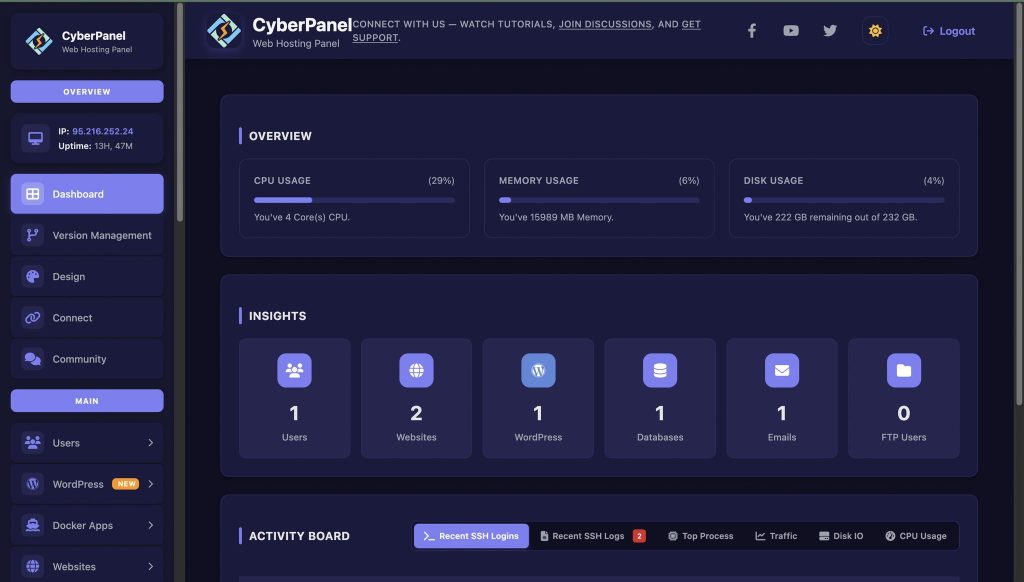
CyberPanel is a clean way to manage servers if you want to host a site after an antiX Linux installation. It gives:
- Website creation
- DNS tools
- Database management
- Security settings
CyberPanel is a web hosting control panel for supported Linux operating systems and is developed by the OpenLiteSpeed project, which enables us to host websites and applications easily.
ntiX Linux Pros and Cons
| Pros | Cons |
|---|---|
| Very light and fast | Not ideal for beginners who want fancy UI |
| Works on 20-year-old hardware | Limited in heavy software |
| Stable | No default Snap support |
| Good for live USB | Some manual steps needed |
Do You Know?
Most people do not explain this, but antiX can extend old hardware life.
| Factor | Without antiX | With antiX |
|---|---|---|
| CPU Load | High under modern distros | Much lower, less heat |
| Fan Noise | Often loud | Noticeably quieter |
| Battery Life | Weak on old laptops | Longer due to light apps |
| Overall Lifespan | Shortened | Extended by efficient resource use |
Final Thoughts!
To sum up, antiX Linux is recommended for those who want to have a speedy system without too much bloat. It adds speed, stability, and ease of use to both old and new computers. If you need a plain and fast distro for work, study, or daily use, then this Linux distro is worth trying once.
Give your computer a second wind with antiX Linux today!
People Also Ask
Is antiX Linux good for gaming?
It is not meant for heavy gaming, but old or light games work fine.
Can Linux antiX run without installation?
Yes. You can run it in live mode from USB.
Is antiX safe for beginners?
Yes. The interface is clean, and the system is easy to learn.
Does antiX Linux support Snap or Flatpak?
Snap is not included. Flatpak can be added with extra steps.
Does antiX Linux work on 32-bit systems?
Yes. It supports both 32-bit and 64-bit machines.


