
On this page
Many who switch to Linux do so with the intention to completely replace Windows, but a few applications remain that can cause compatibility problems. Among the most common search examples is iTunes Linux. People want to sync their Apple devices, access music libraries, manage backups, or continue using their existing iTunes workflow even after changing to Linux.
Briefly, Apple hasn’t made an official native version of iTunes for Linux. The software was targeted to Windows and macOS, and Apple has never delivered a Linux desktop version.
But that doesn’t mean Linux users are totally left out. There are quite a few viable options for getting access to iTunes and its related features, according to whether you want to play Apple Music, sync device(s), back up, or run the old iTunes itself. This article tells you what is possible, what isn’t, and which alternatives should be used in 2026.
Is It Possible To Install iTunes on Linux?
Apple does not offer any official iTunes installer for Linux. Even if you look for download files, you won’t find Apple supporting a Linux version.
The most common choices for Linux users are:
- Run Windows applications on Linux using Wine or similar tools
- Install and use Windows in a virtual environment
- Access Apple Music via a web browser
- Explore music management software native to Linux
Given the method used, one may have to compromise on performance, reliability, and support for different types of devices.
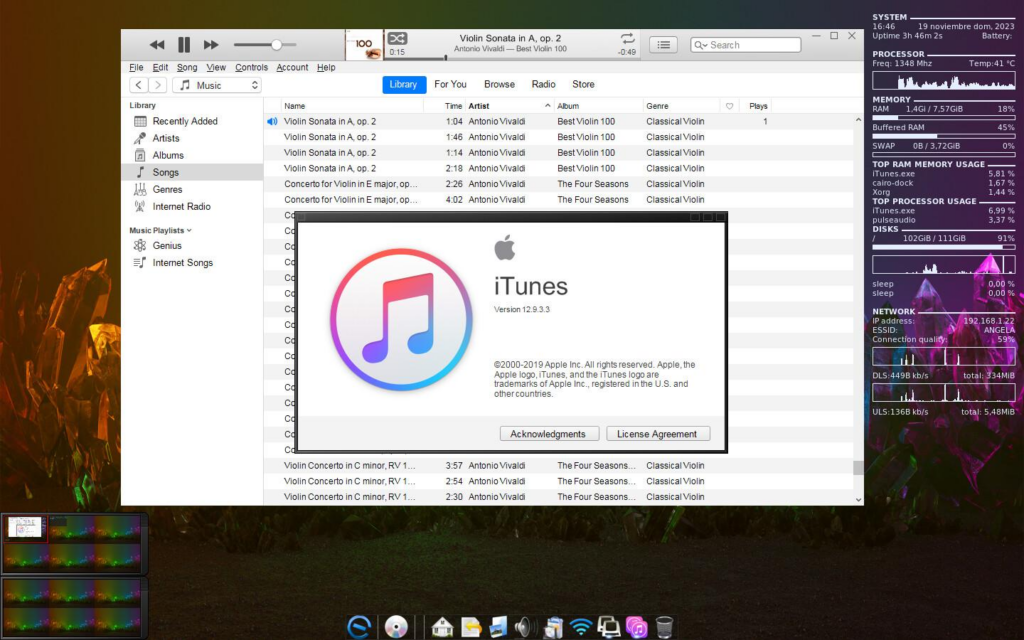
iTunes on Linux via Wine
By far, the most popular way of getting iTunes on Linux is using Wine.
Wine converts many Windows API calls into their Linux counterparts, enabling some Windows programs to be run even if there is no Windows installed at all.
Generally speaking:
Once Wine is ready, the iTunes installer can be run to see if it works inside the Wine environment.
Still, it can be very different given:
- A particular version of Wine
- The version of iTunes
- The Linux distro used
- The graphics driver
- Apple services dependencies
Note:
Very often, the newest iTunes versions present issues with Wine. Some can at least open the program, but many face crashes, authentication, or device detection malfunctions.
For quite a few reasons, Wine is seen more as a “try-it-at-your-own-risk” tool rather than something that is fully supported.
Using A Virtual Machine
If managing the entire functionality of iPhones or iPads is a necessity for users, then the virtual machine approach would be a more dependable tool than Wine.
Generally, the arrangement is as follows:
- Set up VirtualBox, VMware, or any other hypervisor
- Establish a Windows virtual machine
- Install iTunes inside Windows
- Link the Apple gadget via USB passthrough
This method delivers the behavior of a Windows installation that is very close to a native one.
The primary drawbacks are:
- Heavy resource requirementA
- Windows license is a must
- Lots of data required for storage
Backing up devices, performing firmware restores, and synchronization are examples for which virtualization is usually the most reliable option.
Apple Music On Linux Without iTunes
If your only aim is to listen to music, you probably don’t really need iTunes at all.
You can access Apple Music via the web browser at:
The browser-based Apple Music platform is an official one.
Advantages comprise:
- Don’t need to use Wine
- Don’t need to run a virtual machine
- Works in up-to-date browsers
- Direct access to Apple Music streaming library
Downsides include:
- Cannot do traditional iTunes device management
- Local library synchronization features are quite limited
- Using the web player is most probably the easiest option for most people.
iTunes With Linux: What Actually Works?
| Use Case | Recommended Approach |
| Apple Music streaming | Web browser |
| iPhone backups | Virtual machine with Windows |
| Device firmware restore | Virtual machine with Windows |
| Legacy iTunes experimentation | Wine (best effort) |
| Local music management | Linux-native media player |
Linux-Native Alternatives To iTunes
Quite a few Linux users ultimately decide to eliminate iTunes from their computers.
Some of the frequently used alternatives are:
- Strawberry Music Player
- Rhythmbox
- Clementine
- VLC Media Player
- Elisa Music Player
These programs serve music listening, collection management, playlists, and tags features without any Apple software dependence.
Why Apple Has Not Released iTunes For Linux
Traditionally, Apple has oriented its iTunes and related ecosystem software development towards:
- Windows
- macOS
- iOS
- iPadOS
Given the relatively small market size of Linux desktops compared to these platforms, Apple has not developed a native Linux version.
Can One Use iTunes Auf Linux?
German- speaking users often search for iTunes auf Linux when trying to find a way to enjoy Apple’s media ecosystem on Linux. Sadly, the situation stays the same no matter what distro is being used. Apple does not release an official Linux version of iTunes, so users have to depend on methods like Wine, virtual machines, or browser-based Apple Music for their content consumption.
For those who mainly want to listen to music, Apple Music via the web is the simplest way for most. But those who need to sync their devices, make local backups, or do firmware restore might find that having Windows in a virtual machine is the best way for them to do.
Is iTunes Pour Linux Available?
A popular search term too is iTunes pour Linux, mostly among French Linux users looking for native compatibility.
At present, Apple hasn’t declared any move to come out with a Linux version of iTunes. Given this shortcoming, mainly Linux users end up going down one of the three ways:
- making use of Wine to run certain versions of iTunes
- setting up a Windows virtual machine for the full features
- completely doing without iTunes by using music management utilities that are native to Linux
The right one among these depends on what the main purpose is: media playback, device management, or being able to use Apple’s music ecosystem.
Troubleshooting Common iTunes On Linux Issues
Wine Starts, but iTunes Crashes
If at first you don’t succeed, try an earlier iTunes version or the very latest Wine build. Certain pairs turn out to be more stable than others.
Apple Device Not Detected
USB passthrough under Wine tends to be hit and miss. For device handling, a virtual machine should ideally be your choice.
Apple Music Login Problems
Instead of going through the full iTunes authentication via Wine, it is almost always a better idea to use the web player in a browser that is officially supported.
How CyberPanel Fits into a Linux Workflow

Many users of the Linux operating system who are searching for iTunes alternatives are also creating bigger Linux-based workflows for things like developing, hosting, or managing servers.
CyberPanel is a web hosting control panel that is free and open-source and runs on OpenLiteSpeed. It makes tasks like managing websites, installing SSL, handling databases, making backups, and administering servers on Linux machines very easy.
Though CyberPanel is not connected with iTunes, it is an example of the larger Linux ecosystem where people regularly change proprietary desktop workflows to open-source and Linux-native solutions.
iTunes Linux: What Works And What Doesn’t
| Feature | Wine | Virtual Machine | Apple Music Web |
|---|---|---|---|
| Music Streaming | Partial | Yes | Yes |
| iPhone Detection | Unreliable | Yes | No |
| Device Backup | Limited | Yes | No |
| Firmware Restore | No | Yes | No |
| App Store Access | Limited | Yes | No |
| Ease Of Setup | Medium | Difficult | Easy |
Conclusion
People still often search for iTunes Linux, iTunes for Linux, and iTunes on Linux. Though the truth is that Apple has not rolled out a Linux desktop version yet. When it comes to music streaming, it is generally most straightforward to use the Apple Music web player. Managing devices, making backups, restoring, etc., a Windows virtual machine is still the most reliable method. Experimenting with Wine is possible, but it is not always consistent.
Actually, a majority of Linux users either use the web player for Apple Music or switch to media management tools that are native to Linux while keeping a virtual machine around for Apple device tasks from time to time.
Ready to use Apple services on Linux? Try the solutions discussed in this guide and find the most reliable way to run iTunes-related features without giving up your Linux workflow
FAQs
Can I Back Up An iPhone On Linux Using iTunes?
The most reliable method is running iTunes inside a Windows virtual machine.
What Is A Good Linux Alternative To iTunes?
Applications such as Strawberry, Rhythmbox, and Clementine are popular Linux-native alternatives for music management.
Can I Run iTunes On Linux With Wine?
Sometimes. Compatibility varies by Wine version and iTunes version, and results are not guaranteed.


