On this page
CachyOS Linux is an Arch Linux-based distribution built with performance in mind. It uses CPU-optimized packages, a custom-tuned kernel, and a choice of desktop environments to give users a fast and highly customizable Linux desktop.
That sounds similar to many other Linux distributions, but CachyOS takes a more specific approach. It tries to get more out of compatible hardware without making users build every optimization themselves.
It is also not just a lightweight Linux desktop with a different theme. The project changes packages, kernel configuration, system tools, and the installation experience. That makes it interesting for gamers, developers, Linux enthusiasts, and anyone who enjoys having more control over their system.
But should you actually install it? That depends on your hardware and what you expect from Linux.
What Is CachyOS Linux?
CachyOS is a performance-focused Linux distribution based on Arch Linux. It follows Arch’s rolling release model but adds its own optimized packages, kernel, tools, and configuration options.
The project rebuilds packages for modern CPU architectures and provides a custom-tuned kernel. Its goal is straightforward: offer the flexibility of Arch while making performance-related improvements available out of the box.
You still get the Arch ecosystem and the freedom to customize your system. The difference is that CachyOS handles many of the performance decisions for you.
That makes it different from installing plain Arch Linux and configuring everything manually.
Why Was CachyOS Created?
CachyOS was built around a simple idea: modern hardware should be able to take advantage of modern compiler and CPU features.
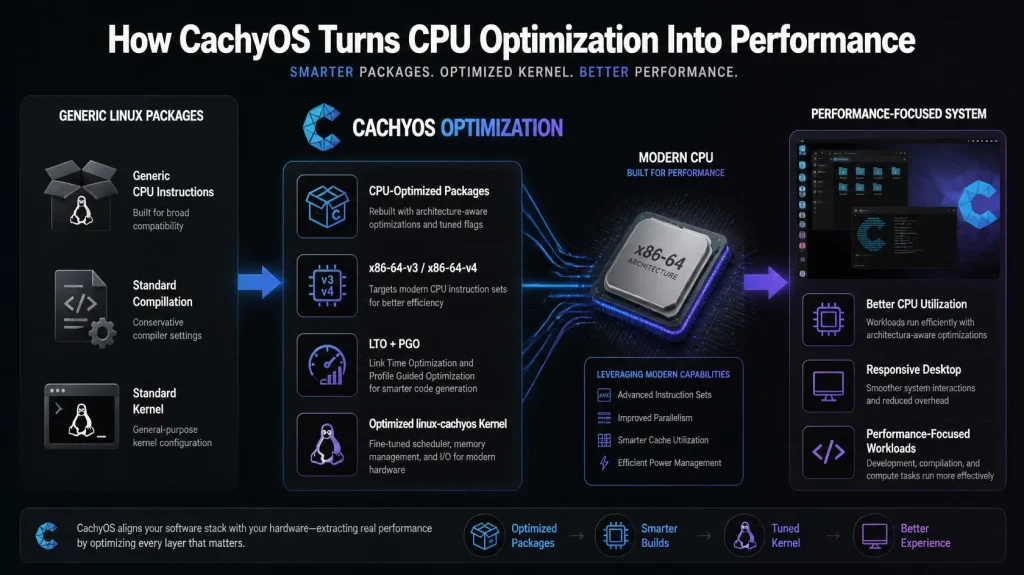
The project uses CPU-optimized builds, including x86-64-v3, x86-64-v4, and Zen4 targets where supported. Its kernel builds also use CPU optimizations and Link Time Optimization.
There is more to it than compiler flags, though.
CachyOS also works on kernel tuning, scheduler options, hardware detection, and system configuration. The project maintains several scheduler choices and provides tools intended to make system setup easier.
The result is a distribution designed to make performance tuning part of the default experience rather than something you have to research and configure yourself.
What Makes CachyOS Different From Arch Linux?
Both distributions share the Arch Linux foundation, but they take different approaches to setup and optimization.
With Arch, you start with a minimal system and decide what belongs on it. CachyOS gives you a more prepared environment with performance-optimized packages, a custom kernel, hardware detection, and graphical installation options.
Here is the practical difference:
| Feature | CachyOS | Arch Linux |
| Base | Arch Linux | Arch Linux |
| Release model | Rolling release | Rolling release |
| Package builds | CPU-optimized builds | Standard Arch builds |
| Kernel | CachyOS tuned kernels | Arch kernel |
| Installation | Graphical and CLI options | More manual |
| Customization | Very high | Very high |
| Main focus | Performance and usability | Flexibility and control |
This does not make CachyOS a replacement for Arch.
If you enjoy building a system piece by piece, Arch still gives you that experience. If you want the same general ecosystem with more performance-oriented defaults, CachyOS is the more convenient route.
Is CachyOS Actually Faster?
It can be, but there is no single performance number that applies to every computer.
CachyOS uses CPU-specific package builds, compiler optimizations, and a tuned kernel. These changes are intended to improve performance and responsiveness on supported hardware.
Your actual results will depend on what you do with the machine.
A gaming PC, for example, has different requirements from a development workstation. Storage speed, CPU architecture, graphics drivers, memory, application workload, and system configuration can all affect the result.
So it is better to think of CachyOS as performance-optimized Linux, not a distribution that magically makes every computer faster.
On compatible modern hardware, its optimizations make more sense. On older hardware, some of the CPU-specific advantages may not apply.
What Is linux-cachyos?
linux-cachyos is the CachyOS kernel package. It is one of the important pieces behind the distribution’s performance-focused approach.
CachyOS provides custom kernel builds with different tuning and scheduler options. The project also documents linux-cachyos as part of its kernel and recovery process.
This distinction is worth remembering:
CachyOS = the Linux distribution.
linux-cachyos = the CachyOS kernel package.
So if you see linux-cachyos in a package list or troubleshooting guide, it does not refer to the entire operating system.
What Hardware Do You Need for CachyOS?
CachyOS can run on a range of hardware, but the project’s recommended requirements are worth checking before installation.
The current documentation lists 3 GB of RAM and 30 GB of storage as minimum requirements. For a more comfortable setup, it recommends 8 GB of RAM, 50 GB of SSD or NVMe storage, and an x86-64-v3-capable CPU. A stable internet connection is also required because the installer uses an online installation process.
| Requirement | Minimum | Recommended |
| RAM | 3 GB | 8 GB |
| Storage | 30 GB | 50 GB SSD/NVMe |
| CPU | Compatible system | x86-64-v3 capable |
| Internet | Stable connection | 50 Mbps or better |
The CPU requirement deserves particular attention.
CachyOS makes extensive use of modern CPU optimizations. If your processor supports the recommended instruction set, you are in a better position to benefit from the distribution’s optimized packages.
The project also recommends installing CachyOS on physical hardware rather than a virtual machine.
Which Desktop Environment Should You Choose?
You are not locked into one desktop environment.
The current CachyOS installer offers more than 17 desktop environments and window managers, including KDE Plasma, GNOME, XFCE, Cinnamon, Budgie, Hyprland, Sway, i3, Niri, LXQt, MATE, and others.
For most users, KDE Plasma is a sensible starting point. It gives you a complete desktop with plenty of customization options.
XFCE or LXQt can make more sense on machines where resource usage matters. If you prefer a keyboard-driven workflow, options such as i3, Sway, Hyprland, or Niri are available.
The important part is that you can choose the environment that matches the way you work.
Is CachyOS Good for Gaming?
Gaming is one of the areas where CachyOS makes a lot of sense.
The distribution combines its performance-focused packages and kernel work with access to the wider Arch ecosystem. CachyOS also maintains a separate Handheld Edition for devices such as the Steam Deck and ROG Ally.
That does not guarantee higher FPS in every game.
Graphics drivers, GPU performance, Proton settings, game engine behavior, and the hardware itself still have a much bigger influence on many gaming workloads.
What CachyOS offers is a Linux environment that is already built with performance in mind. For users who enjoy tweaking their gaming systems, that is a useful starting point.
How Do You Install CachyOS?
CachyOS provides both graphical and command-line installation options. The desktop edition uses a graphical installer for a guided setup.
Before starting, back up important files and prepare a bootable CachyOS USB.
For a typical desktop installation:
- Download the CachyOS ISO from an official source.
- Verify the ISO before creating the bootable USB.
- Boot the computer from the USB drive.
- Launch the CachyOS installer.
- Select your language, region, and keyboard layout.
- Choose your partitioning method.
- Select a desktop environment.
- Choose the packages and other installation options.
- Create your user account.
- Review the installation summary.
- Start the installation.
- Reboot into the new system.
The partitioning step deserves extra attention.
CachyOS currently recommends manual partitioning because its documentation warns that the automatic “Install alongside” and “Replace partition” options are not completely reliable.
If you are installing alongside Windows, there are additional considerations, including Fast Startup, hibernation, BitLocker, Secure Boot, and available disk space.
Do not rush through the disk setup. A mistake here can affect existing data.
Should You Verify the CachyOS ISO?
Yes.
Before installing, verify that the ISO you downloaded has not been corrupted or altered.
CachyOS publishes SHA256 hashes for its current ISO releases and also provides GPG-based signature verification.
For a Linux download, you can calculate the SHA256 hash with:
sha256sum cachyos-desktop-linux.isoCompare the result with the SHA256 value published by CachyOS for the exact ISO you downloaded.
Do not copy an old hash from a tutorial. ISO versions change, so always use the checksum provided for the current release.
What Should You Do After Installing CachyOS?
The first reboot is not the end of the setup.
Start by updating the system. CachyOS provides several ways to manage updates, including its own tools, graphical options, and standard package management through pacman.
You should also check your graphics drivers, confirm that your network works correctly, and make sure your important applications open normally.
If you plan to use the machine for development, gaming, or other demanding work, test those workloads before making major configuration changes.
There is little benefit in changing ten settings at once. If something breaks afterward, you will not know which change caused it.
Is CachyOS Easy to Use?
The answer depends on what you already know.
The installer makes the initial setup much easier than a traditional manual Arch installation. CachyOS also includes hardware detection and custom tools that reduce some of the routine configuration work.
After installation, however, you are still using an Arch-based rolling release distribution.
You may need to understand package updates, repositories, system logs, kernels, drivers, and configuration files. When something goes wrong, you cannot always solve it by clicking through a graphical settings panel.
For someone who wants to learn Linux, that can be a good thing.
For someone who wants a completely hands-off desktop, it may become frustrating.
What Are the Main Advantages of CachyOS?
The strongest reasons to try CachyOS are fairly practical:
- CPU-optimized packages: Supported packages are built with modern CPU features in mind.
- Custom kernel: linux-cachyos provides CachyOS-specific kernel options and tuning.
- Arch ecosystem: You get the flexibility and rolling release model associated with Arch.
- Desktop choice: The installer supports a wide range of desktop environments and window managers.
- Hardware detection: CachyOS provides tools that can help identify and configure hardware.
- Gaming focus: Its desktop and handheld editions are designed with performance and gaming in mind.
- Flexible installation: You can make detailed choices about the desktop, kernel, filesystem, boot manager, and packages.
What Are the Downsides of CachyOS?
The same things that make CachyOS attractive can also make it less suitable for some users.
The rolling release model means your system is continuously updated. You get newer software, but you also need to keep up with those updates.
Hardware support is another consideration. CachyOS’s performance work is most interesting on modern hardware, so older systems may not gain much from every optimization.
Then there is the Arch factor.
You have a lot of freedom, but that freedom comes with responsibility. If you change system components without understanding them, troubleshooting can become more complicated.
CachyOS is not difficult simply because it is based on Arch. It is just not designed around the idea that you should never need to understand what is happening underneath the desktop.
CachyOS vs Ubuntu: Which One Is Better?
CachyOS and Ubuntu are aimed at somewhat different users.
CachyOS is a better fit if you want an Arch-based rolling release system with performance optimizations and extensive customization.
Ubuntu is usually easier to recommend when you want a more established general-purpose desktop with a predictable release structure and a large amount of beginner-focused documentation.
| Category | CachyOS | Ubuntu |
| Base | Arch Linux | Debian |
| Release model | Rolling | Fixed releases and LTS |
| Main focus | Performance and customization | General purpose usability |
| Package manager | pacman | APT |
| Customization | Very high | High |
| Learning curve | Moderate | Lower |
| Best for | Enthusiasts, gamers, power users | Beginners, developers, general users |
Neither one wins every category.
If your priority is performance tuning and customization, CachyOS is more interesting.
If your priority is familiarity, stability, and a large beginner-friendly ecosystem, Ubuntu may be the easier choice.
Who Should Use CachyOS Linux?
CachyOS is a good candidate if you:
- Have relatively modern hardware.
- Want an Arch-based system without doing a completely manual installation.
- Enjoy customizing Linux.
- Care about system responsiveness and performance.
- Play games on Linux.
- Want access to newer software.
- Are comfortable troubleshooting when necessary.
You may want to choose something else if you have very old hardware, dislike rolling releases, or want an operating system that requires very little maintenance.
The distribution is not trying to be everything to everyone. Its appeal is strongest when performance, customization, and the Arch ecosystem are all things you actually want.
Can CachyOS Linux Power a CyberPanel Server?

No, not currently. CachyOS is designed as a performance-focused Arch Linux desktop distribution, while CyberPanel is a web hosting control panel intended for supported server operating systems. It currently supports Ubuntu, AlmaLinux, Rocky Linux, and CloudLinux, so CachyOS is not a supported installation target.
That does not make CachyOS irrelevant to web developers. You can use CachyOS Linux as your development desktop and manage websites hosted on a separate CyberPanel server. CyberPanel handles the hosting side, including websites, WordPress, SSL, DNS, email, databases, and server management through its web interface.
FAQs
What happens if my CPU doesn’t support x86-64-v3?
If your computer features an older processor that does not support the x86-64-v3 microarchitecture instruction set, the installer will automatically fall back to standard, generic x86-64 package builds. While the operating system will still run reliably, you will lose out on the aggressive, low-level hardware optimizations that make Linux CachyOS distinctly fast.
Can I install the linux-cachyos kernel on regular Arch?
Absolutely. The custom linux-cachyos kernel package is entirely modular. The CachyOS team maintains a third-party repository that regular Arch users can easily add to their /etc/pacman.conf file. This allows you to benefit from their advanced kernel scheduler tuning, BBRv3 congestion control, and low-latency patches without needing to reinstall your entire operating system.
Does CachyOS support NVIDIA graphics cards out of the box?
Yes, CachyOS provides excellent out-of-the-box hardware detection. The graphical ISO installer detects whether your system utilizes an Intel, AMD, or NVIDIA graphics card and automatically configures the appropriate open-source or proprietary drivers during the initial system setup phase.
Can I use standard Arch Linux repositories on CachyOS?
Yes. Because CachyOS Linux is fundamentally built on top of Arch, you retain full native access to the official Arch repositories and the Arch User Repository (AUR). CachyOS simply prioritizes its own optimized repositories (cachyos, cachyos-v3, etc.) at the top of your package manager configuration to ensure you download the hardware-optimized versions of software first whenever they are available.
Can I dual-boot CachyOS with Windows?
Yes, but you need to prepare Windows and the disk correctly. CachyOS’s current installation documentation covers requirements such as disabling Fast Startup and hibernation, handling BitLocker, and preparing an empty partition.
Is CachyOS Worth Installing?
CachyOS is worth considering if you want something more performance-focused than a typical Linux desktop and you are comfortable with the Arch ecosystem.
Its strongest point is not one particular benchmark or kernel setting. It is the way several pieces fit together: optimized packages, a tuned kernel, modern hardware support, flexible desktop choices, and an installation process that is much more approachable than building an Arch system entirely by hand.
If that sounds like the kind of Linux setup you want, try it on compatible hardware first. Keep your important data backed up, verify the ISO, and give yourself time to understand the system before making major changes.
If you plan to use CachyOS or another Linux distribution to run websites or applications, you will also need a server environment suited to your workload. Choose a VPS with enough CPU, RAM, storage, and network capacity for what you actually plan to run.