On this page
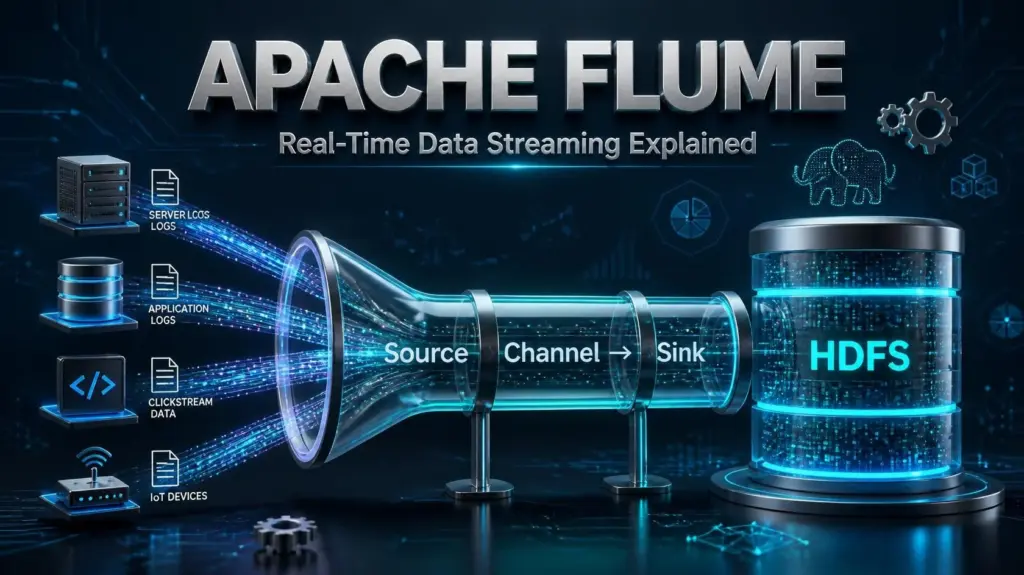
Apache Flume is a distributed service for collecting, aggregating, and transporting large amounts of log and event data from many sources to a receiving system such as HDFS. It runs as lightweight agents that receive data being generated and push it to downstream systems in near real-time, avoiding having to wait for batch-processing jobs to start.
If you have server logs, sensor data, or other event data to capture and want to pipe it somewhere for storage, processing, or analysis without writing unique collection daemons for each one, Apache Flume is a great option. However, there is one project-status caveat you should be aware of before investing significant resources into it, which we’ll discuss shortly.
Apache Flume: Quick Facts
| Attribute | Detail |
| Type | Distributed log and event data collection service |
| Built with | Java |
| Original creator | Cloudera (later donated to the Apache Software Foundation) |
| Core components | Source, Channel, Sink |
| Common data targets | HDFS, HBase, Kafka, Elasticsearch, local file systems |
| Latest stable release | 1.11.0 |
| Project status (2026) | Marked dormant by Apache; undergoing rework, migration advised |
| License | Apache License 2.0 |
What Is Apache Flume
Apache Flume was originally designed to solve a very specific problem: getting log data off hundreds or thousands of servers and into HDFS for later batch-processing without overloading either the servers or the receivers. It accomplishes this by breaking the task into smaller pieces handled by individual agents. Each agent has three components:
- Source: receives or generates data
- Channel: acts as a temporary buffer
- Sink: writes data to the final destination
Multiple agents can be chained together with one sink writing to another agent’s source, with data copied to multiple sinks or aggregated from multiple sources. Flume’s flexible architecture made it a popular choice for many log data collection and processing pipelines, particularly those utilizing Hadoop.
Apache Flume’s Current Status
The following information is critical to understand before considering continued or new investment in Apache Flume:
Apache Flume 1.11.0 is the latest stable release. Before deploying Flume, however, it is important to check the current project status and release information from Apache, especially if you are starting a new production pipeline.
Flume 1.11.0 also includes a security fix for CVE-2022-42468, a vulnerability affecting certain configurations of the JMS Source in older Flume versions. If you are running an older release, review the Apache security information and upgrade guidance before deploying or continuing to use it in production.
For new projects, evaluate Flume alongside other data ingestion and streaming tools based on your requirements for throughput, durability, integrations, maintenance, and long-term support. Existing Flume deployments should also be reviewed regularly to ensure that their version, configuration, and security controls remain appropriate.
Apache Flume vs. Other Tools
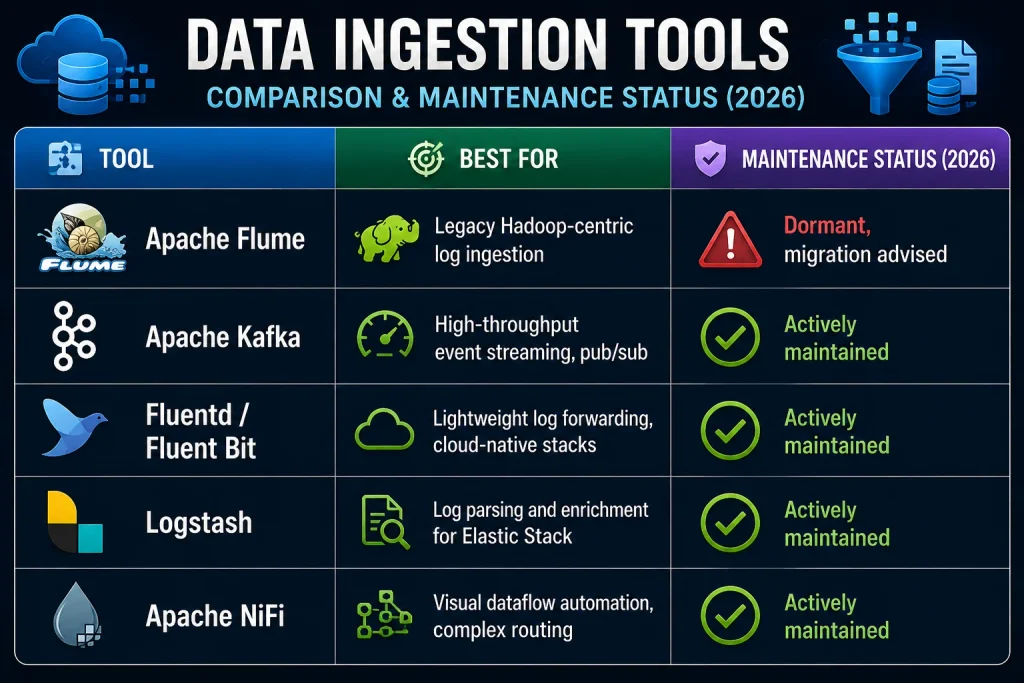
If you are operating existing Flume pipelines, this information may not be relevant to you. If you are setting up new pipelines and considering Flume as an option, treat this as background information and research alternatives for long-term support.
Apache Flume Architecture Explained
At the simplest level, you can think of Flume as a series of relays between data producers and data consumers. Data is piped into an agent through its sources, optionally processed or modified, temporarily stored in the channel, and then sent to the sink(s) for delivery to the final destination(s). Multiple agents can be connected in series so that the sink of one is the source of the next, allowing complex data collection and processing chains to be built. There are three main channel types in Flume, each of which handles data differently:
- Memory: high performance, but data is lost if the agent fails before it is sent to a sink
- File: durable but slower, as it must be written to disk first
- Kafka: uses a Kafka topic as a channel; good for larger pipelines
Event processing can also be customized and extended in Flume with interceptors. Channel selectors determine whether and how an event should be processed if an agent has more than one channel.
Apache Flume Installation: Step-by-Step
The following instructions demonstrate a basic Apache Flume installation on a Linux server. The commands and file paths are examples and may need to be adjusted for your Linux distribution, Java installation, and server environment. For production deployments, make sure the server has adequate resources, storage, security controls, and monitoring.
Before You Begin
In order to install and run Flume, you will need:
- A Java Runtime Environment
- Sufficient memory for your configured sources, channels, sinks, and expected event volume
- Enough free disk space to store your data; file channels require disk space for queued events
- Read and write access to the file system
Step 1: Download the Tarball
Download the latest version of Apache Flume from the official download page. It is recommended that you only download Flume from the official Apache mirrors to ensure that you have a valid copy of the software. For example, you might download apache-flume-1.11.0-bin.tar.gz with a command such as:
wget https://downloads.apache.org/flume/1.11.0/apache-flume-1.11.0-bin.tar.gzStep 2: Extract the Tarball
Extract the downloaded .tar.gz file with a command such as:
tar -xzvf apache-flume-1.11.0-bin.tar.gz
sudo mv apache-flume-1.11.0-bin /usr/local/flume
Step 3: Set Environment Variables
Edit your shell profile to set environment variables for Flume. These might be located in a file such as ~/.bashrc:
export FLUME_HOME=/usr/local/flume
export FLUME_CONF_DIR=$FLUME_HOME/conf
export PATH=$PATH:$FLUME_HOME/bin
Restart your shell or run the file again to reload it:
source ~/.bashrcStep 4: Set JAVA_HOME
Change to the new Flume configuration directory and copy the sample environment file to create a new one:
cd $FLUME_HOME/conf
cp flume-env.sh.template flume-env.sh
Then, edit the file and add the following lines, adjusting the values as needed. The following path is an example for a Java 11 installation on a Debian/Ubuntu-style system. Replace it with the actual Java installation path on your server.
export JAVA_HOME=/usr/lib/jvm/java-11-openjdk-amd64
export JAVA_OPTS="-Xms512m -Xmx1024m"
These JVM values are only starting examples. Adjust the heap size according to your workload, event volume, and available server memory.
Step 5: Set Up Flume Configuration
The following example uses /var/log/syslog, which is common on Debian- and Ubuntu-based systems. If your distribution stores system logs elsewhere, replace this path with the appropriate log file. Return to your home directory and copy the sample configuration file:
cp flume-conf.properties.template flume.confThen, edit the new configuration file and add the following sample configuration:
agent1.sources = source1
agent1.channels = channel1
agent1.sinks = sink1

agent1.sources.source1.type = exec
agent1.sources.source1.command = tail -F /var/log/syslog
agent1.sources.source1.channels = channel1

agent1.channels.channel1.type = memory
agent1.channels.channel1.capacity = 1000

agent1.sinks.sink1.type = logger
agent1.sinks.sink1.channel = channel1
This will create a Flume agent named agent1 with one source, one channel, and one sink. The source will be an executable command that tails the /var/log/syslog file. The channel will be a memory channel with a capacity of 1000, and the sink will be a logger that prints messages to the console.
Step 6: Test the Installation
Test your installation by running the following command:
flume-ng version
This should print out the version of Flume that you installed. To test the configuration file you created in Step 5, enter a command such as:
flume-ng agent --conf conf --conf-file conf/flume.conf --name agent1 -Dflume.root.logger=INFO,consoleIf your Flume installation is working correctly and the configuration file is valid, you should see logging output appear in your console whenever new data is added to the file you specified in your configuration.
Where to Host Apache Flume

When running Flume, you must ensure that the machine or server you are running it on is reliable and stable; using an unstable platform or one that is likely to restart unexpectedly can lead to data loss, particularly if you are using memory channels. This makes it especially important to use a hosting platform that offers good reliability and security features, especially if you are not running Flume on a machine you maintain yourself.
You are likely to find that a web hosting control panel is invaluable for working with Flume. It will provide you with useful insights about the performance of your server. It also allows you to make changes such as adjusting firewall settings or reviewing server logs without having to log in and make manual changes to the system. CyberPanel, for example, was built specifically with such use cases in mind and can help you manage not only Flume but your entire web presence.
Common Use Cases for Apache Flume
- Collecting logs from multiple servers into HDFS for later analysis
- Feeding social media or other clickstream data into the Hadoop processing pipeline
- Delivering continuous event data to a data lake for later analysis
- Intermediating legacy Hadoop processing pipelines that previously used Flume
Best Practices for Apache Flume
- Use file channels for any data that cannot be recreated or re-collected if Flume fails.
- Use conservative initial sizing for sources, channels, and sinks, then tune the configuration based on observed throughput, queue depth, resource usage, and failure behavior.
- Use a multi-agent pipeline for processing pipelines to reduce downtime risk.
- Always test and validate security fixes for Flume, and consider deploying a newer version if the stable branch is in extended maintenance and has not received recent security updates.
Frequently Asked Questions
Is Apache Flume still maintained in 2026?
Apache Flume 1.11.0 is the latest stable release. If you are considering Flume for a new project, check Apache’s latest release and project information before deployment and compare it with other data ingestion and streaming options based on your long-term requirements.
Can I still use Apache Flume safely for an existing pipeline?
An existing Flume deployment can continue to be used, but its safety depends on the Flume version, configuration, environment, and security controls. If you are running an older release, review Apache’s security information and upgrade guidance. You should also monitor the deployment and keep its surrounding server environment properly secured.
Does Apache Flume require Hadoop to work?
No. Flume can write to many sink types, including local files, Elasticsearch, and Kafka. Hadoop’s HDFS is simply the most common destination in classic Flume deployments, not a hard requirement.
What’s the difference between Flume and Kafka?
Flume is purpose-built for moving log-style data from a source to a sink with minimal transformation. Kafka is a general-purpose distributed messaging system built around publish-subscribe topics, and it’s often used as a durable channel inside a Flume pipeline rather than as a replacement, though many teams now use Kafka on its own for streaming use cases Flume used to handle.
How much memory does a typical Flume agent need?
There is no single memory requirement that fits every Flume deployment. Memory usage depends on the number and type of sources, channels, and sinks, event size, throughput, channel capacity, and JVM configuration. Start with resources appropriate for your workload and monitor the agent under realistic traffic before adjusting the JVM heap.
Final Thoughts
Apache Flume provides a straightforward architecture for collecting, buffering, and delivering event data through sources, channels, and sinks. Its flexible agent-based design makes it useful for log collection and other data ingestion workflows.
If you are maintaining an existing Flume deployment, review its configuration, resource usage, and security posture regularly. If you are planning a new pipeline, compare Flume with other data ingestion and streaming solutions to determine which option best fits your workload and long-term requirements.
Whatever platform you choose, a reliable server environment is essential for keeping data ingestion workloads stable and manageable.
Ready to Run Apache Flume on a Reliable Server?
If you’re planning to deploy Apache Flume, your server environment matters just as much as the configuration itself. A reliable, well-managed server can make it easier to monitor resources, manage security settings, and keep your data pipeline running smoothly.
Choose a stable server environment for your Apache Flume deployment and simplify server management with CyberPanel. Get started today and take control of your server from one easy-to-use interface.